Spotify for Mac Can Now Initiate Streams to Chromecast Devices
Spotify for desktop can now directly initiate Chromecast streams, reports 9to5Google.
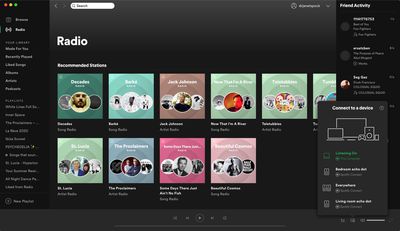
Previously, the only way to control Chromecast streams on the desktop app was by initiating the stream on the Spotify mobile app first, but now you can do this directly from your Mac via Spotify Connect.
Starting a Chromecast stream on the desktop app can be done by clicking the Devices Available button on the bottom-right corner of the interface, where Google Cast as well as Spotify Connect-enabled speakers will now appear alongside any Bluetooth or AirPlay devices.
The functionality is available in version 1.1.38 of the Spotify app for Mac, and should delight users who have been asking for it in the Spotify Community forums for years.
Popular Stories
iOS 26.4 was released today, and it includes a couple of new features for CarPlay: an Ambient Music widget and support for voice-based chatbot apps.
To update your iPhone 11 or newer to iOS 26.4, open the Settings app and tap on General → Software Update. CarPlay will automatically offer the new features so long as the iPhone connected to your vehicle is running iOS 26.4 or later....
Apple today announced Apple Business, a new all-in-one platform that unifies device management, productivity tools, and customer outreach features.
The service is designed to be a consolidated replacement for several of Apple's existing business-focused offerings, including Apple Business Essentials, Apple Business Manager, and Apple Business Connect. It provides organizations with a single...
Apple today released new firmware for the AirPods Pro 2, AirPods Pro 3, and the AirPods 4. The firmware has a version number of 8B39, up from 8B34 on the AirPods Pro 3, 8B28 on the AirPods Pro 2, and 8B21 on the AirPods 4.
There is no word on what's included in the firmware, but Apple has a support document with limited notes. Most updates are limited to bug fixes and performance...
























