
Make Dark Mode Darker in macOS Big Sur With New Toggle to Disable Wallpaper Tint

The fourth beta of macOS Big Sur, released yesterday, adds a new toggle in System Preferences that's designed to disable the wallpaper tinting feature that's meant to make windows blend in with the desktop wallpaper.
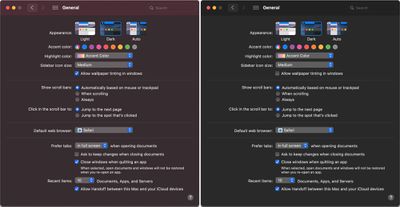
darkmodecomparison
For those who have Dark Mode enabled, turning off wallpaper tinting can make windows on the Mac noticeably darker, especially when a lighter color background is in use.

Apple introduced the wallpaper tinting feature in an earlier version of macOS, and some Mac users who prefer ‌Dark Mode‌ have been hoping for a toggle to disable it. Prior to now, there was a method for turning it off, but it involved enabling the graphite accent color.
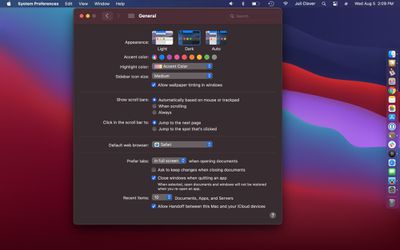
wallpapertintingon

With wallpaper tint on

As 9to5mac points out, being forced to choose graphite was not ideal because it eliminated many of the colored elements of the operating system. With macOS Big Sur, wallpaper tinting can be disabled while leaving the rest of the interface untouched.
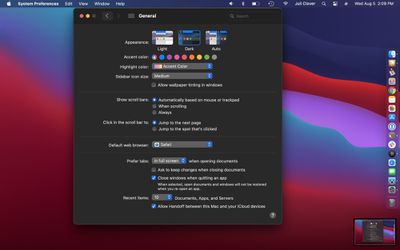
wallpapertintingoff

With wallpaper tint off

Disabling wallpaper tinting will only make a difference to those who use ‌Dark Mode‌, as it does not change the way that windows look in Light Mode. It's small but subtle change that some ‌Dark Mode‌ users will appreciate, and it only applies to windows, and not other elements of the interface like side bars.

The feature can be accessed by opening System Preferences, selecting General, and then clicking on the toggle that says "Allow wallpaper tinting in windows."


Related Forum: macOS Big Sur

Popular Stories

Apple Logo Zoomed

Tim Cook Teases Plans for Apple's Upcoming 50th Anniversary

Thursday February 5, 2026 12:54 pm PST by
Apple turns 50 this year, and its CEO Tim Cook has promised to celebrate the milestone. The big day falls on April 1, 2026. "I've been unusually reflective lately about Apple because we have been working on what do we do to mark this moment," Cook told employees today, according to Bloomberg's Mark Gurman. "When you really stop and pause and think about the last 50 years, it makes your heart ...
wwdc sans text feature

Apple Rumored to Announce New Product on February 19

Thursday February 5, 2026 12:22 pm PST by
Apple plans to announce the iPhone 17e on Thursday, February 19, according to Macwelt, the German equivalent of Macworld. The report, citing industry sources, is available in English on Macworld. Apple announced the iPhone 16e on Wednesday, February 19 last year, so the iPhone 17e would be unveiled exactly one year later if this rumor is accurate. It is quite uncommon for Apple to unveil...
Finder Siri Feature

Why Apple's iOS 26.4 Siri Upgrade Will Be Bigger Than Originally Promised

Friday February 6, 2026 3:06 pm PST by
In the iOS 26.4 update that's coming this spring, Apple will introduce a new version of Siri that's going to overhaul how we interact with the personal assistant and what it's able to do. The iOS 26.4 version of Siri won't work like ChatGPT or Claude, but it will rely on large language models (LLMs) and has been updated from the ground up. Upgraded Architecture The next-generation...
iOS 26

iOS 26.3 and iOS 26.4 Will Add These New Features to Your iPhone

Tuesday February 3, 2026 7:47 am PST by
While the iOS 26.3 Release Candidate is now available ahead of a public release, the first iOS 26.4 beta is likely still at least a week away. Following beta testing, iOS 26.4 will likely be released to the general public in March or April. Below, we have recapped known or rumored iOS 26.3 and iOS 26.4 features so far. iOS 26.3 iPhone to Android Transfer Tool iOS 26.3 makes it easier...
iphone 17 pro dark blue 1

iPhone 18 Pro Max Rumored to Deliver Next-Level Battery Life

Friday February 6, 2026 5:14 am PST by
The iPhone 18 Pro Max will feature a bigger battery for continued best-in-class battery life, according to a known Weibo leaker. Citing supply chain information, the Weibo user known as "Digital Chat Station" said that the iPhone 18 Pro Max will have a battery capacity of 5,100 to 5,200 mAh. Combined with the efficiency improvements of the A20 Pro chip, made with TSMC's 2nm process, the...

Top Rated Comments

Internet Enzyme Avatar
72 months ago

Big Sur peeps, what's the difference between this and enabling 'Reduce Transparency'?
Reduce Transparency affects sidebars, immersive toolbars, and the menu bar and the dock, whereas tinting affects the material color of the windows themselves. Look at the side-by-side at the top of the article.
Score: 7 Votes (Like | Disagree)
icerabbit Avatar
72 months ago
We need this for light mode too!

Let me turn off the transparancy / translucence where my active window content changes willy nilly based on what is behind it.
Score: 5 Votes (Like | Disagree)
zorinlynx Avatar
72 months ago
When light mode is enabled, the menu bar on the top is still in dark mode.

Is this an intentional change or a bug? I already reported it, but haven't heard back and it's still unchanged in the latest beta.

I'm one of those rare unicorns known as a "Light mode user" and hate that the menu bar doesn't respect the setting anymore in Big Sur. :(
Score: 4 Votes (Like | Disagree)
Internet Enzyme Avatar
72 months ago
Wallpaper tinting has gotten really intense in Big Sur. I like it because it adds some whimsy, but whenever you add some whimsy you need an option to turn it off.
Score: 4 Votes (Like | Disagree)
now i see it Avatar
72 months ago
translucent windows and menus are always the first thing I disable on all of their OSes.
Score: 4 Votes (Like | Disagree)
djbuddha Avatar
72 months ago

There is. sudo softwareupdate -i -a --restart
You’re not funny. Somebody will actually take you seriously
Score: 3 Votes (Like | Disagree)















