The Best Features in Samsung's New Galaxy Note20 That Apple Should Adopt

Samsung at the beginning of August introduced its new flagship Galaxy Note20 smartphone, which will compete with Apple's upcoming iPhone 12 models. We're going to do an in-depth comparison when the ‌iPhone‌ 12 comes out, but for now, we thought we'd take a look at the new Galaxy Note20 to highlight some of its best features.


Many of the Galaxy Note20's best offerings are major Samsung features that have been used in prior Galaxy devices, but they're what makes Samsung stand out as well as being features that we wouldn't mind seeing in a future ‌iPhone‌.

Displays with 120Hz Refresh Rates

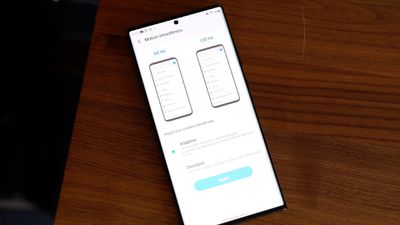
Samsung's Galaxy lineup, including the Galaxy Note20, is known for sharp, vibrant OLED displays with minimal bezels. The Note20, like some prior Samsung models, has a 120Hz refresh rate option that makes that super sharp OLED display even better. It's super smooth, as people who own an iPad Pro might be familiar with because Apple has had 120Hz maximum refresh rates on the ‌iPad Pro‌ for a couple years now.

note20120hz
Samsung hasn't quite perfected the higher refresh rate and it still presumably has a major impact on battery life, which is why it's limited to Full High Definition resolution (1080p) and does not work when the phone is set to the higher QHD+ resolution (1440p).

Apple is rumored to be working on 120Hz display technology for the ‌iPhone‌, but as with Samsung's phones, battery life is a concern. There have been a lot of mixed rumors on whether the ‌iPhone‌ 12 lineup will support 120Hz ProMotion displays, but it may be a feature that Apple needs to wait to implement until there's more battery efficient LTPO display technology available. It's definitely a feature that's on the horizon, but we may not get it until 2021.

Wireless Powershare

For the past couple of years, Samsung devices have offered a Wireless Powershare feature, which is also included in the Note20. With Wireless Powershare toggled on, the Note20 becomes a Qi-based wireless charger and can provide power to other smartphones, headphones, smart watches, and more.
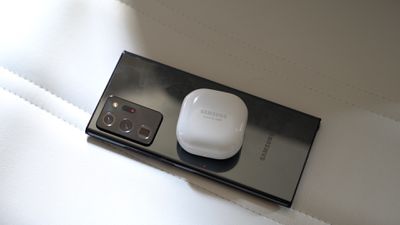
note20wirelesspowershare
It would be nice to have this feature in an ‌iPhone‌ for charging up the Apple Watch and the AirPods, or even sharing power with other iPhones. There were actually rumors in 2019 that suggested the ‌iPhone‌ 11 lineup would include bilateral charging functionality, but it's not something that Apple ended up implementing.

Apple analyst Ming-Chi Kuo speculated that the charging efficiency of the two-way charging feature might not have met Apple's requirements, leading to it being scrapped. Whether this is a feature that will pop up in a future ‌iPhone‌ remains to be seen, but we haven't heard it rumored for the ‌iPhone‌ 12.

Multitasking Windows

Samsung's Galaxy devices have long offered a version of split screen multitasking, allowing multiple apps to be used at once, and the Galaxy Note20 is no exception. It's a useful feature on the 6.7 to 6.9-inch displays offered in the Note20 and Note20 Ultra.
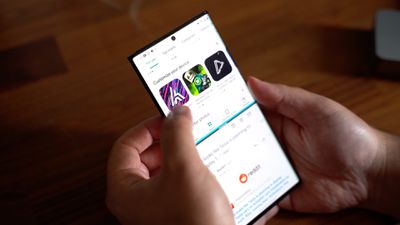
note20splitscreen
Apple has long had a split view multitasking feature on the iPad, but multiple app usage has never been brought to the ‌iPhone‌. That made sense when iPhones were smaller, but now that ‌iPhone‌ displays are getting larger and larger, many ‌iPhone‌ users would likely prefer to be able to use two apps side by side.

In iOS 14, Apple did add Picture in Picture support so you can watch videos or make video calls while doing other things on the ‌iPhone‌, but there's still no true multitasking functionality.

S-Pen

The S-Pen stylus that comes with the Galaxy Note has long been what differentiates the Note lineup from the standard Galaxy devices. The S-Pen is pretty much akin to an Apple Pencil for the ‌iPad‌, with super low latency and some useful note taking features.
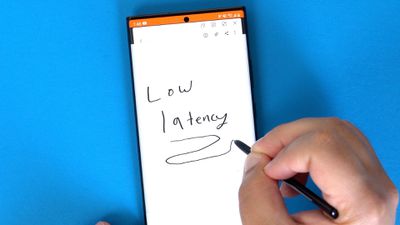
note20spen
The S-Pen attaches right to the Galaxy Note20, and popping it out lets you automatically start writing a note even when the display is off. The S-Pen also lets you do things like create a note, write on the screen, select elements on the display, translate selected text, and more.

There's been a rumor here and there over the years that Apple might add ‌Apple Pencil‌ support to the ‌iPhone‌ or develop an ‌Apple Pencil‌ specific to the ‌iPhone‌, but there's never been any concrete suggestion that a stylus for the ‌iPhone‌ is the plan. It would be nice to have the option to use the ‌Apple Pencil‌ with the ‌iPhone‌, though, for those who already have an ‌iPad‌ and an ‌Apple Pencil‌.

DEX

Samsung devices have this neat feature called DEX that lets you dock a smartphone to a PC or a Mac to turn the smartphone into the computer, allowing for direct control with a mouse and a keyboard.
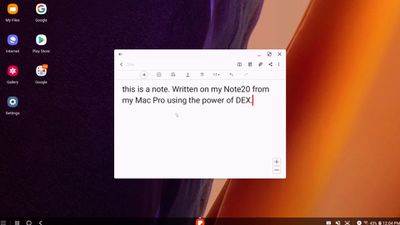
note20dex
Early versions of DEX required a dock and an external monitor and keyboard, but now you can just plug a smartphone like the Note20 into a computer and finish working on something that you started on the phone.

Apple has Handoff and Continuity features that work in much the same way if you have multiple Apple devices, letting you start something on one device and pick it up on another, but that's limited to Apple devices and it would be nice to just be able to plug in to access what you need without having to fuss with Continuity, or connect to an external monitor, keyboard, and mouse for a MacBook-like experience on the ‌iPhone‌.

Would you like to see any of these Samsung features in the ‌iPhone‌? What's your favorite Galaxy Note20 feature that you wish Apple would implement? Let us know in the comments.


Tag: Samsung

Popular Stories

Apple Logo Zoomed

Tim Cook Teases Plans for Apple's Upcoming 50th Anniversary

Thursday February 5, 2026 12:54 pm PST by
Apple turns 50 this year, and its CEO Tim Cook has promised to celebrate the milestone. The big day falls on April 1, 2026. "I've been unusually reflective lately about Apple because we have been working on what do we do to mark this moment," Cook told employees today, according to Bloomberg's Mark Gurman. "When you really stop and pause and think about the last 50 years, it makes your heart ...
wwdc sans text feature

Apple Rumored to Announce New Product on February 19

Thursday February 5, 2026 12:22 pm PST by
Apple plans to announce the iPhone 17e on Thursday, February 19, according to Macwelt, the German equivalent of Macworld. The report, citing industry sources, is available in English on Macworld. Apple announced the iPhone 16e on Wednesday, February 19 last year, so the iPhone 17e would be unveiled exactly one year later if this rumor is accurate. It is quite uncommon for Apple to unveil...
Finder Siri Feature

Why Apple's iOS 26.4 Siri Upgrade Will Be Bigger Than Originally Promised

Friday February 6, 2026 3:06 pm PST by
In the iOS 26.4 update that's coming this spring, Apple will introduce a new version of Siri that's going to overhaul how we interact with the personal assistant and what it's able to do. The iOS 26.4 version of Siri won't work like ChatGPT or Claude, but it will rely on large language models (LLMs) and has been updated from the ground up. Upgraded Architecture The next-generation...
maxresdefault

Apple Shows Off a Key Reason to Upgrade to the iPhone 17

Saturday February 7, 2026 9:26 am PST by
Apple today shared an ad that shows how the upgraded Center Stage front camera on the latest iPhones improves the process of taking a group selfie. "Watch how the new front facing camera on iPhone 17 Pro takes group selfies that automatically expand and rotate as more people come into frame," says Apple. While the ad is focused on the iPhone 17 Pro and iPhone 17 Pro Max, the regular iPhone...
iOS 26

iOS 26.3 and iOS 26.4 Will Add These New Features to Your iPhone

Tuesday February 3, 2026 7:47 am PST by
While the iOS 26.3 Release Candidate is now available ahead of a public release, the first iOS 26.4 beta is likely still at least a week away. Following beta testing, iOS 26.4 will likely be released to the general public in March or April. Below, we have recapped known or rumored iOS 26.3 and iOS 26.4 features so far. iOS 26.3 iPhone to Android Transfer Tool iOS 26.3 makes it easier...

Top Rated Comments

inplainview Avatar
71 months ago

Apple doesn’t need any tips from Samsung.
This is the problem with Apple Fanboys. You can learn from anyone and good ideas are not monolithic. While I am a super duper happy Apple iPhone 11 Max user, I will never jump ship but I am willing to not bury my head in the sand and am willing to learn something.
Score: 34 Votes (Like | Disagree)
Fatyank Avatar
71 months ago
By far for me it would be the pencil/stylus. If you never used a Samsung note device you can’t understand how handy a stylus is. I have my own business and constantly speak with people whenI’m out and about. Grabbing phone numbers or addresses is so simple with a stylus especially now that you don’t even need to turn on the device to use it. I use a iPhone 11Pro Max and Bear Notes (Which works great and has watch app also) but it is stil quicker to pop out the stylus and jot down info from a contact/potential client.

I believe Apple could learn a thing or three from Samsung. Stylus, smaller bezels, customizable homescreens.
Score: 14 Votes (Like | Disagree)
Slendrman Avatar
71 months ago
Love

Apple doesn’t need any tips from Samsung.
TRIGGERED
Score: 13 Votes (Like | Disagree)
pweicks Avatar
71 months ago
No, pls don’t adopt power share feature. The last thing I want is for family and friends to be coming up to me constantly asking if they can bum off of my phones charge.
Score: 8 Votes (Like | Disagree)
GtrDude Avatar
71 months ago
Apple needs to:
1. redesign the notification center. It's ridiculous.
2. add haptic feedback to the keyboard, and make it possible to customize different intensities to your heart's content. It's crazy that you have no feedback whatsoever if you're typing and have the phone on mute.Those who are concerned with battery can just turn it off.
3. make it possible to adjust volume for independent apps and settings and not this general thing they're doing, forcing you to do it while the thing is being played, such as separate volume control for keyboard volume, music volume, ring volume, system volume.
4. add suggestions from the address book when you're dialing a phone number. Common now Apple.
5. make it possible to customize the texting app in every conceivable way. Font size, bubble size shape color.
6. make it possible to schedule a message to be sent at a certain time/date.
7. make it possible to move the icons anywhere you want to.
8. Use an OS-wide clipboard and make it not expire. You should be able to copy text now and paste it tomorrow if you want to.
9. Give us an option to NOT go to the next email but back to inbox after deleting an email.
Score: 8 Votes (Like | Disagree)
TheYayAreaLiving ?️ Avatar
71 months ago
Bring the 120HZ. Enough said.

This is good for competition. Samsung does offer alot of good features.
Score: 8 Votes (Like | Disagree)