
GoodNotes 5 Updated to Support Document Sharing via iCloud Sync

Popular note-taking app and PDF editor GoodNotes has been updated to support document sharing over iCloud for the first time.
syncdevices%402x
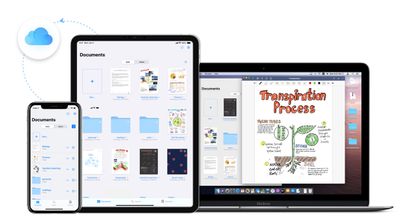
After updating to version 5.5.0, users will be able to share individual notes and entire folders of notes using unique URLs, as well as collaboratively edit the same note with others at the same time.

Users can share documents from their GoodNotes library by tapping a document title, which opens a context menu containing the new Collaborate option. If a user is already working in a document, they can tap the share icon to reveal the same option.

Shared documents display a special icon in the GoodNotes library, and can also be accessed from a new Shared tab in the app's navigation bar. Changes to shared documents sync via ‌iCloud‌ and take around 15 to 30 seconds to show up on other devices, and anyone with the link can open and edit a shared document in GoodNotes.

The developers concede that this way of working is unlikely to replace real-time collaborative whiteboard apps, but it does offer a means of working together on things like calendars, meeting notes, grocery lists, and so on over an extended period of time.

GoodNotes 5 costs $7.99 and can be downloaded for iPhone and iPad from the App Store. [Direct Link]


Popular Stories

Apple Logo Zoomed

Tim Cook Teases Plans for Apple's Upcoming 50th Anniversary

Thursday February 5, 2026 12:54 pm PST by
Apple turns 50 this year, and its CEO Tim Cook has promised to celebrate the milestone. The big day falls on April 1, 2026. "I've been unusually reflective lately about Apple because we have been working on what do we do to mark this moment," Cook told employees today, according to Bloomberg's Mark Gurman. "When you really stop and pause and think about the last 50 years, it makes your heart ...
wwdc sans text feature

Apple Rumored to Announce New Product on February 19

Thursday February 5, 2026 12:22 pm PST by
Apple plans to announce the iPhone 17e on Thursday, February 19, according to Macwelt, the German equivalent of Macworld. The report, citing industry sources, is available in English on Macworld. Apple announced the iPhone 16e on Wednesday, February 19 last year, so the iPhone 17e would be unveiled exactly one year later if this rumor is accurate. It is quite uncommon for Apple to unveil...
Finder Siri Feature

Why Apple's iOS 26.4 Siri Upgrade Will Be Bigger Than Originally Promised

Friday February 6, 2026 3:06 pm PST by
In the iOS 26.4 update that's coming this spring, Apple will introduce a new version of Siri that's going to overhaul how we interact with the personal assistant and what it's able to do. The iOS 26.4 version of Siri won't work like ChatGPT or Claude, but it will rely on large language models (LLMs) and has been updated from the ground up. Upgraded Architecture The next-generation...
iOS 26

iOS 26.3 and iOS 26.4 Will Add These New Features to Your iPhone

Tuesday February 3, 2026 7:47 am PST by
While the iOS 26.3 Release Candidate is now available ahead of a public release, the first iOS 26.4 beta is likely still at least a week away. Following beta testing, iOS 26.4 will likely be released to the general public in March or April. Below, we have recapped known or rumored iOS 26.3 and iOS 26.4 features so far. iOS 26.3 iPhone to Android Transfer Tool iOS 26.3 makes it easier...
iphone 17 pro dark blue 1

iPhone 18 Pro Max Rumored to Deliver Next-Level Battery Life

Friday February 6, 2026 5:14 am PST by
The iPhone 18 Pro Max will feature a bigger battery for continued best-in-class battery life, according to a known Weibo leaker. Citing supply chain information, the Weibo user known as "Digital Chat Station" said that the iPhone 18 Pro Max will have a battery capacity of 5,100 to 5,200 mAh. Combined with the efficiency improvements of the A20 Pro chip, made with TSMC's 2nm process, the...

Top Rated Comments

johnnytravels Avatar
71 months ago
It’s a good app, I wish however that the Mac version was a bit less clunky and not so obviously a Catalyst app (but it comes free with the iPad version).

In comparison to Notability I think a prefer the fact that the text of PDFs can be directly selected, highlighted and copied as text.
Writing and text recognition seems a little worse to me.

One feature I would really like to see is the option to scan excerpts from books into documents, ideally with OCR. Currently it is only possible to either take photos and add those or turn scans into entire pages.
Score: 2 Votes (Like | Disagree)
johnnytravels Avatar
71 months ago

I have a little off-topic question, but related to note-taking.
Anyone tried purchasing any kind of paper-like screen protector?

Have purchased the elecom one, I think I like it.

Any opinions or other recommendations?
Thanks!
I am currently using this and it works really well for me:
https://www.amazon.com/dp/B084237PKK/ref=dp_prsubs_1

The best combination of a real matte screen and great Pencil friction I have found. Better than Paperlike, better than many others that reduce the screen’s clarity while actually adding glare to it.
Comes with a handy installation tool, too ;)
Score: 1 Votes (Like | Disagree)
CalMin Avatar
71 months ago

Anyone got any opinions of this versus Notability?
They're both great. Personally, I get on really well with Goodnotes as it suits my need to organize. My only real wish is that it had audio recording.

Notability is great too and it has the audio recording (which is done really, really well). There's also something about my writing in Notability - it's just smoother and more pen-like. That sounds minor, but somehow, they have really got the inking feel nice in Notability.

The thing to do is to buy and try both. Apple will refund you for the one that you don't like if you ask nicely via 'Report a problem' and don't do it too often. I ended up keeping both - I mostly use GoodNotes, but sometimes use Notability when I need to use voice recording.

There is also the app that no-one mentions and that is Noteshelf. It's killer feature was Evernote sync, and when I had to use a Windows PC for work that was invaluable to me to get my notes on that platform.
Score: 1 Votes (Like | Disagree)
BuffaloTF Avatar
71 months ago

Anyone got any opinions of this versus Notability?
I think you'll find it's as close to a 'push' as possible, I have both... but... Notability is my go to. First off, GoodNotes charges for each numbered upgrade. Infinite scrolling with no need to flip pages. More screen real estate given to writing instead of a Microsoft Office style gigantic banner bar (which simultaneously has its benefits). Annotating PDFs or PowerPoints is just better with an easier interface. Audio recording... it's more than just audio, but it plays out your actual handwriting as the audio plays - so if you ever look at a note and say "wtf does that tie to?" you can just play the audio to hear what you were writing about.
Score: 1 Votes (Like | Disagree)
kylew1212 Avatar
71 months ago

Anyone got any opinions of this versus Notability?
reference:
I have used both Notability & GoodNotes on my iPad and Mac.

I prefer Goodnotes over notability of the organization capabilities. There Is not enough actual not taking differences (to me) for that portion to matter. Notability does not allow for folders, goodnotes does. I have tons of notes that I wsnt to easily manage and rarely use. Notability felt clunkier in this area.

Notability pros:

* Both sync to iCloud, but Notability has a version history for each document.
* Audio recording


GoodNotes pros:

* Great organization
* This new document collaboration


Both have Mac apps, I do not remember the cost of them to compare. They might have even been free.
I only use the Mac apps for importing PDFs, and reviewing notes. I rarely edit with Mac.
Score: 1 Votes (Like | Disagree)
ChrisH3677 Avatar
71 months ago

Anyone got any opinions of this versus Notability?
It beats Notability hands down in all except two things

1) Shapes. Notability gives you control over modifying your shapes
2) Audio recording. GN doesn't have any. Notability allows you to record audio while you take notes - and in playback of the audio, your note taking plays back too so what you wrote is shown in sync with what you heard!

But, those two features weren't enough for me.
Score: 1 Votes (Like | Disagree)















