Microsoft Begins Beta Testing Trackpad Support in Word and Excel Apps for iPad

Microsoft this week began testing mouse and trackpad support in the latest beta versions of its Word and Excel apps for iPad. The functionality was introduced in version 2.42 of each app, available through Apple's beta testing service TestFlight.
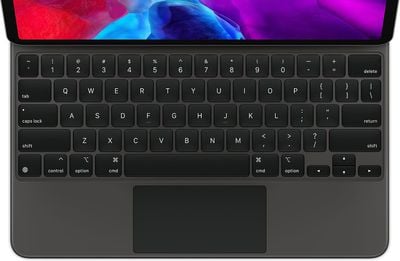
ipadpromagickeyboardtrackpad
Mouse and trackpad support provides rich visual feedback when editing documents or spreadsheets. When using a trackpad, the cursor displays as a circle on the screen, popping up only when you have a finger on the trackpad. The circle then morphs into various other shapes when hovering over app icons, text fields, or other on-screen elements.

iPadOS 13.4 introduced trackpad and mouse support on all iPad Pro models, the iPad Air 2 and later, the fifth-generation iPad and later, and the iPad mini 4 and later. Keyboards with built-in trackpads include Apple's Magic Keyboard, Brydge's Pro+ for the iPad Pro, Logitech's Combo for the 10.2-inch iPad and the 10.5-inch iPad Air, and more.

Microsoft previously said that mouse and trackpad support in the Word, Excel, and PowerPoint apps will be made available to all users at some point this fall.

Popular Stories

Apple Logo Zoomed

Tim Cook Teases Plans for Apple's Upcoming 50th Anniversary

Thursday February 5, 2026 12:54 pm PST by
Apple turns 50 this year, and its CEO Tim Cook has promised to celebrate the milestone. The big day falls on April 1, 2026. "I've been unusually reflective lately about Apple because we have been working on what do we do to mark this moment," Cook told employees today, according to Bloomberg's Mark Gurman. "When you really stop and pause and think about the last 50 years, it makes your heart ...
wwdc sans text feature

Apple Rumored to Announce New Product on February 19

Thursday February 5, 2026 12:22 pm PST by
Apple plans to announce the iPhone 17e on Thursday, February 19, according to Macwelt, the German equivalent of Macworld. The report, citing industry sources, is available in English on Macworld. Apple announced the iPhone 16e on Wednesday, February 19 last year, so the iPhone 17e would be unveiled exactly one year later if this rumor is accurate. It is quite uncommon for Apple to unveil...
Finder Siri Feature

Why Apple's iOS 26.4 Siri Upgrade Will Be Bigger Than Originally Promised

Friday February 6, 2026 3:06 pm PST by
In the iOS 26.4 update that's coming this spring, Apple will introduce a new version of Siri that's going to overhaul how we interact with the personal assistant and what it's able to do. The iOS 26.4 version of Siri won't work like ChatGPT or Claude, but it will rely on large language models (LLMs) and has been updated from the ground up. Upgraded Architecture The next-generation...
iOS 26

iOS 26.3 and iOS 26.4 Will Add These New Features to Your iPhone

Tuesday February 3, 2026 7:47 am PST by
While the iOS 26.3 Release Candidate is now available ahead of a public release, the first iOS 26.4 beta is likely still at least a week away. Following beta testing, iOS 26.4 will likely be released to the general public in March or April. Below, we have recapped known or rumored iOS 26.3 and iOS 26.4 features so far. iOS 26.3 iPhone to Android Transfer Tool iOS 26.3 makes it easier...
iphone 17 pro dark blue 1

iPhone 18 Pro Max Rumored to Deliver Next-Level Battery Life

Friday February 6, 2026 5:14 am PST by
The iPhone 18 Pro Max will feature a bigger battery for continued best-in-class battery life, according to a known Weibo leaker. Citing supply chain information, the Weibo user known as "Digital Chat Station" said that the iPhone 18 Pro Max will have a battery capacity of 5,100 to 5,200 mAh. Combined with the efficiency improvements of the A20 Pro chip, made with TSMC's 2nm process, the...

Top Rated Comments

Powermax Avatar
70 months ago
I am still waiting for Pause/Play with the Spacebar in the YouTube App.
Score: 8 Votes (Like | Disagree)
GeoStructural Avatar
70 months ago

Better late than never?
What? Trackpad for iOS/iPad OS was released just recently.


I'm still waiting for the day when I can advance slides in Powerpoint on iOS with a keyboard like on a Mac or PC.
This is already possible with the current app and it has been possible for a long time.

I am actually waiting for full-fledged versions of the Apps, iPad Pro is particularly powerful enough to run the entire suite smoothly, Excel for iPad is pretty much a file viewer, no where near the desktop app I use daily and rely so much on. PowerPoint is better featured but it is still missing so much. Word can get the job done, but still not ideal.
Score: 7 Votes (Like | Disagree)
Aluminum213 Avatar
70 months ago
Please take your time Microsoft, I know you’re a small company with limited resources. Don’t stress yourself too much
Score: 6 Votes (Like | Disagree)
justiny Avatar
70 months ago
I am actually waiting for full-fledged versions of the Apps, iPad Pro is particularly powerful enough to run the entire suite smoothly, Excel for iPad is pretty much a file viewer, no where near the desktop app I use daily and rely so much on. PowerPoint is better featured but it is still missing so much. Word can get the job done, but still not ideal.
This x1000

I travel for work and carry both my iPad Pro and MBP with me. I would love to leave my MBP at home but the fact is, I need it because the iPadOS Office apps only get me 80% to completing my work. Even on Word, I can't get the job done without needing 3 other apps and switching back and forth, it's just not worth it.
Score: 5 Votes (Like | Disagree)
Spock Avatar
70 months ago

Can we just make a touch screen MacBook already. All of this just seems to be beating around the bush.
Adding touchpad support to the iPad somehow equals beating around the bush for a touchscreen MacBook? If anything it shows that Apple shouldn’t use a touchscreen in the MacBook..
Score: 4 Votes (Like | Disagree)
G5isAlive Avatar
70 months ago

Adding touchpad support to the iPad somehow equals beating around the bush for a touchscreen MacBook? If anything it shows that Apple shouldn’t use a touchscreen in the MacBook..
Why? I don't follow your logic here. Why does an iPad with touchpad support have anything to do with whether a MacBook would or would not benefit from a touch screen? Serious question. I get that iOS has been designed from ground up to be a touch screen, and a MacBook would not be as good of one, but that doesn't mean it would be bad with one.
Score: 3 Votes (Like | Disagree)