
Apple Releases 14.2 Software for HomePod With New Siri, Intercom and Home Theater Features - MacRumors
Skip to Content

Apple Releases 14.2 Software for HomePod With New Siri, Intercom and Home Theater Features

Alongside iOS and iPadOS 14.2, Apple today released new 14.2 software for the HomePod, which includes support for new Siri and Intercom features. Today's update comes a couple of weeks after the release of HomePod 14.1 software.
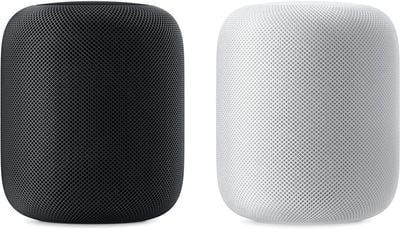
homepod duo
With the update, ‌Siri‌ can now provide a personal snapshot of each ‌HomePod‌ user's day, offering up news information, weather, traffic, reminders, and more when asked "What's my update?"

Intercom now supports iPhone, iPad, Apple Watch, AirPods, and CarPlay, and the full-size ‌HomePod‌ can be connected to an Apple TV 4K for immersive sound. Apple's full release notes for the update are below:

Software version 14.2 includes support for new Siri, Intercom, and Home Theater features. This update also includes bug fixes and improvements.

- Ask Siri "What's my update?" to hear a personal snapshot of your day that includes the news, weather, traffic, reminders, and calendar appointments.

- Intercom using iPhone, iPad, Apple Watch, AirPods, and CarPlay.

-Connect HomePod to Apple TV 4K and enjoy stereo, surround sound, and Dolby Atmos audio. Add a second HomePod for a more immersive soundstage.

‌‌‌HomePod‌‌‌‌ software is installed automatically on the ‌‌‌‌HomePod‌‌‌‌, but the ‌‌‌‌HomePod‌‌‌‌ can also be manually updated by following the instructions in our ‌‌HomePod‌‌ update how to.

Related Roundups: HomePod, HomePod mini

Popular Stories

iOS 26

iOS 26.4 Adds Two New Features to CarPlay

Tuesday March 24, 2026 1:55 pm PDT by
iOS 26.4 was released today, and it includes a couple of new features for CarPlay: an Ambient Music widget and support for voice-based chatbot apps. To update your iPhone 11 or newer to iOS 26.4, open the Settings app and tap on General → Software Update. CarPlay will automatically offer the new features so long as the iPhone connected to your vehicle is running iOS 26.4 or later....
Apple Business hero

Apple Unveils 'Apple Business' All-in-One Platform

Tuesday March 24, 2026 8:53 am PDT by
Apple today announced Apple Business, a new all-in-one platform that unifies device management, productivity tools, and customer outreach features. The service is designed to be a consolidated replacement for several of Apple's existing business-focused offerings, including Apple Business Essentials, Apple Business Manager, and Apple Business Connect. It provides organizations with a single...
AirPods Pro Firmware Feature

Apple Releases New Firmware for AirPods Pro 3, AirPods Pro 2 and AirPods 4

Tuesday March 24, 2026 12:31 pm PDT by
Apple today released new firmware for the AirPods Pro 2, AirPods Pro 3, and the AirPods 4. The firmware has a version number of 8B39, up from 8B34 on the AirPods Pro 3, 8B28 on the AirPods Pro 2, and 8B21 on the AirPods 4. There is no word on what's included in the firmware, but Apple has a support document with limited notes. Most updates are limited to bug fixes and performance...

Top Rated Comments

B/D Avatar
70 months ago
Lordy lord,this sound absolutely incredible. Tried with a couple of stereo paired Homepods, and the Atmos track of Greyhound.


First things first, requirements and set-up:

A). Upgrade Homepods and Apple TV 4K to final version of 14.2 (different build than the RC).

B). Make sure that the Homepods and the Apple TV are in the same room (via the Home app), as the Apple TV.

C). Makes sure that both of them AND the Apple TV, are set up as a hub for Homekit (no idea why this is necessary).

D). Make sure that the audio output of the Apple TV is set to Auto and that it says Atmos ON.

E). Makes sure that the Homepods are set as the default output of the Apple TV. If you don´t do this and merely select them from the Apple TV Airplay menu, the inmersive audio feature will not work or appear, and the homepods will sound the same as before.

F). Try some content with 5.1 or Atmos sound.

G). ENJOY.
Score: 8 Votes (Like | Disagree)
70 months ago
Can Apple just allow the HomePod mini speakers to be used as rear speakers and call it a day.
Score: 6 Votes (Like | Disagree)
glindon Avatar
70 months ago
Okay, so I got home and tested this out. Took a bit of messing with the home app and restarting my homepods because my stereo pair was showing up twice in the home app and twice in the default output options on the ATV. Took several tries to get the audio calibration to work as the ATV kept connecting to my sound bar to play the sound or the prompt wouldn’t come up on my phone, or the test sound would play and the prompt would tell me that it didn’t hear the test sound.

First impressions playing Blade Runner 2049: The homepods sound pretty good, good bass as I expected. I can tell that there is an “ambient effect” and it’s better that hearing the movie in stereo. Sounds and effects have a spaciousness, however none of the “effects” give the illusion of coming from the rear or sides. It’s not mind blowing. Switching back to my Atmos sound bar with sub and rear speakers... there is no comparison. The sound bar wins hands down as I expected. I could see where homepods would make better sense in a smaller bedroom and there is a cost difference ~$700 for stereo homepods vs ~$900 5.1.2 sound bar w/ sub and wireless rear speakers. But my money would be on spending the extra $200 If you were choosing between the two. Of course if you already have bought a pair of homepods it‘s a nice upgrade, but calling it “surround” or Atmos is kinda stretch. Slightly better than the old stereo mode is what I’d say.
Score: 6 Votes (Like | Disagree)
70 months ago
Still no news on third party music services integration...?!
Score: 5 Votes (Like | Disagree)
70 months ago

Looking forward to see how well this morning theatre setup with Atmos works.
Yep. Wondering if the Surround and Atmos features means some sort of virtualised surround field (spatial audio on Airpods Pro is staggering the first time you hear it), or merely that the Homepods can accept multichannel audio signals and make a sound as opposed not being able to handle the input and not making a sound.
Score: 4 Votes (Like | Disagree)
Jjbrennan1108 Avatar
70 months ago

I’m having issues with my stereo homepods connected to Apple TV giving a crackling/skipping sound whenever I navigate the menu or play a game. I have 2 TVs and 2 set of stereo homepods. It’s doing it on both TVs. All devices on latest update.
Anybody got an idea as to what might be happening?
Having the same issue, frequent cracking/popping sounds inc. skipping across the whole user interface. When playing something it all works perfectly fine, its only when using the menus. Very annoying. Anyone else having this issue or have a way to resolve it?
Score: 3 Votes (Like | Disagree)

















