MacRumors Giveaway: Win a Luna Display Adapter and Turn Your iPad or Extra Mac Into a Second Screen - MacRumors
Skip to Content

MacRumors Giveaway: Win a Luna Display Adapter and Turn Your iPad or Extra Mac Into a Second Screen

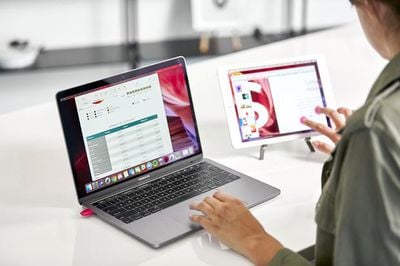
For this week's giveaway, we've teamed up with Astropad to offer MacRumors readers a chance to win a Luna Display adapter that's able to transform an extra old Mac, PC or iPad into a secondary display that can be used with your main Mac.
lunadisplaymactomac2
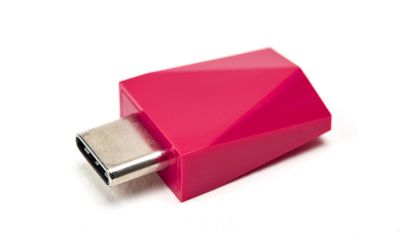
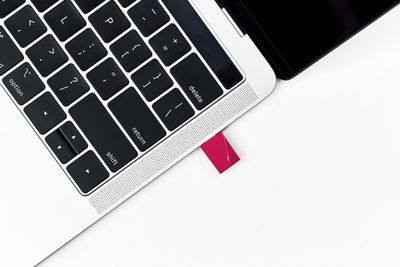
The Luna Display adapter, priced at $80, is a small dongle that plugs into your Mac using a USB-C port (on newer Macs) or a Mini DisplayPort and when used in combination with the Luna Display software, your primary Mac can be connected to an ‌iPad‌ or another Mac over WiFi, giving you a way to take advantage of old hardware or add an extra display without having to invest in a new device.
lunadisplay2
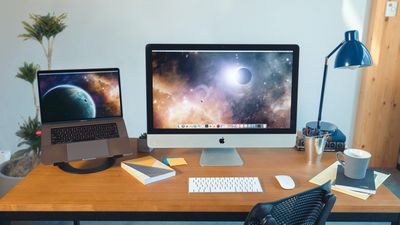
When connected, the Luna Display extends the primary Mac's display to the secondary Mac or ‌iPad‌ to allow the extra device to be used as a second screen, which is useful as more and more people continue working and learning from home with makeshift office setups.
luna display mac to mac mode
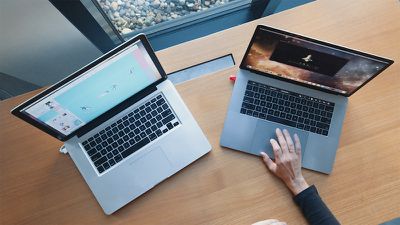
The Mac and ‌iPad‌ have built-in Sidecar functionality that can turn an ‌iPad‌ into a secondary display for a Mac without an accessory, but the Luna Display sets itself apart with the Mac-to-Mac support, which ‌Sidecar‌ is not capable of. Luna Display is also able to work with older iPads that don't have ‌Sidecar‌ support.

luna display macbook
In Mac-to-Mac mode, the primary Mac needs to have macOS El Capitan or later installed, while the secondary Mac can be running macOS Mountain Lion or later, so Luna Display works with machines that are quite old. For best performance, the main Mac should be a 2012 MacBook Air, MacBook Pro, Mac mini, iMac, or later, or a 2013 Mac Pro or later.
luna product raw 087 copy 1800x1800
Luna Display offers full keyboard, trackpad, and mouse support on both connected Macs in Mac-to-Mac mode, with more information on how it works available on the Luna Display website.

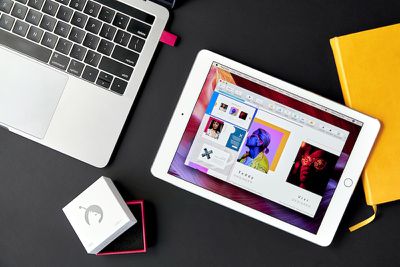
As for iPads, the Luna Display is compatible with almost all modern iPads, including the ‌iPad‌ 2 or later, all iPad mini models, all iPad Pro models, and all iPad Air models, with iOS 9.1 or later as the only requirement. Performance is faster on newer iPads, but older models work well too.
lunadisplay3
For those who have PCs, there is a Luna Display adapter for Windows, which can be preordered from the website. The PC version of Luna Display extends your desktop from Mac to PC to ‌iPad‌, allowing your devices to work interchangeably.

We have five Luna Display adapters to give away to MacRumors readers. To enter to win, use the Gleam.io widget below and enter an email address. Email addresses will be used solely for contact purposes to reach the winners and send the prizes. You can earn additional entries by subscribing to our weekly newsletter, subscribing to our YouTube channel, following us on Twitter, following us on Instagram, or visiting the MacRumors Facebook page.

Due to the complexities of international laws regarding giveaways, only U.S. residents who are 18 years or older and Canadian residents (excluding Quebec) who have reached the age of majority in their province or territory are eligible to enter. To offer feedback or get more information on the giveaway restrictions, please refer to our Site Feedback section, as that is where discussion of the rules will be redirected.


The contest will run from today (November 13) at 11:00 a.m. Pacific Time through 11:00 a.m. Pacific Time on November 20. The winners will be chosen randomly on November 20 and will be contacted by email. The winners will have 48 hours to respond and provide a shipping address before new winners are chosen.


Popular Stories

iOS 26

iOS 26.4 Adds Two New Features to CarPlay

Tuesday March 24, 2026 1:55 pm PDT by
iOS 26.4 was released today, and it includes a couple of new features for CarPlay: an Ambient Music widget and support for voice-based chatbot apps. To update your iPhone 11 or newer to iOS 26.4, open the Settings app and tap on General → Software Update. CarPlay will automatically offer the new features so long as the iPhone connected to your vehicle is running iOS 26.4 or later....
Apple Business hero

Apple Unveils 'Apple Business' All-in-One Platform

Tuesday March 24, 2026 8:53 am PDT by
Apple today announced Apple Business, a new all-in-one platform that unifies device management, productivity tools, and customer outreach features. The service is designed to be a consolidated replacement for several of Apple's existing business-focused offerings, including Apple Business Essentials, Apple Business Manager, and Apple Business Connect. It provides organizations with a single...
AirPods Pro Firmware Feature

Apple Releases New Firmware for AirPods Pro 3, AirPods Pro 2 and AirPods 4

Tuesday March 24, 2026 12:31 pm PDT by
Apple today released new firmware for the AirPods Pro 2, AirPods Pro 3, and the AirPods 4. The firmware has a version number of 8B39, up from 8B34 on the AirPods Pro 3, 8B28 on the AirPods Pro 2, and 8B21 on the AirPods 4. There is no word on what's included in the firmware, but Apple has a support document with limited notes. Most updates are limited to bug fixes and performance...

Top Rated Comments

70 months ago

Sorry, might have not been clear enough. It will still work but the output on your 5k screen won’t look great.

See https://community.lunadisplay.com/t/5k-imac-cant-use-retinal-resolution/410/3

It will be fine if you want to use your MacBook’s screen as a display for your 5k iMac, but I wanted it the other way around since the working from home thing started: Use my private 5k iMac as a display for my work MacBook.
Thanks for the link to an official answer. I will almost certainly be able to squeeze another year or maybe even two out of my iMac, so hopefully they will upgrade their functionality by then!
Score: 1 Votes (Like | Disagree)
70 months ago

Logged in for the first time in years specifically to ask about this. According to their website, it’ll work on any Mac new enough, but a quick perusal of the internet suggests that it doesn’t work with 5k iMacs specifically.

I have a 2014 5k iMac that I’m content with, but I am very open to using it as a display like this when I eventually upgrade.
Sorry, might have not been clear enough. It will still work but the output on your 5k screen won’t look great.

See https://community.lunadisplay.com/t/5k-imac-cant-use-retinal-resolution/410/3

It will be fine if you want to use your MacBook’s screen as a display for your 5k iMac, but I wanted it the other way around since the working from home thing started: Use my private 5k iMac as a display for my work MacBook.
Score: 1 Votes (Like | Disagree)
70 months ago

That was my grand plan too ... but they don’t support that screen res and the experience was pretty underwhelming 👎
Logged in for the first time in years specifically to ask about this. According to their website, it’ll work on any Mac new enough, but a quick perusal of the internet suggests that it doesn’t work with 5k iMacs specifically.

I have a 2014 5k iMac that I’m content with, but I am very open to using it as a display like this when I eventually upgrade.
Score: 1 Votes (Like | Disagree)