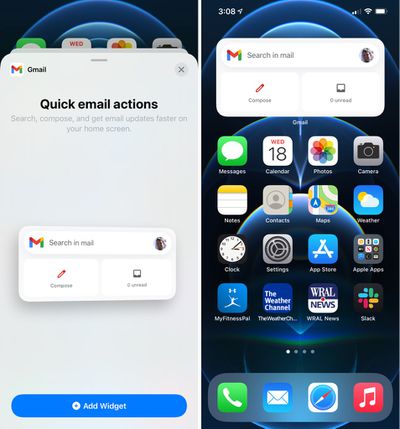
Google today updated its Gmail app designed for the iPhone and the iPad, introducing a new widget that can be added to the Today center alongside other widgets or to the Home Screen on an iPhone.
After updating, the Gmail widget can be added to the Home Screen by pressing and holding to enter jiggle mode and then tapping the "+" button. From there, scroll down and tap on Gmail to add the widget, using a finger to drag it to the appropriate spot.
The Gmail widget can be used to search within the Gmail app, compose a new email message, or view unread email messages. It provides shortcuts for these tasks only and does not list sensitive email information nor can it be customized with other functionality.
iOS 26.4 was released today, and it includes a couple of new features for CarPlay: an Ambient Music widget and support for voice-based chatbot apps.
To update your iPhone 11 or newer to iOS 26.4, open the Settings app and tap on General → Software Update. CarPlay will automatically offer the new features so long as the iPhone connected to your vehicle is running iOS 26.4 or later....
Apple today announced Apple Business, a new all-in-one platform that unifies device management, productivity tools, and customer outreach features.
The service is designed to be a consolidated replacement for several of Apple's existing business-focused offerings, including Apple Business Essentials, Apple Business Manager, and Apple Business Connect. It provides organizations with a single...
Tuesday March 24, 2026 12:31 pm PDT by Juli Clover
Apple today released new firmware for the AirPods Pro 2, AirPods Pro 3, and the AirPods 4. The firmware has a version number of 8B39, up from 8B34 on the AirPods Pro 3, 8B28 on the AirPods Pro 2, and 8B21 on the AirPods 4.
There is no word on what's included in the firmware, but Apple has a support document with limited notes. Most updates are limited to bug fixes and performance...
Wow - great job on a useless widget - so instead of just viewing the app icon with unread counts, or just tapping the icon to open the app and getting the same functionality, we now have the option of taking up 8 icon spaces. Awesome work Google!
Widgets have potential and I hope Apple delivers it with the next iteration. Right now they are basically huge icons.
I want widgets to be contextual, interactive, clickable and able to perform the functions of the app from the main screen without taking me to it and adding one more step to the process.
Wow - great job on a useless widget - so instead of just viewing the app icon with unread counts, or just tapping the icon to open the app and getting the same functionality, we now have the option of taking up 8 icon spaces. Awesome work Google!
well to be fair, they are pretty limited by apples widget guidelines
I remember an article from a few years ago that said "You want the best Google experience? Buy an iPhone". Exactly pointing out that for some reason Google pays much more attention to its iPhone apps than to its Android apps.
The American market is dominated by iOS, and Apple users are also the most willing to pay for apps and services, I am not coming up with this, I actually heard about it in an App Development research/teaching group.
The rest of the world uses Android, but a large proportion of those users are not paying subscribers to any type of service Google offers, so... it makes sense.