Safari Translation Feature Reportedly Working in Additional Countries - MacRumors
Skip to Content

Safari Translation Feature Reportedly Working in Additional Countries

Apple appears to be rolling out its Safari webpage translation to more countries. According to iPhoneSoft, iOS users in France have reported gaining access to the feature, and tips sent to MacRumors suggest Mac users in Sweden are also seeing it show up for the first time.
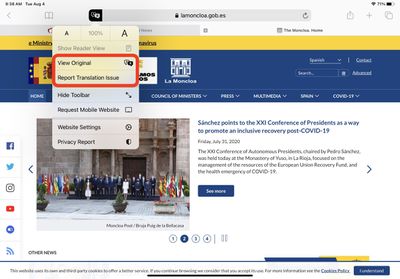
safari
Apple introduced Safari's machine translation earlier this year when it debuted iOS 14 and macOS Big Sur at WWDC in June.

The feature allows users to translate the language of websites viewed in Apple's native browser; it can translate Arabic, Chinese, English, French, German, Italian, Japanese, Korean, Portuguese, Russian, and Spanish.

Based on the latest information, Apple appears to have remotely enabled the translate option for the two additional countries for users running iOS 14.2.1, and revised version of macOS 11.0.1 Big Sur‌.

Related Forums: iOS 14, macOS Big Sur

Popular Stories

iOS 26

iOS 26.4 Adds Two New Features to CarPlay

Tuesday March 24, 2026 1:55 pm PDT by
iOS 26.4 was released today, and it includes a couple of new features for CarPlay: an Ambient Music widget and support for voice-based chatbot apps. To update your iPhone 11 or newer to iOS 26.4, open the Settings app and tap on General → Software Update. CarPlay will automatically offer the new features so long as the iPhone connected to your vehicle is running iOS 26.4 or later....
Apple Business hero

Apple Unveils 'Apple Business' All-in-One Platform

Tuesday March 24, 2026 8:53 am PDT by
Apple today announced Apple Business, a new all-in-one platform that unifies device management, productivity tools, and customer outreach features. The service is designed to be a consolidated replacement for several of Apple's existing business-focused offerings, including Apple Business Essentials, Apple Business Manager, and Apple Business Connect. It provides organizations with a single...
AirPods Pro Firmware Feature

Apple Releases New Firmware for AirPods Pro 3, AirPods Pro 2 and AirPods 4

Tuesday March 24, 2026 12:31 pm PDT by
Apple today released new firmware for the AirPods Pro 2, AirPods Pro 3, and the AirPods 4. The firmware has a version number of 8B39, up from 8B34 on the AirPods Pro 3, 8B28 on the AirPods Pro 2, and 8B21 on the AirPods 4. There is no word on what's included in the firmware, but Apple has a support document with limited notes. Most updates are limited to bug fixes and performance...


Top Rated Comments

70 months ago
Doesn't appear to be working in the UK. For me, at least!

Perhaps they are waiting until they can add Welsh/[I]Cymraeg?[/I]
Score: 4 Votes (Like | Disagree)
Unsupported Avatar
70 months ago

Still no Yorkshire Translation.
I do wonder how many non Brits will understand that...

Attachment Image
Score: 3 Votes (Like | Disagree)
DocStone Avatar
70 months ago
Works in the USA. I can read British, Australian, and South African news just fine. ;-)
Score: 3 Votes (Like | Disagree)
Marlon DLTH :) Avatar
70 months ago
It’s working in Mexico as well.


Attachment Image
Score: 2 Votes (Like | Disagree)
Unsupported Avatar
70 months ago

I too restarted - and waited. Still appeared not to work but then went to another site, suddenly prompted to allow translation - so probably the restart did work. Thanks.
Some sites don't have the option to translate, but I have noticed that in those cases a menu shows at the bottom showing your language preferences.


I found the solution thanks to feedback I received from Spanish Apple Support and a contributor's advice.

Force quitting the app before restarting is also useful, in some cases it resolves the issue without restarting:
https://support.apple.com/en-gb/HT201330

This is where I noted the 30 seconds reference:
https://support.apple.com/en-gb/HT201559

Attachment Image
Score: 1 Votes (Like | Disagree)
70 months ago

I found the fix. Simple really, I needed to wait at least 30 seconds after shutting the iPhone 8 down before restarting it!
I too restarted - and waited. Still appeared not to work but then went to another site, suddenly prompted to allow translation - so probably the restart did work. Thanks.
Score: 1 Votes (Like | Disagree)

















