
Apple Launches Redesigned Accessibility Site and New Support Videos - MacRumors
Skip to Content

Apple Launches Redesigned Accessibility Site and New Support Videos

Apple today is honoring International Day of Persons with Disabilities with a re-launch of its Accessibility site and a new collection of tutorial videos highlighting the accessibility features of its software.
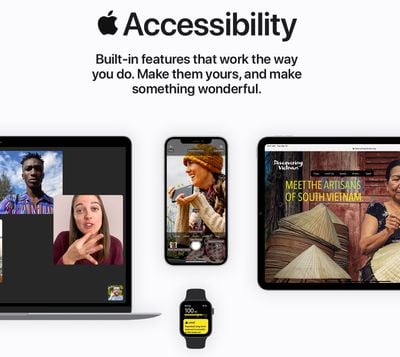
accessibility site
As spotted by iMore, the redesigned site is made up of four broad sections that showcase many of the accessibility features across Apple's product range, with new categories covering vision, mobility, hearing, and cognitive features.

The vision section covers several iOS features such as the Magnifier, Zoom, Larger Text, Voiceover + Braille, and Spoken Content, while the hearing covers using Sound Recognition, Headphone Accommodations, Sensory Alerts, Live Listen, and many more useful tools.

Meanwhile, over on the Apple Support YouTube channel, Apple has added new how-to videos to its Accessibility playlist on using the Magnifier, the BackTap feature, and specific Voice Control usage scenarios, including how to take a selfie.


Apple's Accessibility website and the Apple Support channel have more details.

Apple's Accessibility Engineering Lead for iOS Chris Fleizach and Senior Director of Global Accessibility, Policy, and Initiatives Sarah Herrlinger also did an interview with TechCrunch's Matthew Panzarino to discuss the newest accessibility technology from Apple.


Popular Stories

iOS 26

iOS 26.4 Adds Two New Features to CarPlay

Tuesday March 24, 2026 1:55 pm PDT by
iOS 26.4 was released today, and it includes a couple of new features for CarPlay: an Ambient Music widget and support for voice-based chatbot apps. To update your iPhone 11 or newer to iOS 26.4, open the Settings app and tap on General → Software Update. CarPlay will automatically offer the new features so long as the iPhone connected to your vehicle is running iOS 26.4 or later....
Apple Business hero

Apple Unveils 'Apple Business' All-in-One Platform

Tuesday March 24, 2026 8:53 am PDT by
Apple today announced Apple Business, a new all-in-one platform that unifies device management, productivity tools, and customer outreach features. The service is designed to be a consolidated replacement for several of Apple's existing business-focused offerings, including Apple Business Essentials, Apple Business Manager, and Apple Business Connect. It provides organizations with a single...
AirPods Pro Firmware Feature

Apple Releases New Firmware for AirPods Pro 3, AirPods Pro 2 and AirPods 4

Tuesday March 24, 2026 12:31 pm PDT by
Apple today released new firmware for the AirPods Pro 2, AirPods Pro 3, and the AirPods 4. The firmware has a version number of 8B39, up from 8B34 on the AirPods Pro 3, 8B28 on the AirPods Pro 2, and 8B21 on the AirPods 4. There is no word on what's included in the firmware, but Apple has a support document with limited notes. Most updates are limited to bug fixes and performance...

Top Rated Comments

jerry333 Avatar
69 months ago
And you still can't lock the screen in Landscape Mode. This seems like such a simple thing, but you can't do it.
Score: 2 Votes (Like | Disagree)
CHLFC Avatar
69 months ago

I wish Apple paid more attention to Voice Control:

1. Rent a better speech recognition engine from Nuance.
2. Cover all other languages, not just 3 variants of English.
3. Add a user vocabulary feature for all the languages they support.
4. Implement an easy language switching for text dictation, independently from Voice Control language.
5. Make it work in all text fields, including in Windows virtual machines.
6. Test the feature so it does not feel half-baked.

That would be a true, not marketing, honouring of the International Day of Persons with Disabilities.
Agree with you 100 per cent on all your points. Voice Control has been such a half baked disappointment thus far. Apple has practically ignored it since launch. macOS Big Sur and iOS 14 brought few improvements worth mentioning. If you are in employment and disabled and rely on speech recognition on a Mac to get things done, long emails, documents etc you can forget Voice Control. It’s little more than a patronising toy. I have to run Parallels on my MacBook and use Nuance Dragon to be productive.As an Apple fan I feel let down. It doesn’t need to be like this if Apple showed Voice Control some love and investment and recognised the critical importance high quality speech recognition is to some disabled people who don’t have a plan B for communicating with the online world. Hopefully, someone with influence within Apple is reading the important points you make and we will see some significant improvements to Voice Control in 2021.

I would add word training to your list. I have jargon and friends with foreign names and Voice Control fails to recognise them time after time.
Score: 1 Votes (Like | Disagree)
69 months ago
I wish Apple paid more attention to Voice Control:

1. Rent a better speech recognition engine from Nuance.
2. Cover all other languages, not just 3 variants of English.
3. Add a user vocabulary feature for all the languages they support.
4. Implement an easy language switching for text dictation, independently from Voice Control language.
5. Make it work in all text fields, including in Windows virtual machines.
6. Test the feature so it does not feel half-baked.

That would be a true, not marketing, honouring of the International Day of Persons with Disabilities.
Score: 1 Votes (Like | Disagree)
miniyou64 Avatar
69 months ago
Apple makes some ridiculously bad decisions regarding accessibility making you wonder do they actually ever ask people with disabilities to test things? Is Apple better than other companies sure. But some of their decisions are nonsensical
Score: 1 Votes (Like | Disagree)
Apple_Robert Avatar
69 months ago
Trying to meet the needs of so many people with different physical needs is where Apple really shines.
Score: 1 Votes (Like | Disagree)
Mr. Awesome Avatar
69 months ago

& not on the iPad for some reason.
The iPad is much bigger, so it’s harder for the accelerometer to detect a tap anywhere on the back.
Score: 1 Votes (Like | Disagree)















