
Apple Updates Final Cut Pro, iMovie, Clips, and Compressor Apps With Streamlined YouTube/Facebook Sharing Function - MacRumors
Skip to Content

Apple Updates Final Cut Pro, iMovie, Clips, and Compressor Apps With Streamlined YouTube/Facebook Sharing Function

Apple today updated its video apps iMovie, Final Cut Pro, and Compressor for Mac with a unified sharing option for platforms like YouTube and Facebook. Apple has also updated its iMovie and Clips apps for iOS with matching functionality.
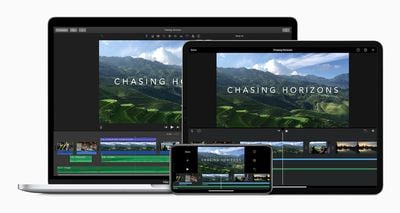
imovie mac ipad iphone
In a new support document, Apple provides detailed instructions on how to share video files from iMovie, Final Cut Pro, Compressor, and Clips on YouTube, Facebook, and Vimeo. Depending on the app, there are options to adjust a video's aspect ratio, resolution, orientation, compression, captions, or other settings.

The instructions for Final Cut Pro:

1. Select your project in the Final Cut Pro browser, click the Share button , then choose YouTube & Facebook. Or choose File > Share > YouTube & Facebook.
2. In the Share window, click Info to change the name of the clip, the description, and more. Click Settings to choose resolution, compression, and caption settings.
3. Click Next, choose a location to save the video file, then click Save.
4. With Safari or another web browser, sign in to your YouTube, Facebook, or Vimeo account, then upload the video file. You can also get the Vimeo for macOS app from the Mac App Store to upload your video to Vimeo.

While apps like iMovie and Final Cut Pro already had sharing options for YouTube and Facebook, the process is now unified and streamlined. The latest updates for each app are available now on the App Store and Mac App Store.


Popular Stories

iOS 26

iOS 26.4 Adds Two New Features to CarPlay

Tuesday March 24, 2026 1:55 pm PDT by
iOS 26.4 was released today, and it includes a couple of new features for CarPlay: an Ambient Music widget and support for voice-based chatbot apps. To update your iPhone 11 or newer to iOS 26.4, open the Settings app and tap on General → Software Update. CarPlay will automatically offer the new features so long as the iPhone connected to your vehicle is running iOS 26.4 or later....
Apple Business hero

Apple Unveils 'Apple Business' All-in-One Platform

Tuesday March 24, 2026 8:53 am PDT by
Apple today announced Apple Business, a new all-in-one platform that unifies device management, productivity tools, and customer outreach features. The service is designed to be a consolidated replacement for several of Apple's existing business-focused offerings, including Apple Business Essentials, Apple Business Manager, and Apple Business Connect. It provides organizations with a single...
AirPods Pro Firmware Feature

Apple Releases New Firmware for AirPods Pro 3, AirPods Pro 2 and AirPods 4

Tuesday March 24, 2026 12:31 pm PDT by
Apple today released new firmware for the AirPods Pro 2, AirPods Pro 3, and the AirPods 4. The firmware has a version number of 8B39, up from 8B34 on the AirPods Pro 3, 8B28 on the AirPods Pro 2, and 8B21 on the AirPods 4. There is no word on what's included in the firmware, but Apple has a support document with limited notes. Most updates are limited to bug fixes and performance...

Top Rated Comments

jayducharme Avatar
69 months ago
I gave up on exporting from FCPX directly to YouTube. The upload process would often fail for unknown reasons. I just make a Master File and then drag that into YouTube's upload interface. It's a lot quicker that way and I get the same result.
Score: 8 Votes (Like | Disagree)
69 months ago
Anyone remember the Final Cut Pro "yak" easter egg? If you stared at your timeline too long, grass would grow on it and a little yak would come out and nibble the grass and say surreal things. It was tastefully programmed so that it only appeared on rare occasions, usually in the wee hours of the morning when it was pleasantly disturbing. I believe the yak was gone before Final Cut Pro X came out.

That's how long I've been using Final Cut, about 20 years. I switched to DaVinci Resolve a couple weeks ago and have been in editing heaven. FCP was phenomenal for a long time, but having a normal track view back is wonderful. Everything about Resolve seems polished and useful. I'm upset Apple has let Final Cut rot on the vine for so long because I truly loved using it. Resolve is everything Final Cut should be in 2020.

Attachment Image
Score: 3 Votes (Like | Disagree)
69 months ago
Kind of underwhelming. It’s starting to look more and more like when aperture updates took longer each time, and each time was something even smaller.
Score: 3 Votes (Like | Disagree)
verstaerker Avatar
69 months ago
WTF??? They basically removed the function!
Score: 2 Votes (Like | Disagree)
Kylo83 Avatar
69 months ago
what about dolby vision editing support????
Score: 2 Votes (Like | Disagree)
69 months ago

Interesting. I'm an "AUTO" user (not a deep digger, knob twister, tech enthusiast) and my path was Windows Movie Maker, OSX iMovie, MacOS FCPX. Been using FCPX for almost 3 years now (editing 2-3 videos a month, educational videos on Youtube, 30-40 minutes length each). I haven't yet taken any SkillShare videos on FCPX, but I'm considering it, since I really struggle with color grading and voice audio cleanup. I've just dropped Audacity in favour of FCPX sound processing.

So you're suggesting DaVinci Resolve should be my next step?
Well that's hard to say, but I sure like it. Maybe watch a youtube video specifically about Resolve's "Cut page," which is the simpler of Resolve's two editor views. I watched a handful of youtube videos about Resolve and just seeing how it worked convinced me to switch. I find myself working much faster in the Cut page than I did in FCPX. While FCPX's weird timeline has some advantages, I was always hesitant to try changing things (like flipping the order of a couple shots) for fear of messing everything up. The simpler interface on Resolve's Cut page has removed these fears for me--the structure of the timeline is so stable and predictable.

It's also got a great AI-based "AUTO" button for color correction, but I think that's only in the paid version. I've been really surprised with how well it does. I use AUTO as the starting point for color correction to get a properly exposed and color balanced image, then add on more nodes to tweak that to the project's needs.

The one place where Final Cut has a clear advantage is system optimization. My 5-year-old Macbook Pro was plenty fast for most of what I did in Final Cut, but it really dragged when I switched to Resolve. I liked Resolve so much that I used this as an excuse to upgrade, and now Resolve is absolutely flying on my new Macbook Pro!
Score: 1 Votes (Like | Disagree)















