
Parallels 16 for M1 Macs Now Available Through Technical Preview Program - MacRumors
Skip to Content

Parallels 16 for M1 Macs Now Available Through Technical Preview Program

Parallels today began informing customers about the launch of a new Parallels Desktop 16 for M1 Mac Technical Preview Program, which is available today. The software cannot run an Intel x86-based OS, and requires an Arm-based operating system installation image.
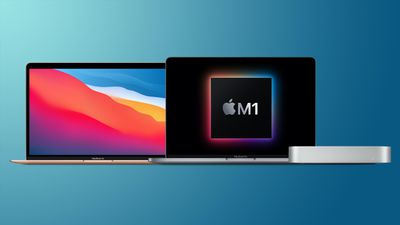
mac mini macbook pro macbook air m1
Microsoft is offering a version of Arm-based Windows that's available through the Windows Insider program that will run on ‌M1‌ Macs through Parallels, but there is no publicly available version of of Arm Windows that can be purchased.
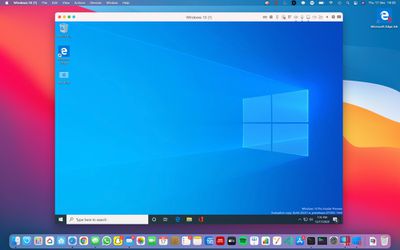
m1 mac windows

An ‌M1‌ Mac running Windows, via forum member faffoo

Those who have signed up for the Technical Preview Program are able to be the first to test Parallels for ‌M1‌ Macs. There are several limitations that users should be aware of.

- It is not possible to install or start an Intel x86 based operating system in a virtual machine.
- It is not possible to suspend and resume a virtual machine, including reverting to a "running state" snapshot.
- It is not possible to use the close button when a virtual machine is running; Shutdown virtual machine instead.
- ARM32 applications do not work in a virtual machine.

The current versions of Parallels are not able to run on ‌M1‌ Macs, but Parallels in November following the launch of the new Macs said that a version of Parallels compatible with Apple's chips was in active development.

At the time, Parallels said that the software designed for Macs was looking "very promising."

When Apple Silicon Mac was first announced during the keynote at WWDC on June 22 of this year, Apple demoed a Parallels Desktop for Mac prototype running a Linux virtual machine flawlessly on Apple Silicon. Since WWDC, our new version of Parallels Desktop which runs on Mac with Apple M1 chip has made tremendous progress. We switched Parallels Desktop to universal binary and optimized its virtualization code; and the version that we are eager to try on these new MacBook Air, Mac mini and MacBook Pro 13″ looks very promising. Parallels is also amazed by the news from Microsoft about adding support of x64 applications in Windows on ARM.

Parallels Desktop 16 was first released in August for Intel-based Macs, but has since been updated with a universal binary that's now ready for ‌M1‌ Macs. Parallels is available for a one-time fee of $99.99, but the Pro and Business editions require a $79.99 per year subscription.


Popular Stories

iOS 26

iOS 26.4 Adds Two New Features to CarPlay

Tuesday March 24, 2026 1:55 pm PDT by
iOS 26.4 was released today, and it includes a couple of new features for CarPlay: an Ambient Music widget and support for voice-based chatbot apps. To update your iPhone 11 or newer to iOS 26.4, open the Settings app and tap on General → Software Update. CarPlay will automatically offer the new features so long as the iPhone connected to your vehicle is running iOS 26.4 or later....
Apple Business hero

Apple Unveils 'Apple Business' All-in-One Platform

Tuesday March 24, 2026 8:53 am PDT by
Apple today announced Apple Business, a new all-in-one platform that unifies device management, productivity tools, and customer outreach features. The service is designed to be a consolidated replacement for several of Apple's existing business-focused offerings, including Apple Business Essentials, Apple Business Manager, and Apple Business Connect. It provides organizations with a single...
AirPods Pro Firmware Feature

Apple Releases New Firmware for AirPods Pro 3, AirPods Pro 2 and AirPods 4

Tuesday March 24, 2026 12:31 pm PDT by
Apple today released new firmware for the AirPods Pro 2, AirPods Pro 3, and the AirPods 4. The firmware has a version number of 8B39, up from 8B34 on the AirPods Pro 3, 8B28 on the AirPods Pro 2, and 8B21 on the AirPods 4. There is no word on what's included in the firmware, but Apple has a support document with limited notes. Most updates are limited to bug fixes and performance...

Top Rated Comments

69 months ago
That is one confusing article.
Score: 26 Votes (Like | Disagree)
oosamon Avatar
69 months ago
I feel for the Parallels folks.....
Score: 11 Votes (Like | Disagree)
69 months ago
Well it does run at least. ARM Windows 10 Insider Preview running on M1 MacBook Pro

Attachment Image
Score: 10 Votes (Like | Disagree)
69 months ago
I think the article is lacking the bullet list of whats actually possible? arm linux distributions?
Score: 10 Votes (Like | Disagree)
LeeW Avatar
69 months ago
With all the 'it is not possible to..' it doesn't really seem it can do much!
Score: 10 Votes (Like | Disagree)
nylon Avatar
69 months ago
I think you can download a Windows 10 ARM image from MS through the insider preview program.

https://www.microsoft.com/en-us/software-download/windowsinsiderpreviewARM64
Score: 9 Votes (Like | Disagree)














