
iPadOS 14.5 Beta Adds Apple Pencil Scribble Support for German, French, Spanish, Italian and Portuguese - MacRumors
Skip to Content

iPadOS 14.5 Beta Adds Apple Pencil Scribble Support for German, French, Spanish, Italian and Portuguese

Apple in iPadOS 14 introduced an Apple Pencil feature called "Scribble," which lets users write in any text field on the iPad, with the handwritten text then converted automatically into typed text.
scribble ipados 14 5 beta
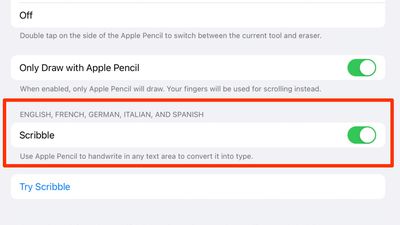
At launch, Scribble was limited to the English and Chinese languages, but with iPadOS 14.5 beta that's available to developers and public beta testers, Apple is expanding Scribble support to German, French, Spanish, Italian, and Portuguese.

With the beta installed on an ‌iPad‌, users in these countries can now write in their native languages, and iPadOS is able to accurately translate the text. Enabling a language is done through the "Keyboard" section of the Settings app.

Any supported language that is enabled as a Keyboard option will be listed under "Scribble" in the ‌Apple Pencil‌ settings on an ‌iPad‌, and that language will be available for use when writing, with special characters supported.

Scribble can be used across iPadOS 14 for writing out iMessages, conducting Safari searches, looking for directions in Maps, creating Notes, scheduling Calendar events, and more. It comes with other features such as Smart Selection for copy/pasting handwritten notes, and there's built-in data detection that converts numbers and email addresses to make them tappable.

Apple's Feature Availability page continues to list just English and Chinese as available Scribble options, but that should change when iPadOS 14.5 sees an official release in early spring.

There are many other changes and feature additions that Apple is introducing in iPadOS 14.5, including support for the most recent gaming controllers, an Apple loading logo that's properly displayed horizontally when the ‌iPad‌ is in landscape mode, new emoji characters, and more, with everything new listed in our iOS 14.5 guide.


Related Forum: iOS 14

Popular Stories

iOS 26

iOS 26.4 Adds Two New Features to CarPlay

Tuesday March 24, 2026 1:55 pm PDT by
iOS 26.4 was released today, and it includes a couple of new features for CarPlay: an Ambient Music widget and support for voice-based chatbot apps. To update your iPhone 11 or newer to iOS 26.4, open the Settings app and tap on General → Software Update. CarPlay will automatically offer the new features so long as the iPhone connected to your vehicle is running iOS 26.4 or later....
Apple Business hero

Apple Unveils 'Apple Business' All-in-One Platform

Tuesday March 24, 2026 8:53 am PDT by
Apple today announced Apple Business, a new all-in-one platform that unifies device management, productivity tools, and customer outreach features. The service is designed to be a consolidated replacement for several of Apple's existing business-focused offerings, including Apple Business Essentials, Apple Business Manager, and Apple Business Connect. It provides organizations with a single...
AirPods Pro Firmware Feature

Apple Releases New Firmware for AirPods Pro 3, AirPods Pro 2 and AirPods 4

Tuesday March 24, 2026 12:31 pm PDT by
Apple today released new firmware for the AirPods Pro 2, AirPods Pro 3, and the AirPods 4. The firmware has a version number of 8B39, up from 8B34 on the AirPods Pro 3, 8B28 on the AirPods Pro 2, and 8B21 on the AirPods 4. There is no word on what's included in the firmware, but Apple has a support document with limited notes. Most updates are limited to bug fixes and performance...

Top Rated Comments

BWhaler Avatar
67 months ago
I’ve said it before, but 14.5 is looking like it’s epic.

I just hope behind the scenes Apple is stomping out thousands and thousands of bugs. Crush that backlog. We care more about it just works than new features.
Score: 4 Votes (Like | Disagree)
tzm41 Avatar
67 months ago
14.5 is getting better and better!
Score: 4 Votes (Like | Disagree)
67 months ago
That’s great. Usually it takes years for Apple to release features for other countries and languages. Hopefully more languages follow soon.
Score: 2 Votes (Like | Disagree)
yurc Avatar
67 months ago
I had already using dedicated input software like this since iOS 10, called Mazec (for Japanese text), they even can use finger not limited just with Apple Pencil so virtually compatible with any iOS device not just iPad.


But well still faster to typing normally though, I am use this input method because it nice to have and I think it would useful someday.

Attachment Image
Score: 2 Votes (Like | Disagree)
67 months ago

I'm moving the US. To be able to communicate with the folks there, should I learn Chinese or Spanish?
Learn from urbandictionary.com. You’ll have no problem communicating with people on Wall Street with that language.
Score: 1 Votes (Like | Disagree)
chriscl Avatar
67 months ago
Happy to see Scribble in German, finally. I switch between German and English so having Scribble in both will be a real boon.
Score: 1 Votes (Like | Disagree)















