
iOS 14.5 to Introduce Find My Support for Powerbeats Pro [Updated] - MacRumors
Skip to Content

iOS 14.5 to Introduce Find My Support for Powerbeats Pro [Updated]

Beginning with iOS and iPadOS 14.5, Powerbeats Pro users will be able to locate, track, and find their headphones with the built-in Find My app.
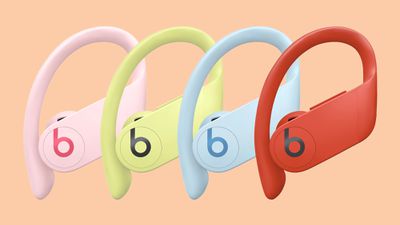
powerbeats pro jun 2020 feature2

The ‌Find My‌ app, formerly named ‌Find My‌ iPhone, helps users locate and track devices linked to their iCloud accounts such as their iPhone, Mac, Apple Watch, or AirPods. Thanks to Apple's purchase of Beats in 2014, products such as the ‌Powerbeats Pro‌ have enjoyed deep integration with iOS and macOS. However, they have lacked support for the ‌Find My‌ app.

With iOS and iPadOS 14.5, users will be able to locate and keep track of their Bluetooth earbuds right from within the ‌Find My‌ app. Currently, Apple says that if ‌Powerbeats Pro‌ are lost, customers should contact Apple Support, making the process of finding them lengthy.

Like AirPods, users will be able to trigger a sound to play from the ‌Powerbeats Pro‌ to locate them. All in all, the new integration helps blur the line between the software experience for Apple's AirPods line and the Beats brand.

iOS and iPadOS 14.5, expected in the early spring, has quickly become the most significant update to iOS 14 since its launch in September. Starting with the new update in conjunction with watchOS 7.5, users will be able to unlock their iPhones with their Apple Watch, even if they're wearing a mask. Additional features in the update include crowdsourcing for accidents in Apple Maps, brand new emojis, the ability to select a default music streaming service and more.

(Thanks, Francis!)

Update: Dutch website iCulture notes that Beats Flex, and possibly some other Beats products containing Apple's W1 or H1 chips, also appear to support the ‌Find My‌ app in the iOS 14.5 beta.

Update 2: French website MacGeneration was first to spot the addition of Beats in the ‌Find My‌ app, including the Solo Pro.

Related Forum: iOS 14

Popular Stories

iOS 26

iOS 26.4 Adds Two New Features to CarPlay

Tuesday March 24, 2026 1:55 pm PDT by
iOS 26.4 was released today, and it includes a couple of new features for CarPlay: an Ambient Music widget and support for voice-based chatbot apps. To update your iPhone 11 or newer to iOS 26.4, open the Settings app and tap on General → Software Update. CarPlay will automatically offer the new features so long as the iPhone connected to your vehicle is running iOS 26.4 or later....
Apple Business hero

Apple Unveils 'Apple Business' All-in-One Platform

Tuesday March 24, 2026 8:53 am PDT by
Apple today announced Apple Business, a new all-in-one platform that unifies device management, productivity tools, and customer outreach features. The service is designed to be a consolidated replacement for several of Apple's existing business-focused offerings, including Apple Business Essentials, Apple Business Manager, and Apple Business Connect. It provides organizations with a single...
AirPods Pro Firmware Feature

Apple Releases New Firmware for AirPods Pro 3, AirPods Pro 2 and AirPods 4

Tuesday March 24, 2026 12:31 pm PDT by
Apple today released new firmware for the AirPods Pro 2, AirPods Pro 3, and the AirPods 4. The firmware has a version number of 8B39, up from 8B34 on the AirPods Pro 3, 8B28 on the AirPods Pro 2, and 8B21 on the AirPods 4. There is no word on what's included in the firmware, but Apple has a support document with limited notes. Most updates are limited to bug fixes and performance...

Top Rated Comments

66 months ago

AirPods can do this? I wasn't aware of that, awesome!
In my experience it’s completely useless. First, it doesn’t make a sound while in the case. Second, it doesn’t actually make a sound until you connect to a loose AirPod, which you generally won’t do as it will be disconnected from your phone and in some kind of sleep mode. Third, the location it shows is only the last connected location. In its current iteration find my AirPod is a gimmick.
Score: 4 Votes (Like | Disagree)
szw-mapple fan Avatar
66 months ago
14.5 just keeps getting better and better.
Score: 4 Votes (Like | Disagree)
66 months ago

Sounds like they won’t have the fully baked in offline lost mode like the iPhones, iPads and Macs have, but this is still a welcome addition! Unless they change something in how the sleep mode affects connectivity and pairing, I don’t see how that would be possible sadly.
this is exactly the same with AirPods now...
but I guess with airtags coming soon, this might change if the integrate some sort of AirTags to at least the case.
Score: 2 Votes (Like | Disagree)
Apple Mac Daz Avatar
66 months ago
Shaping up to be a decent and big update
Score: 2 Votes (Like | Disagree)
64 months ago

How did you pair them? I’m trying to pair my beats flex to the find my app but can’t for the life of me get past the ‘searching items…’ screen
I didn't have to do anything special for find my beyond normal pairing for music/calls etc, they just showed up on their own
Score: 1 Votes (Like | Disagree)
66 months ago
I'm surprised no one has mentioned that this function was active for some Bluetooth Beats headphones prior to iOS 13. It was taken away for some unknown reason and now it's back. Weird. I wonder what changed?
Score: 1 Votes (Like | Disagree)
















