Google Chrome for Desktop Gains Live Captions Feature for Audio and Video

Google today rolled out its live caption transcription feature to version 89 of Chrome browser for desktop, as first spotted by XDA Developers.
chrome live captions feature google
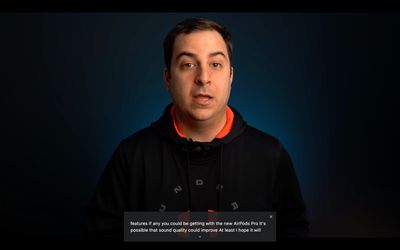
Previously only available on some Pixel and Samsung phones, Live Captions uses machine learning to create a real-time transcription for videos or audio played through the browser, making online media more accessible for members of the Deaf community and other people with hearing loss.

Once enabled, Live Captions appear in a box in the bottom of the browser whenever you play audio or video that includes people talking. We tried it on YouTube videos and Spotify podcasts, and it worked well, although the words do appear after a slight delay and aren't always 100% accurate.

It's also worth mentioning that the feature only seems to work for spoken English at this time, but otherwise it's generally pretty good at transcribing speech where captions may not have been available. Here's how to get it working.

How to Enable Google Chrome's New Live Caption Feature

  1. Launch Google Chrome on your desktop.
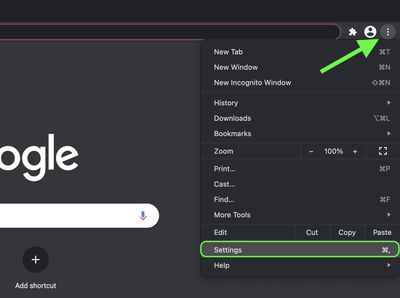
  2. Click the customize button in the top-right corner of the browser window (the vertical column of three dots).
  3. Click Settings in the dropdown menu.
    chrome

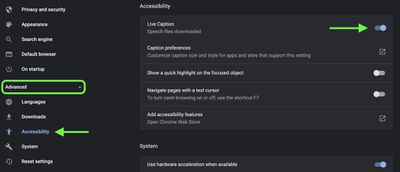
  4. Click the Advanced heading to expand the section, then select Accessibility.
  5. Click the switch next to Live Captions to enable it. If you don't see the option, make sure you're updated to Chrome 89 (Settings -> About Chrome). If the browser's already up-to-date, quit the app and then relaunch it, and you should see the new Live Captions setting appear.
    chrome

As soon as you enable Live Captions, Chrome will begin downloading speech recognition files, a process that should take only a few seconds. Once it's finished, you should see an automatic transcription whenever someone is talking in video or audio that's being played back through the browser.
chrome live captions
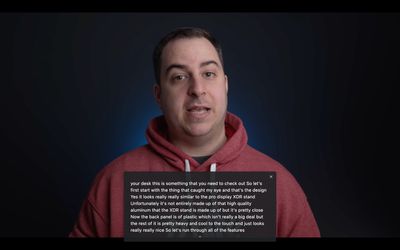
You can expand the live transcription box to make it larger by clicking the small chevron at the bottom of the overlay, and drag it around the screen for better positioning. Captions will also appear if you mute the audio or have the volume turned down, allowing you to follow videos or podcasts without distracting anyone in the vicinity.


Popular Stories

maxresdefault

Apple Shows Off a Key Reason to Upgrade to the iPhone 17

Saturday February 7, 2026 9:26 am PST by
Apple today shared an ad that shows how the upgraded Center Stage front camera on the latest iPhones improves the process of taking a group selfie. "Watch how the new front facing camera on iPhone 17 Pro takes group selfies that automatically expand and rotate as more people come into frame," says Apple. While the ad is focused on the iPhone 17 Pro and iPhone 17 Pro Max, the regular iPhone...
Finder Siri Feature

Why Apple's iOS 26.4 Siri Upgrade Will Be Bigger Than Originally Promised

Friday February 6, 2026 3:06 pm PST by
In the iOS 26.4 update that's coming this spring, Apple will introduce a new version of Siri that's going to overhaul how we interact with the personal assistant and what it's able to do. The iOS 26.4 version of Siri won't work like ChatGPT or Claude, but it will rely on large language models (LLMs) and has been updated from the ground up. Upgraded Architecture The next-generation...
wwdc sans text feature

Apple Rumored to Announce New Product on February 19

Thursday February 5, 2026 12:22 pm PST by
Apple plans to announce the iPhone 17e on Thursday, February 19, according to Macwelt, the German equivalent of Macworld. The report, citing industry sources, is available in English on Macworld. Apple announced the iPhone 16e on Wednesday, February 19 last year, so the iPhone 17e would be unveiled exactly one year later if this rumor is accurate. It is quite uncommon for Apple to unveil...
apple wallet drivers license feature iPhone 15 pro

Apple Says These 7 U.S. States Plan to Offer iPhone Driver's Licenses

Monday February 9, 2026 6:24 am PST by
In select U.S. states, residents can add their driver's license or state ID to the Apple Wallet app on the iPhone and Apple Watch, and then use it to display proof of identity or age at select airports and businesses, and in select apps. The feature is currently available in 13 U.S. states and Puerto Rico, and it is expected to launch in at least seven more in the future. To set up the...
14 inch MacBook Pro Keyboard

New MacBook Pros Could Now Arrive in March

Sunday February 8, 2026 6:02 am PST by
New MacBook Pro models with the M5 Pro and M5 Max chips could arrive as soon as Monday, March 2, according to Bloomberg's Mark Gurman. In today's "Power On" newsletter, Gurman said that the release of new MacBook Pro models is tied to the release of macOS Tahoe 26.3. The launch is said to be slated for as early as the week of March 2. He added that the M4 Pro and M4 Max models on sale today...

Top Rated Comments

GeoStructural Avatar
64 months ago
What a gimmick. It will become a real feature when Apple invents it in 2030 under some cheesy name like “Magic subs” or “Air Translate”.
Score: 10 Votes (Like | Disagree)
jonnysods Avatar
64 months ago
Pretty slick, the technology Google push is pretty amazing. I wish Siri was as quick and responsive as Google.

The one thing that pops into my mind is - I bet all that text gets saved somewhere too...
Score: 6 Votes (Like | Disagree)
Chafka Avatar
64 months ago
This isn't too surprising to me. About four years ago when I was working through my Masters degree, I would upload my interviews to a private youtube channel for transcription (got done in about an hour I think it was). Same tech, same company and they have had a chance to refine it by now so I am sure it is much faster (obviously). Really cool stuff though, and really convenient.
Score: 4 Votes (Like | Disagree)
icanhazmac Avatar
64 months ago
Hard pass as soon as I read "Google", not installing their crap on my system.
Score: 4 Votes (Like | Disagree)
lkrupp Avatar
64 months ago
Anyone who values their privacy yet uses Chrome needs to see a psychiatrist. You are sick in the head
Score: 4 Votes (Like | Disagree)
IllinoisCorn Avatar
64 months ago
I feel for corporate workers who are forced to use Chrome when there are so many other stable chromium choices.
Score: 4 Votes (Like | Disagree)