macOS Big Sur 11.3 Includes Game Controller Emulation for iPhone/iPad Apps on M1 Macs - MacRumors
Skip to Content

macOS Big Sur 11.3 Includes Game Controller Emulation for iPhone/iPad Apps on M1 Macs

Over the course of the macOS Big Sur 11.3 beta, Apple has been refining and improving the way that iPad and iPhone apps run on M1 Macs. In the latest beta, Apple has added game controller emulation for ‌M1‌ devices, allowing a keyboard or a keyboard and mouse combo to function as a game controller.
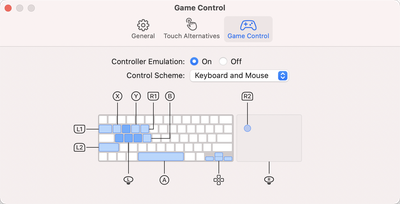
game control emulation
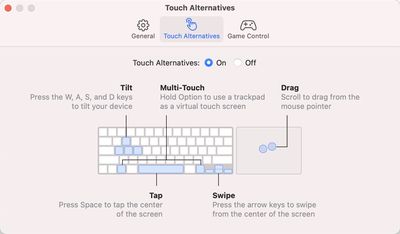
The new game controller feature was discovered by MacRumors contributor Steve Moser. When running an iPhone or ‌iPad‌ app, opening up the preferences brings up a Touch Alternatives and Game Control interface that can be used to make touch-based iPhone and ‌iPad‌ apps run better with Mac controls.

With Controller Emulation toggled on, common game controller buttons are mapped to keyboard keys and mouse buttons. X, for example, is mapped to Q, the direction stick is mapped to WASD, and Y is mapped to E. L1 and L2 can be accessed by pressing Tab and Shift, respectively, and the Space Bar is the A button.

Controller Emulation will allow iPhone and ‌iPad‌ games that have controller support built in to be accurately controlled with a keyboard and/or mouse when those games are played on an ‌M1‌ Mac. This feature is designed for those who don't have a game controller, as those who do can just connect a controller to play.

The macOS 11.3 Big Sur beta also includes the aforementioned Touch Alternatives panel for mapping touch-based features like tap, swipe, drag, and tilt to keyboard keys, and it has a feature for making iPhone and ‌iPad‌ app windows larger.

touch alternatives m1 macs
Controller Emulation and Touch Alternatives work independently of one another, and only one of these features can be enabled at a time.

As for game controller support, many current controllers from Sony and Microsoft are compatible with ‌M1‌ Macs, and the beta adds support for the latest PlayStation 5 and Xbox One X controllers.

Related Forum: macOS Big Sur

Popular Stories

iOS 26

iOS 26.4 Adds Two New Features to CarPlay

Tuesday March 24, 2026 1:55 pm PDT by
iOS 26.4 was released today, and it includes a couple of new features for CarPlay: an Ambient Music widget and support for voice-based chatbot apps. To update your iPhone 11 or newer to iOS 26.4, open the Settings app and tap on General → Software Update. CarPlay will automatically offer the new features so long as the iPhone connected to your vehicle is running iOS 26.4 or later....
Apple Business hero

Apple Unveils 'Apple Business' All-in-One Platform

Tuesday March 24, 2026 8:53 am PDT by
Apple today announced Apple Business, a new all-in-one platform that unifies device management, productivity tools, and customer outreach features. The service is designed to be a consolidated replacement for several of Apple's existing business-focused offerings, including Apple Business Essentials, Apple Business Manager, and Apple Business Connect. It provides organizations with a single...
AirPods Pro Firmware Feature

Apple Releases New Firmware for AirPods Pro 3, AirPods Pro 2 and AirPods 4

Tuesday March 24, 2026 12:31 pm PDT by
Apple today released new firmware for the AirPods Pro 2, AirPods Pro 3, and the AirPods 4. The firmware has a version number of 8B39, up from 8B34 on the AirPods Pro 3, 8B28 on the AirPods Pro 2, and 8B21 on the AirPods 4. There is no word on what's included in the firmware, but Apple has a support document with limited notes. Most updates are limited to bug fixes and performance...

Top Rated Comments

65 months ago
This is going to be huge in a few years.
Score: 12 Votes (Like | Disagree)
65 months ago

This is going to be huge in a few years.
No, it won't.
Score: 5 Votes (Like | Disagree)
65 months ago
...that no one will be using because there are almost no iOS apps in the Mac App Store, and Apple prevents us from sideloading apps :)
Score: 4 Votes (Like | Disagree)
65 months ago
That's a good first step; I hope it will be configurable for those who don't like the default mappings.

Next should be the ability to allow us to create additional key mappings to correspond to touch and/or gesture controls at specific locations within an app. This would be useful for any app, not just controller-based ones.
Score: 3 Votes (Like | Disagree)
65 months ago
Article needs to be correct to say Xbox Series X controller
Score: 2 Votes (Like | Disagree)
65 months ago

hmm I must not be one of the affected, i’m sideloading practically any app i can think of just fine here with iMazing
Me too. I've sideloaded hundreds so far. It's still working despite what others have said.

However, I did see this note ('https://www.reddit.com/r/mac/comments/m7tdtk/managed_to_get_optedout_ios_apps_running_on_m1/grfri4p/') from an 11.3 beta tester, so be aware, there might be rocky roads ahead:


iMazing stopped working for me on the 11.3 beta, and apps that I’d previously installed using it don’t open.
I'd be very disappointed if this change is forced upon us in the public release of 11.3.
Score: 1 Votes (Like | Disagree)