Apple Seeds Fifth Beta of macOS Big Sur 11.3 to Developers [Update: Public Beta Available]

Apple today seeded the fifth beta of an upcoming macOS Big Sur 11.3 update to developers for testing purposes, with the new beta coming one week after the launch of the fourth beta and more than a month after the release of macOS Big Sur 11.2, a bug fix update.
macOS Big Sur Feature Triad
Developers can download the ‌‌macOS Big Sur‌‌ 11.3 beta using the Software Update mechanism in System Preferences after installing the proper profile from the Apple Developer Center.

macOS Big Sur 11.3 introduces more customization options for Safari, adding a way to rearrange the different sections on the Start Page like Favorites, Reading List, Siri Suggestions, Privacy Report, and more. Developers also have access to a new integration to develop features for the Start Page.

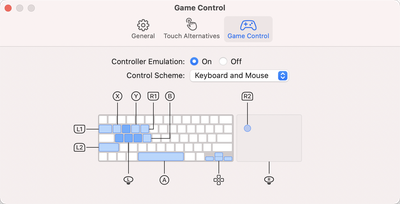
The update also includes optimizations for using iOS apps on M1 Macs. When running iPhone and iPad apps on ‌M1‌ Macs, there's a Touch Alternatives preference pane that allows users to set keyboard commands for touch input alternatives, plus iPadOS apps launch with a larger window if the Mac's display allows it. Touch Alternatives can be enabled for ‌iPhone‌ or ‌iPad‌ apps by clicking on the app's name in the menu bar and then selecting the Preferences option. Touch Alternatives let you customize taps, swipes, and drags.

Apple has also added a "Controller Emulation" feature that can be enabled for ‌iPhone‌ and ‌iPad‌ apps to map game controller buttons to keyboard keys and mouse buttons. Controller Emulation will allow ‌‌iPhone‌‌ and ‌‌iPad‌‌ games that have controller support built in to be accurately controlled with a keyboard and/or mouse when those games are played on an ‌‌M1‌‌ Mac.

game control emulation
In the Reminders app, reminder lists can be sorted by Due Date, Creation Date, Priority, or Title, and there is an option to print lists by going to File > Print. Reminders can also be moved manually across lists with drag and drop, something that wasn't possible before.

Apple is adding a new "Made For You" library shortcut in Apple Music for finding personal mixes and Replay playlists, and the Listen Now section has been updated with support for highlighting live events.

The ‌Apple Music‌ app also features a new autoplay option that allows the streaming service to continue to play music after a playlist or music queue ends. ‌Apple Music‌ sources music similar to what's in a person's ‌Apple Music‌ library, similar to the autoplay feature added in iOS 14.
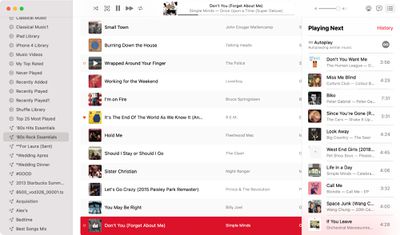
macos big sur apple music autoplay
With this feature enabled, ‌Apple Music‌ audio will not end even after a playlist or album is over. To check that it's on, play a playlist or album and then click on the three dot/line menu button in the upper right hand corner. From there, make sure the infinity symbol is toggled on.

In the Apple News app, there's a redesigned ‌Apple News‌+ tab with a dedicated "For You" section and a new Browse tab that makes it easier to browse through available content. The new For You section is designed to help ‌Apple News‌+ users find favorite magazines and newspapers much faster, plus it adds new tools for managing downloaded issues.

macOS Big Sur 11.3 also adds support for the latest PlayStation 5 DualSense and Xbox Series X/S controllers for use with macOS games.

There's also an updated "Support" interface when accessing "About This Mac." The new design includes details on your warranty and it allows for starting a repair right from the Mac interface.
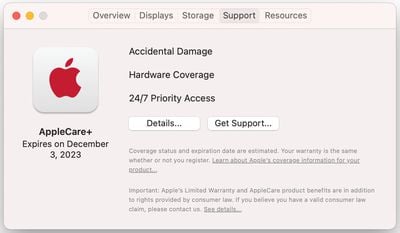
macos big sur beta support
The tab works similarly to the AppleCare coverage menu in the iOS Settings app, which lets users request repairs, buy an ‌AppleCare‌ plan, and check their coverage.

For HomePod users, macOS Big Sur 11.3 brings support for ‌HomePod‌ Stereo pairs, allowing a set of paired HomePods to be set as the default sound output option, with the two HomePods showing up as a single selectable speaker rather than separate as in prior versions of macOS.

Code in macOS Big Sur 11.3 suggests that the Optimized Battery Charging feature will now make sure the Mac's battery is fully charged before a scheduled calendar event. The Mac will charge to 100 percent three hours before a calendar event's start time.

Optimized Battery Charging is designed to preserve the lifespan of the Mac's battery by limiting the amount of time that a Mac sits at 100 percent battery.

In Safari, there's support for WebM video playback, allowing users to play WebM videos using Apple's browser. WebM is a niche video format designed to be a royalty-free alternative to the H.264 codec used in the MP4 format. WebM allows video files to remain small without sacrificing quality and can be played with little processing power, making it ideal for webpages and browsers.

Code in macOS Big Sur 11.3 suggests that Rosetta could be removed from some ‌M1‌ Macs in some select regions after the software is released. There's a mention that "Rosetta is no longer available in this region. Applications requiring Rosetta will no longer run," but no additional information is available at this time.

There are also appear to be new assets that suggest a feature for mapping game controller buttons to keyboard layouts, and there's a Game Center toggle to enable or disable connections with friends, which lets games set you up with your friends or prevents apps from accessing that info.

More on macOS Big Sur can be found in our macOS Big Sur roundup. The software is expected to see a release this spring.


Related Forum: macOS Big Sur

Popular Stories

Apple Logo Zoomed

Tim Cook Teases Plans for Apple's Upcoming 50th Anniversary

Thursday February 5, 2026 12:54 pm PST by
Apple turns 50 this year, and its CEO Tim Cook has promised to celebrate the milestone. The big day falls on April 1, 2026. "I've been unusually reflective lately about Apple because we have been working on what do we do to mark this moment," Cook told employees today, according to Bloomberg's Mark Gurman. "When you really stop and pause and think about the last 50 years, it makes your heart ...
wwdc sans text feature

Apple Rumored to Announce New Product on February 19

Thursday February 5, 2026 12:22 pm PST by
Apple plans to announce the iPhone 17e on Thursday, February 19, according to Macwelt, the German equivalent of Macworld. The report, citing industry sources, is available in English on Macworld. Apple announced the iPhone 16e on Wednesday, February 19 last year, so the iPhone 17e would be unveiled exactly one year later if this rumor is accurate. It is quite uncommon for Apple to unveil...
Finder Siri Feature

Why Apple's iOS 26.4 Siri Upgrade Will Be Bigger Than Originally Promised

Friday February 6, 2026 3:06 pm PST by
In the iOS 26.4 update that's coming this spring, Apple will introduce a new version of Siri that's going to overhaul how we interact with the personal assistant and what it's able to do. The iOS 26.4 version of Siri won't work like ChatGPT or Claude, but it will rely on large language models (LLMs) and has been updated from the ground up. Upgraded Architecture The next-generation...
iOS 26

iOS 26.3 and iOS 26.4 Will Add These New Features to Your iPhone

Tuesday February 3, 2026 7:47 am PST by
While the iOS 26.3 Release Candidate is now available ahead of a public release, the first iOS 26.4 beta is likely still at least a week away. Following beta testing, iOS 26.4 will likely be released to the general public in March or April. Below, we have recapped known or rumored iOS 26.3 and iOS 26.4 features so far. iOS 26.3 iPhone to Android Transfer Tool iOS 26.3 makes it easier...
iphone 17 pro dark blue 1

iPhone 18 Pro Max Rumored to Deliver Next-Level Battery Life

Friday February 6, 2026 5:14 am PST by
The iPhone 18 Pro Max will feature a bigger battery for continued best-in-class battery life, according to a known Weibo leaker. Citing supply chain information, the Weibo user known as "Digital Chat Station" said that the iPhone 18 Pro Max will have a battery capacity of 5,100 to 5,200 mAh. Combined with the efficiency improvements of the A20 Pro chip, made with TSMC's 2nm process, the...

Top Rated Comments

RumorConsumer Avatar
64 months ago
Fix...SMB....
Score: 8 Votes (Like | Disagree)
blazerunner Avatar
64 months ago
WHERE ARE AMD 6000 SERIES GPU DRIVERS?
Score: 6 Votes (Like | Disagree)
hagar Avatar
64 months ago
Will it fix the horrible performance of Big Sur on Fusion Drives? It takes over 5 minutes to boot my iMac. It’s an absolute joke.

Apple has acknowledged the bug but said nothing about a possible fix. So should we all buy a new Mac now because Apple released Fusion Drives with SSD blades of 24 Gb that are way too small for Big Sur?

In that case they should have been honest and put those machines on the non-compatible list.
Score: 4 Votes (Like | Disagree)
mikeboss Avatar
64 months ago
Build 20E217a
Score: 3 Votes (Like | Disagree)
hagar Avatar
64 months ago

Wow, 24GB? When I bought an iMac with a fusion drive back in 2012 they shipped it with a 128GB SSD for a 1TB fusion drive. I actually split it into an OS drive and data drive because I didn't want to deal with the fusion drive stuff.

I'm surprised they actually REDUCED the size of the SSD blades considering how crazy-cheap SSDs have gotten since then!

EDIT: My Mac's OS partition with Big Sur is 15.2GB. I'm thinking what happened is during the update process there wasn't enough space on your SSD so some of the OS ended up on the HDD. The system really should move data round to get most-frequently-used blocks onto the SSD. But really, 24GB is just way too small. I'm really wondering what Apple was thinking here especially since they started with 128GB when Fusion drives first came out.
Very true. They really dropped the ball here just to save some bucks.

I did a clean install (without restoring a backup) because I assumed something went wrong during the upgrade process from Catalina. And indeed, my system was faster (but nowhere near Catalina performance). However, as soon as I installed some software (including iworks and MS Office), performance tanked. Nothing I can do about it except downgrade to a previous OS. Something I never had to do in the 17 years I’ve been using macs.
Score: 3 Votes (Like | Disagree)
tywebb13 Avatar
64 months ago

Build 20E217a
For many hours that was the build number. I got this on one mac. But many hours later I installed it onto another mac and the build is now 20E5217a. I think that was the intended build number. I think it is a mistake on apple's part - but not a serious one. I think there has been a re-release with the correct build number (unless they are now randomly releasing 2 slightly different simultaneous betas - but that is unlikely).

I think that there is going to be no major difference between 20E217a and 20E5217a and so won't bother trying to "update" the mac with 20E217a to 20E5217a.

However there will probably soon be a full installer. There isn't one yet. There hasn't always been - so don't be too hopeful. Nevertheless apple are getting much better at providing full installers for betas lately.

So going forward the build to look for for the full installer will be 20E5217a, not 20E217a - if there is going to be one.

Attachment Image
Score: 2 Votes (Like | Disagree)