
Images of Prototype Show Apple Planned iPad With Two Ports

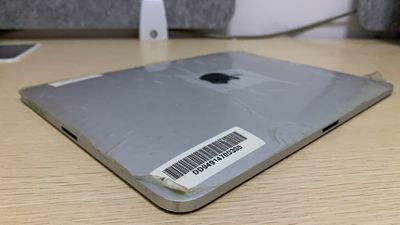
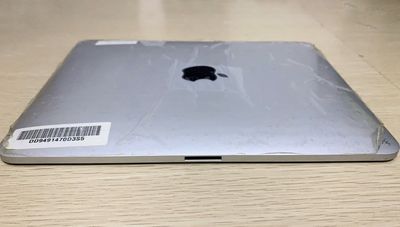
Apple prototyped models of the first-generation iPad with two ports for expanded docking options, according to images of a prototype unit.
ipad two ports docking 1

Shared on Twitter by Apple device collector Giulio Zompetti, the images reinforce previous reports that Apple was planning to offer two 30-pin connector ports on the original ‌iPad‌, with one on the base below the Home Button, and one on the left-hand side.
ipad two ports docking 2

Zompetti explained that Apple was initially planning to offer a "dual dock system" on its first tablet. Presumably, this would have functioned in much the same way that the smart connector did on the first and second-generation ‌iPad‌ Pros, third-generation iPad Air, and seventh and eighth-generation ‌iPad‌, in order to be able to connect to the Smart Keyboard or accessories such as Logitech's Logi BASE ‌iPad‌ charging dock in landscape mode. The two-port system apparently also supported concurrent charging.

Beyond docking in accessories such as keyboards, two ports could also have opened up the option for connecting to multiple wired accessories such as external hard drives or SD card readers via a dongle for compatibility with the 30-pin connector, without the need for a multi-port adapter.

Prototype first-generation iPads with two ports have been seen a number of times before, with some images even showing the internals of a two-port ‌iPad‌. Patents depicting the dual-port design have also come to light in the past.

Apple reportedly chose to remove the feature in the design verification testing stage. While Apple has launched 22 different ‌iPad‌ models in six screen sizes, every ‌iPad‌ model to date has only had just one port for data transfer and charging.

Given that some ‌iPad‌ power-users hope that the tablet will one day feature more than one port to aid productivity, it is interesting that Apple considered implementing such a feature long before the creation of the iPad Pro or even the switch to a USB-C connector on some models. Some may believe that the images prove that Apple saw the ‌iPad‌ as a productivity-oriented device long before it was truly capable of doing so with features such as multitasking, the Files app, or mouse support.


Related Roundup: iPad
Buyer's Guide: iPad (Don't Buy)
Related Forum: iPad

Popular Stories

maxresdefault

Apple Shows Off a Key Reason to Upgrade to the iPhone 17

Saturday February 7, 2026 9:26 am PST by
Apple today shared an ad that shows how the upgraded Center Stage front camera on the latest iPhones improves the process of taking a group selfie. "Watch how the new front facing camera on iPhone 17 Pro takes group selfies that automatically expand and rotate as more people come into frame," says Apple. While the ad is focused on the iPhone 17 Pro and iPhone 17 Pro Max, the regular iPhone...
Finder Siri Feature

Why Apple's iOS 26.4 Siri Upgrade Will Be Bigger Than Originally Promised

Friday February 6, 2026 3:06 pm PST by
In the iOS 26.4 update that's coming this spring, Apple will introduce a new version of Siri that's going to overhaul how we interact with the personal assistant and what it's able to do. The iOS 26.4 version of Siri won't work like ChatGPT or Claude, but it will rely on large language models (LLMs) and has been updated from the ground up. Upgraded Architecture The next-generation...
wwdc sans text feature

Apple Rumored to Announce New Product on February 19

Thursday February 5, 2026 12:22 pm PST by
Apple plans to announce the iPhone 17e on Thursday, February 19, according to Macwelt, the German equivalent of Macworld. The report, citing industry sources, is available in English on Macworld. Apple announced the iPhone 16e on Wednesday, February 19 last year, so the iPhone 17e would be unveiled exactly one year later if this rumor is accurate. It is quite uncommon for Apple to unveil...
apple wallet drivers license feature iPhone 15 pro

Apple Says These 7 U.S. States Plan to Offer iPhone Driver's Licenses

Monday February 9, 2026 6:24 am PST by
In select U.S. states, residents can add their driver's license or state ID to the Apple Wallet app on the iPhone and Apple Watch, and then use it to display proof of identity or age at select airports and businesses, and in select apps. The feature is currently available in 13 U.S. states and Puerto Rico, and it is expected to launch in at least seven more in the future. To set up the...
14 inch MacBook Pro Keyboard

New MacBook Pros Could Now Arrive in March

Sunday February 8, 2026 6:02 am PST by
New MacBook Pro models with the M5 Pro and M5 Max chips could arrive as soon as Monday, March 2, according to Bloomberg's Mark Gurman. In today's "Power On" newsletter, Gurman said that the release of new MacBook Pro models is tied to the release of macOS Tahoe 26.3. The launch is said to be slated for as early as the week of March 2. He added that the M4 Pro and M4 Max models on sale today...

Top Rated Comments

Reason077 Avatar
64 months ago
Hey Macrumors,

2012 just called. They want their article back!

https://www.geekwebguides.com/2012/05/28/prototype-original-ipad-with-dual-dock-connectors-surfaces/
Score: 20 Votes (Like | Disagree)
555gallardo Avatar
64 months ago
Not exactly a news since this prototype was shared online some time ago, but still nice to see it again.
Score: 18 Votes (Like | Disagree)
ITMacRN Avatar
64 months ago
There actually is a story behind this according to Wayne Goodrich, the man who produced keynotes for Steve Jobs:

"During iPad launch preparation, we were struggling to get the iPad “beauty shots” to look like Steve imagined they should look. We’d had multiple photo shoots and teams working literally to get one or two insanely great images of the iPad. He wanted a beauty shot with a clean edge and the Apple logo visible the right side up. The problem was this was not possible without seeing the long side iPad 30-pin connector. You may ask, there’s only one on the short side. At that point there were two, one on each side. That way you could dock it in landscape or portrait orientation.

I had thought he was satisfied with the beauty shots delivered since we’d moved on in the slide deck. But one night close to the keynote date, he decided he wasn’t happy with those beauty shots of the iPad. I was tired and knew that there was no way to make them any better.

So, that evening before shutting down for the night, I photoshopped out the port on the long side on a few of the shots and sent them off to him. I figured he’d see them in the morning and we’d have a good laugh about it. Instead he almost immediately called me as said, “These are exactly what I was looking for… oh you didn’t?” To which I replied, “I did” and the phone went click.

There was no way to get a beauty shot that Steve would accept with that port on the side, so the iPad shipped without it. It also simplified the presentation, which he liked."
Score: 13 Votes (Like | Disagree)
Spock Avatar
64 months ago

Not exactly a news since this prototype was shared online some time ago, but still nice to see it again.
Came here to say the same thing, I am pretty sure that I have seen prototypes of this before a few years ago.
Score: 12 Votes (Like | Disagree)
bassanoclapper Avatar
64 months ago
Or did they just include two ports on the prototype to see which variant worked better, rather than planned a dual port iPad?
Score: 10 Votes (Like | Disagree)
EmotionalSnow Avatar
64 months ago

There actually is a story behind this according to Wayne Goodrich, the man who produced keynotes for Steve Jobs:

"During iPad launch preparation, we were struggling to get the iPad “beauty shots” to look like Steve imagined they should look. We’d had multiple photo shoots and teams working literally to get one or two insanely great images of the iPad. He wanted a beauty shot with a clean edge and the Apple logo visible the right side up. The problem was this was not possible without seeing the long side iPad 30-pin connector. You may ask, there’s only one on the short side. At that point there were two, one on each side. That way you could dock it in landscape or portrait orientation.

I had thought he was satisfied with the beauty shots delivered since we’d moved on in the slide deck. But one night close to the keynote date, he decided he wasn’t happy with those beauty shots of the iPad. I was tired and knew that there was no way to make them any better.

So, that evening before shutting down for the night, I photoshopped out the port on the long side on a few of the shots and sent them off to him. I figured he’d see them in the morning and we’d have a good laugh about it. Instead he almost immediately called me as said, “These are exactly what I was looking for… oh you didn’t?” To which I replied, “I did” and the phone went click.

There was no way to get a beauty shot that Steve would accept with that port on the side, so the iPad shipped without it. It also simplified the presentation, which he liked."
A guy on Reddit also said that both ports couldn't be used at the same time.
Score: 5 Votes (Like | Disagree)















