
Longtime Apple Maps Bug in Australia Erroneously Lists Businesses in Residential Areas

There's a curious bug in the Apple Maps app that's affecting Australians, which appears to be caused by a bad data set. Multiple complaints on Twitter suggest that ‌Apple Maps‌ is listing certain businesses incorrectly, directing Australians to residential areas rather than the actual business location.
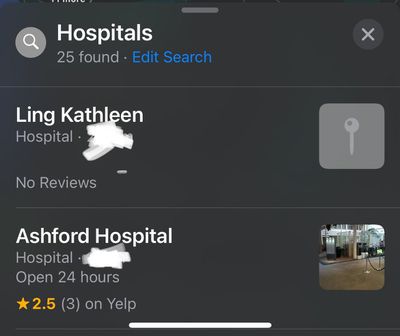
apple maps hospital error

An erroneous hospital listing located near Twitter user Russell Ivanovic

‌Apple Maps‌ appears to be pulling in data from where business owners live, rather than where their businesses are located.


There are a long list of complaints on Twitter about the errors that Australians have experienced, with restaurants, hospitals, pharmacies, and more listed in the wrong place.


Twitter users John Cleary and Russell Ivanovic suggest that Apple has imported an Australian business database that lists the places that businesses are registered to, which is typically the business owner's home address.


The long list of Twitter complaints suggest that this problem has existed in Australia for quite some time, and at least one person confirmed that he had a business listed as located at his home address.

Some of the Twitter users have reported the errors, but Apple has yet to address the problem for Australians who are being misdirected.


Apple has had issues with the ‌Apple Maps‌ app in the past, but has worked hard to introduce improvements through acquisitions and its own mapping efforts with map vehicles. ‌Apple Maps‌ has gained multiple new features over the years like the street-level Look Around feature, but there are clearly still issues that need to be fixed.


Popular Stories

Apple Logo Zoomed

Tim Cook Teases Plans for Apple's Upcoming 50th Anniversary

Thursday February 5, 2026 12:54 pm PST by
Apple turns 50 this year, and its CEO Tim Cook has promised to celebrate the milestone. The big day falls on April 1, 2026. "I've been unusually reflective lately about Apple because we have been working on what do we do to mark this moment," Cook told employees today, according to Bloomberg's Mark Gurman. "When you really stop and pause and think about the last 50 years, it makes your heart ...
wwdc sans text feature

Apple Rumored to Announce New Product on February 19

Thursday February 5, 2026 12:22 pm PST by
Apple plans to announce the iPhone 17e on Thursday, February 19, according to Macwelt, the German equivalent of Macworld. The report, citing industry sources, is available in English on Macworld. Apple announced the iPhone 16e on Wednesday, February 19 last year, so the iPhone 17e would be unveiled exactly one year later if this rumor is accurate. It is quite uncommon for Apple to unveil...
Finder Siri Feature

Why Apple's iOS 26.4 Siri Upgrade Will Be Bigger Than Originally Promised

Friday February 6, 2026 3:06 pm PST by
In the iOS 26.4 update that's coming this spring, Apple will introduce a new version of Siri that's going to overhaul how we interact with the personal assistant and what it's able to do. The iOS 26.4 version of Siri won't work like ChatGPT or Claude, but it will rely on large language models (LLMs) and has been updated from the ground up. Upgraded Architecture The next-generation...
iOS 26

iOS 26.3 and iOS 26.4 Will Add These New Features to Your iPhone

Tuesday February 3, 2026 7:47 am PST by
While the iOS 26.3 Release Candidate is now available ahead of a public release, the first iOS 26.4 beta is likely still at least a week away. Following beta testing, iOS 26.4 will likely be released to the general public in March or April. Below, we have recapped known or rumored iOS 26.3 and iOS 26.4 features so far. iOS 26.3 iPhone to Android Transfer Tool iOS 26.3 makes it easier...
iphone 17 pro dark blue 1

iPhone 18 Pro Max Rumored to Deliver Next-Level Battery Life

Friday February 6, 2026 5:14 am PST by
The iPhone 18 Pro Max will feature a bigger battery for continued best-in-class battery life, according to a known Weibo leaker. Citing supply chain information, the Weibo user known as "Digital Chat Station" said that the iPhone 18 Pro Max will have a battery capacity of 5,100 to 5,200 mAh. Combined with the efficiency improvements of the A20 Pro chip, made with TSMC's 2nm process, the...

Top Rated Comments

GeoStructural Avatar
63 months ago
Privacy focused company discloses business owner’s home addresses.
Score: 10 Votes (Like | Disagree)
nitramluap Avatar
63 months ago
It has serious privacy & safety implications. I’m a doctor and I have to have a ‘company’ but it’s just me in it... and it has no physical address nor any direct public interaction. It is a requirement for a business to have an address though (not a PO Box) so everyone uses their home address.

This has always been public domain data but it required someone knowing your actual business name and searching for it online. With Apple Maps using this data, people can simply bump into it scrolling on the map. If your business name isn’t cryptic, then everyone will know WHO lives in that house. Great for thieves to work out if a house is worth burgling...

I complained to Apple when I first saw this YEARS ago and they deleted my company name on Apple Maps immediately - so they WILL act, but I think it’s better if they didn’t use that dataset in the first place as it's not helpful.
Score: 7 Votes (Like | Disagree)
goonie4life9 Avatar
63 months ago
Folks, I just finished talking to a Senior Advisor and they assured me that this is most certainly not a problem, because if it was, they would have heard about it long before any customer noticed, because Apple support talks to millions of Apple Maps users an hour. The Senior Advisor assured me they were taking ownership of this case and would work to find a resolution that satisfies both of us. The first step in troubleshooting is to erase the MapOS and set it up as new. Now, the important thing is that you DON'T erase your entire device, just the MapOS. To do this, you need to go to Settings and then Maps. You'll scroll to the bottom and click the "Erase MapOS." Once you click "Erase MapsOS," it will ask you to confirm and once you click "Ok," it will begin the erasure. Once it is erased, it will download a fresh copy of MapsOS from Apple's servers.

If you don't see the "Erase MapOS" option, there is no further troubleshooting Apple can provide. Instead, the issue will need to be RTA'd to Engineering. To do that, you will need to download Capture Data onto your iOS device, run the data capture, with Mail Logging enabled of course, and submit the logs to Apple. Because Capture Data is a Mac app, you will not be able to run Capture Data on your iOS device. Instead, the Senior Advisor will submit the RTA to Engineering and Engineering will reply within 48 hours, to ask for screenshots of the bug. Engineering will provide no support if you don't cooperate with providing screenshots. Once you provide screenshots, Engineering will again reply in 48 hours, to determine if you are using Apple Maps or a third-party map app. Once you confirm that you are using Apple Maps, they will issue Apple's Official Position on the matter: No further support will be provided because you need to keep your device up to date.
Score: 6 Votes (Like | Disagree)
Macyourdayy Avatar
63 months ago
Finally an explanation why our suburbs are littered with small businesses that shouldn’t be there. What a dumb ass cock up. It’s been like this since 2012.
Score: 3 Votes (Like | Disagree)
TheYayAreaLiving ?️ Avatar
63 months ago
Well here you go folks...

It’s not as bad as the video clip below. APPLE Will sort it out.

Score: 3 Votes (Like | Disagree)
hagar Avatar
63 months ago

i add the fact macos maps APP still dont allows to navigate from a manually selected point on the map to another. but who cares! shareholders dont use gps. they have a chauffeur!
Yes it does. On the iPad, drop a pin on the map and press Directions. In the direction details window, by default “my location“ is selected as the starting point. Click on it to change the route. Next, choose your desired starting point on the map. It will appear in the list underneath the start and stop points. Select it to set it as your start point (Or first press the up down button to swap them and set the end point).

You have now directions from and to manually selected points on the map.

(On the iPhone, it seems you need to enter the address of at least the start or destination as the map is covered by the direction details pop-up window.)
Score: 3 Votes (Like | Disagree)















