Adobe Premiere Rush Now Fully Supports M1 Macs - MacRumors
Skip to Content

Adobe Premiere Rush Now Fully Supports M1 Macs

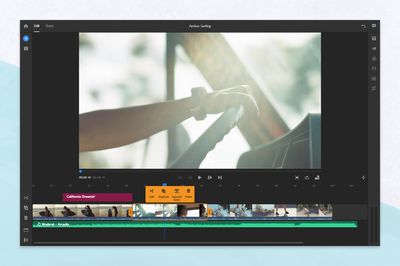
Adobe has today released a major update for Premiere Rush, adding full support for the M1 chip, alongside a range of small updates to Premiere Rush and Premiere Pro.
premiere rush m1 support
Premiere Rush is Adobe's video editing app designed for easy creativity on the go. The update to Premiere Rush brings enhanced speed and optimization on desktops using the ‌M1‌ chip, such as the MacBook Air, the 13-inch MacBook Pro, and Mac mini, so users can work faster and get more done.

Premiere Rush is also gaining a new timeline Context Menu. Users can now tap a video clip on the timeline to bring up the context menu on iOS to split, duplicate, or delete a clip. In addition, users can tap a video clip with audio to separate the audio clip from the video.

There are also changes to reset functionality, allowing users to reset all adjustments for Color, Audio, and Transforms.

On the other hand, Premiere Pro is gaining Dynamic Lumetri Previews. Lumetri presets now display a frame from your current sequence and thumbnails for Lumetri presets in the Effects panel dynamically update, providing a preview of the preset.

Popular Stories

iOS 26

iOS 26.4 Adds Two New Features to CarPlay

Tuesday March 24, 2026 1:55 pm PDT by
iOS 26.4 was released today, and it includes a couple of new features for CarPlay: an Ambient Music widget and support for voice-based chatbot apps. To update your iPhone 11 or newer to iOS 26.4, open the Settings app and tap on General → Software Update. CarPlay will automatically offer the new features so long as the iPhone connected to your vehicle is running iOS 26.4 or later....
Apple Business hero

Apple Unveils 'Apple Business' All-in-One Platform

Tuesday March 24, 2026 8:53 am PDT by
Apple today announced Apple Business, a new all-in-one platform that unifies device management, productivity tools, and customer outreach features. The service is designed to be a consolidated replacement for several of Apple's existing business-focused offerings, including Apple Business Essentials, Apple Business Manager, and Apple Business Connect. It provides organizations with a single...
AirPods Pro Firmware Feature

Apple Releases New Firmware for AirPods Pro 3, AirPods Pro 2 and AirPods 4

Tuesday March 24, 2026 12:31 pm PDT by
Apple today released new firmware for the AirPods Pro 2, AirPods Pro 3, and the AirPods 4. The firmware has a version number of 8B39, up from 8B34 on the AirPods Pro 3, 8B28 on the AirPods Pro 2, and 8B21 on the AirPods 4. There is no word on what's included in the firmware, but Apple has a support document with limited notes. Most updates are limited to bug fixes and performance...


Top Rated Comments

ryanmillercg Avatar
65 months ago
Too late, we all switched to Da Vinci Resolve 🤣
Score: 4 Votes (Like | Disagree)
JippaLippa Avatar
65 months ago
Hopefully this means the full Premiere Pro apple silicon patch will come soon.


Too late, we all switched to Da Vinci Resolve 🤣
Davinci Resolve is probably better for pure editing and colour correction, but lacks some features that Premiere Pro has.
For example if you work with motion graphics, you have the dynamic link with After Effects Precomps, also lots of industry standard plugins (like the Red Giant suites) don't work with Resolve.
On the other hand Premiere has, in my opinion, the worst possible interface in existance...truly terrible.
Score: 2 Votes (Like | Disagree)
JippaLippa Avatar
65 months ago

Definitely Adobe has amazing integration between those two.
I try often to do things with FCP and Motion in the hopes of doing a full switch one day, however it’s not quite there.
Motion serves to FCP functionality (Motion being the effects render engine for them and all) and as an user is quite easy to do quite the complex stuff: titles, generators, transitions, etc as a plugin to use in FCP with HUD display and inspector parameters.
However, importing a Motion timeline as a precomp clip in FCP? you can’t, either pre-render it or go the plug-in way but parameter-less (this pollutes ALL projects). Want to create a precomp inside a comp in motion? You can’t... there’s only ever one main “comp”.
Ask the community how to go about those two basic features? I get told that Motion is a very advanced software and that I shouldn’t think about it like After Effects (I’m being open minded, but it’s hard to take that since even FCP has the concept of precomps, they call it compound clips).
I think Affinity it’s getting close to PSD feature parity, usability experience is already way past above Adobe. I think the same for FCP and Motion but a lot less features still and some plugins are just not there.
Motion is not nearly as advanced as After Effects, and believe me.
First because I used it, second because I have 10 years of experience in the field of motion design and I acquired quite the experience with these tools.
While Illustrator, Photoshop and Indesign (and Premiere Pro if you don't need Dynamic Link) have compelling cheaper alternatives, After Effects is perhaps the only software from Adobe that has no competition as no other software in existence does what After Effects does.
Many programs do some things much better, but for some things (mainly 2D Motion Graphics) After Effects is absolutely unbeatable, and in fact no 2D Motion Designer uses anything else, despite the horrible support from Adobe, the laggy performance and the slue of bugs with each release...
Score: 1 Votes (Like | Disagree)
adamw Avatar
65 months ago
Glad to see Adobe releasing more M1 native apps.
Score: 1 Votes (Like | Disagree)

















