
Apple Confirms Magic Keyboard With Touch ID is Compatible With a MacBook's Touch ID Sensor - MacRumors
Skip to Content

Apple Confirms Magic Keyboard With Touch ID is Compatible With a MacBook's Touch ID Sensor

Apple today updated its Platform Security Guide with in-depth security information about the new Magic Keyboard with Touch ID, the ability to unlock an iPhone with an Apple Watch while wearing a mask, and more.
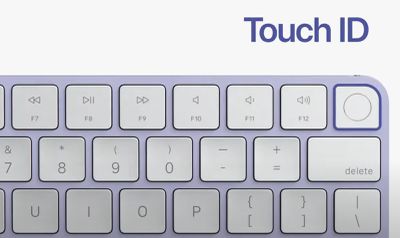
touch id magic keyboard for imac
The updated guide reveals a few interesting tidbits about the Magic Keyboard with Touch ID, including that it is compatible with the built-in Touch ID sensor on recent MacBook Pro and MacBook Air models:

Magic Keyboard with Touch ID and built-in Touch ID sensors are compatible. If a finger that was enrolled on a built-in Mac Touch ID sensor is presented on a Magic Keyboard with Touch ID, the Secure Enclave in the Mac successfully processes the match—and vice versa.

This compatibility means that, from a technical standpoint, there is nothing stopping Apple from selling the Magic Keyboard with Touch ID on a standalone basis. As we previously reported, the new Magic Keyboard is fully compatible with all M1 Macs, but Apple is currently only offering the keyboard with the new iMac unveiled last month.

Apple has made some previously iMac-exclusive accessories available to purchase separately at a later date in the past. When the iMac Pro launched in December 2017, for example, Space Gray versions of the Magic Keyboard, Magic Mouse, and Magic Trackpad were only available with the iMac Pro, but became available separately in March 2018.

The updated guide also reveals that the Magic Keyboard with Touch ID can be securely paired with only one Mac at a time, but a Mac can maintain secure pairings with up to five
different Magic Keyboard with Touch ID keyboards.

To enroll a new fingerprint, the user must physically confirm their intent to use a Magic Keyboard with Touch ID with the Mac, according to Apple. Physical intent is confirmed by pressing twice on the Mac power button when indicated by the user interface, or by successfully matching a fingerprint that had previously been enrolled with the Mac.

As for unlocking an iPhone with an Apple Watch on iOS 14.5 and watchOS 7.4 or later, the following criteria must be met, according to Apple:

• iPhone must have been unlocked using another method at least once after the
associated Apple Watch was placed on wrist and unlocked.
• Sensors must be able to detect that the nose and mouth are covered.
• Distance measured must be 2–3 meters or less
• Apple Watch must not be in bedtime mode.
• Apple Watch or iPhone must have been unlocked recently, or Apple Watch must have
experienced physical motion indicating that the wearer is active (for example, not
asleep).
• iPhone must have been unlocked at least once in the past 6.5 hours.
• iPhone must be in a state where Face ID is allowed to perform a device unlock.

The updated Platform Security Guide is available on Apple's website, with a document revision history included on page 214.


Popular Stories

iOS 26

iOS 26.4 Adds Two New Features to CarPlay

Tuesday March 24, 2026 1:55 pm PDT by
iOS 26.4 was released today, and it includes a couple of new features for CarPlay: an Ambient Music widget and support for voice-based chatbot apps. To update your iPhone 11 or newer to iOS 26.4, open the Settings app and tap on General → Software Update. CarPlay will automatically offer the new features so long as the iPhone connected to your vehicle is running iOS 26.4 or later....
Apple Business hero

Apple Unveils 'Apple Business' All-in-One Platform

Tuesday March 24, 2026 8:53 am PDT by
Apple today announced Apple Business, a new all-in-one platform that unifies device management, productivity tools, and customer outreach features. The service is designed to be a consolidated replacement for several of Apple's existing business-focused offerings, including Apple Business Essentials, Apple Business Manager, and Apple Business Connect. It provides organizations with a single...
AirPods Pro Firmware Feature

Apple Releases New Firmware for AirPods Pro 3, AirPods Pro 2 and AirPods 4

Tuesday March 24, 2026 12:31 pm PDT by
Apple today released new firmware for the AirPods Pro 2, AirPods Pro 3, and the AirPods 4. The firmware has a version number of 8B39, up from 8B34 on the AirPods Pro 3, 8B28 on the AirPods Pro 2, and 8B21 on the AirPods 4. There is no word on what's included in the firmware, but Apple has a support document with limited notes. Most updates are limited to bug fixes and performance...

Top Rated Comments

sintra1 Avatar
64 months ago

I don't understand why Apple won't sell them separately. Seems like they'd be in big demand.
Almost certainly supply issues right now . Expect them to be offered in 8 -10 weeks imho
Score: 20 Votes (Like | Disagree)
performa_6400 Avatar
64 months ago
This will bridge a sizable UX gap for those of us that work in clamshell mode. Love it.
Score: 5 Votes (Like | Disagree)
jayducharme Avatar
64 months ago
I don't understand why Apple won't sell them separately. Seems like they'd be in big demand.
Score: 4 Votes (Like | Disagree)
Neberheim Avatar
63 months ago
I would think that Apple is waiting to sell the keyboard separately until they have finished transitioning the consumer-oriented computers away from Intel. You just know that people would buy an Intel Mac and TouchID keyboard and then be pissed that they aren’t compatible.
Score: 3 Votes (Like | Disagree)
DribbleCastle Avatar
63 months ago

If they ever sell one of these with a num pad i’ll be all over it
They do have a Numpad version available for the iMac so chances are good they'll eventually sell one.


Attachment Image
Score: 2 Votes (Like | Disagree)
TheWatchfulOne Avatar
63 months ago

I don't understand why Apple won't sell them separately. Seems like they'd be in big demand.
They have to have enough keyboards in stock to support selling the keyboards separately as well as including them with the computers. It may take awhile to build up enough stock to be able to do that.
Score: 2 Votes (Like | Disagree)















