
Hands-On With the Redesigned Apple TV 4K Siri Remote - MacRumors
Skip to Content

Hands-On With the Redesigned Apple TV 4K Siri Remote

Apple alongside the second-generation Apple TV 4K debuted a redesigned version of the Siri Remote, which is now available to customers with new ‌Apple TV‌ orders and as a $60 standalone replacement for the original ‌Siri‌ Remote.


We picked up the updated ‌Siri‌ Remote to see if it's worth picking up if you have an original ‌Apple TV‌ 4K or HD and are tired of the first iteration of the remote, which has several shortcomings.

Apple entirely overhauled the ‌Siri‌ Remote's design. It has an all-aluminum body that does away with the touchpad interface, instead adopting a touch-based clickpad and several additional buttons for control purposes.
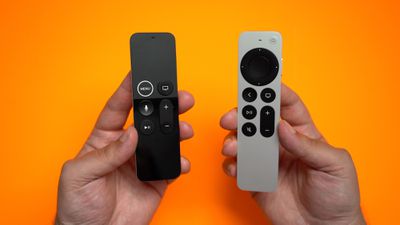
siri remote 2
The new remote is thicker than the prior version, and Apple has used that thickness change as an explanation for why the ‌Siri‌ Remote 2 doesn't need Find My. It's bigger, thicker, and shouldn't get as easily lost in couch cushions, though whether that's true remains to be seen and will vary from household to household.
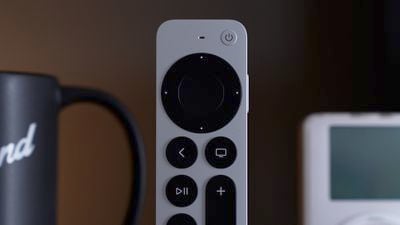
siri remote 3
Along with no ‌Find My‌, the new remote does not feature a gyroscope or an accelerometer, so you can't play games with it. Apple now recommends gaming controllers for playing games rather than the standard remote.

The clickpad that Apple added can be used like a standard directional button, and you can also swipe around if you want, but you don't have to. It's much more versatile than the prior touch interface, and it's useful to be able to scroll/scrub through content using a circular swipe gesture.
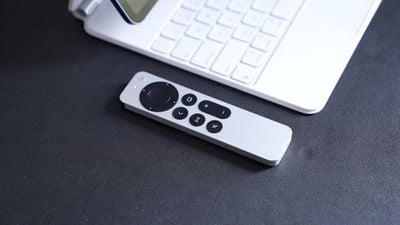
siri remote 4
The buttons are tactile and satisfying to press, and Apple has added dedicated mute and power buttons along with the standard buttons for play/pause, volume control, and more. ‌Siri‌ can be activated through a side button.

Like the prior ‌Siri‌ Remote, you can charge this one using Lightning, and other than the physical changes, it operates the same as the original remote so it should be intuitive for most ‌Apple TV‌ users. If you're fed up with the original ‌Siri‌ Remote, the updated version has the potential to be a good alternative if you don't mind the selling price. Get a new ‌Siri‌ Remote? Let us know what you think in the comments.

Related Roundup: Apple TV
Buyer's Guide: Apple TV (Don't Buy)

Popular Stories

iOS 26

iOS 26.4 Adds Two New Features to CarPlay

Tuesday March 24, 2026 1:55 pm PDT by
iOS 26.4 was released today, and it includes a couple of new features for CarPlay: an Ambient Music widget and support for voice-based chatbot apps. To update your iPhone 11 or newer to iOS 26.4, open the Settings app and tap on General → Software Update. CarPlay will automatically offer the new features so long as the iPhone connected to your vehicle is running iOS 26.4 or later....
Apple Business hero

Apple Unveils 'Apple Business' All-in-One Platform

Tuesday March 24, 2026 8:53 am PDT by
Apple today announced Apple Business, a new all-in-one platform that unifies device management, productivity tools, and customer outreach features. The service is designed to be a consolidated replacement for several of Apple's existing business-focused offerings, including Apple Business Essentials, Apple Business Manager, and Apple Business Connect. It provides organizations with a single...
AirPods Pro Firmware Feature

Apple Releases New Firmware for AirPods Pro 3, AirPods Pro 2 and AirPods 4

Tuesday March 24, 2026 12:31 pm PDT by
Apple today released new firmware for the AirPods Pro 2, AirPods Pro 3, and the AirPods 4. The firmware has a version number of 8B39, up from 8B34 on the AirPods Pro 3, 8B28 on the AirPods Pro 2, and 8B21 on the AirPods 4. There is no word on what's included in the firmware, but Apple has a support document with limited notes. Most updates are limited to bug fixes and performance...

Top Rated Comments

azentropy Avatar
63 months ago
Just got mine an hour ago so haven't done anything with it yet. However I am perplexed with the included cable. Strange as to why would Apple include an USB-A to Lightning charge cable and not a USB-C to Lightning.
Score: 11 Votes (Like | Disagree)
63 months ago
The mute, and the play/pause buttons need to be switched around.
Score: 10 Votes (Like | Disagree)
rle737ng Avatar
63 months ago
I absolutely hated the old Siri remote. Ordered the new one the first day. They should have designed this in the first place. Finally, a remote you can pick up without changing something.
Score: 7 Votes (Like | Disagree)
jz0309 Avatar
63 months ago
so many complaints here about the old Siri remote, everyone hailing the new one, and now you need support docs and video tutorials on how to use it, eg fast forwarding a video ... this is just hilarious to watch.
I do have 2 ATV 4k in the house, original Siri Remote and neither my wife nor I lose it or are complaining about its functionality, but everyone is different ...
Score: 5 Votes (Like | Disagree)
63 months ago

that's a TV app button, not a home button. That's good to have but I also I want a dedicated button that takes you to the home screen.
Try clicking Settings -> Remotes and Devices -> TV Button.
Score: 3 Votes (Like | Disagree)
V.K. Avatar
63 months ago
New ATV remote is certainly an improvement on the old one but it's far from perfect. Apple still can't let go of their minimalistic design fetish when it comes to the remote. It's an entirely wrong approach. A remote must above all be simple to operate. That should trump all other considerations. When a basic function requires a combination of several gestures/clicks that's a design fail. It inevitably introduces possibilities for errors that absolutely don't need to be there. That's particularly true when it comes to older people with reduced coordination. Another side of the same issue is that you have to read the manual or watch how to videos to figure out how to perform many of the basic functions. Older people also aren't going to do that. Many (most?) regular users who are not geeks like Macrumors visitors won't either.
Apple should have made the remote even bigger with even more buttons. In particular basic operations such as home screen or fast forward should have had their own dedicated buttons.
Score: 3 Votes (Like | Disagree)
















