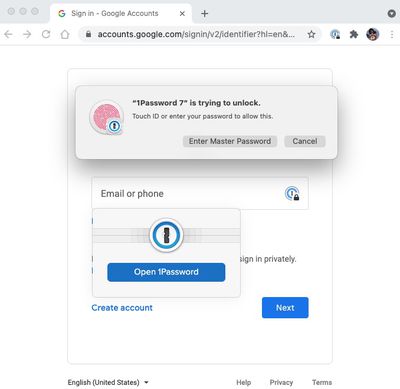
AgileBits has released a version of 1Password for web browsers that brings Touch ID integration to the popular password management service.
The addition of support for biometric authentication means that if 1Password is locked and you have the desktop app installed, you can use the Touch ID ring that comes with Apple's latest MacBooks and Magic Keyboards to unlock your passwords.
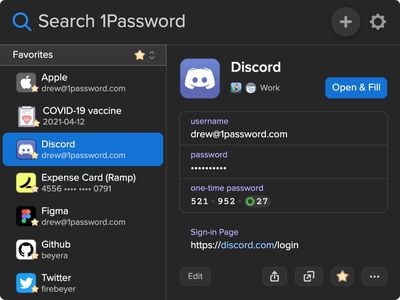
The web version of the app has also gained a dark mode, which should please users who browse at night and suffer from eye fatigue as a result. The dark mode update should also make 1Password dialogs sit more harmoniously with websites that adopt dark themes.
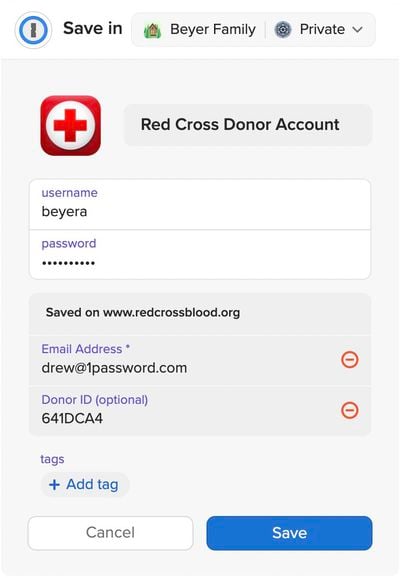
Another significant change for subscribers appears in the save window, which now shows everything that will be added to a new item, and allows users to adjust the contents and add tags to stay organized. The password generator also now suggests strong passwords that fit the requirements of the website being viewed.
Version 2.0.0/2.0.1 of 1Password for browsers also includes a giant list of changes, fixes, and improvements, all of which you can find on the new 1Password release page.
iOS 26.4 was released today, and it includes a couple of new features for CarPlay: an Ambient Music widget and support for voice-based chatbot apps.
To update your iPhone 11 or newer to iOS 26.4, open the Settings app and tap on General → Software Update. CarPlay will automatically offer the new features so long as the iPhone connected to your vehicle is running iOS 26.4 or later....
Apple today announced Apple Business, a new all-in-one platform that unifies device management, productivity tools, and customer outreach features.
The service is designed to be a consolidated replacement for several of Apple's existing business-focused offerings, including Apple Business Essentials, Apple Business Manager, and Apple Business Connect. It provides organizations with a single...
Tuesday March 24, 2026 12:31 pm PDT by Juli Clover
Apple today released new firmware for the AirPods Pro 2, AirPods Pro 3, and the AirPods 4. The firmware has a version number of 8B39, up from 8B34 on the AirPods Pro 3, 8B28 on the AirPods Pro 2, and 8B21 on the AirPods 4.
There is no word on what's included in the firmware, but Apple has a support document with limited notes. Most updates are limited to bug fixes and performance...
Serious question — why would someone use this app over the iCloud Keychain? Is it just because it’s cross platform?
BigMovieGeek already provided a good answer, but I'll add a couple more points as a longtime 1Password user:
1. It monitors sites where you have a login for hacks and reminds you to change your password. 2. It informs you when 2FA becomes available for a site 3. It allows you to store all sorts of details in addition to passwords: bank details, credit cards, serial numbers, software licenses, etc. I value this because it saves me from having to think where that information might be. It's all in one place, always.
None of this is meant to convince you to move away from iCloud Keychain. If that works for you, great. It's just that there are many of us that want something more than that, and 1Password/Lastpass/etc cater to that market.
Yes dear sir, that's exactly why I asked the question and some lovely people provided amazing responses for which I'm grateful, however you're not one of them.
Becuase in every post about 1Password, this EXACT same question is asked (along with the inevitable "but, but, SUBSCRIPTIONS are bad!" posts). In most cases (maybe not you), the OP does not actually want a valid answer, they just want to bash a non-Apple application that dares try and make money.)
But, here are only a few reasons I will always use 1P over Keychain
* Multiple vaults - I can keep my passwords organized by work, personal, financial, streaming services, etc. * Sharing vaults - I can share vaults with others in my family so they can only see certain passwords (e.g. my whole family has access to our streaming passwords, only my wife & I have access to our financial passwords) * Works with ANY browser, not just Safari. I use Edge as my primary browser. Keychain doesn't work with it. So, I need a password manager that works with my choice of browser. * Store more than passwords. I keep all my software licenses in 1P. Plus I can attach receipts, emails, etc. to the entries to keep everything together. * More flexibility in generating passwords. Unfortunately, there is still a lot of legacy tech on the internet and some site don't support long or complex passwords (or have very limited complexity support). I need something that I can fine tune passwords. * A MUCH BETTER GUI than Keychain. Not all my passwords are linked to a website (e.g. my login password to my work computer.) I regularly need to look up passwords that need to be typed on another device. That would be painful in Keychain.
I know there are other choices (Bitwarden, Keypass, etc). But I have built my workflow around 1P. It costs my $60 a year. That is a small price to pay for the benefit it gives me. If other software works for someone else. Good for them.
Seeing the replies (and knowing I need to be better than I currently am) I thought I'd have a look at 1password, but it is yet another subscription service. That is a hard pass for me.
Is there a similar one people can recommend where I can just pay a one off fee, please?
Bitwarden has a free tier and it's open source. You can find the different tiers here ('https://bitwarden.com/pricing/').
Serious question — why would someone use this app over the iCloud Keychain? Is it just because it’s cross platform?
There’s a few reasons I use LastPass.
[LIST=1] * Cross platform and allows me to use my passwords across multiple iCloud accounts. * Ability to store bank details and credit card numbers (cross platform). * Ability to store secure documents (eg legal docs that I want to keep around - and safe). * Flexible password generator that can easily confirm to a website‘s requirements (eg no special characters or at least 1).
Is it any better than the others? Probably not, but it works for me and reduces the number of passwords I need to remember across devices to one.
Another really useful feature is the ability to handle 2FA. Whenever a site provides a QR code to enroll, 1Password has a simple icon you can click that will scan the page and add it to the stored item. Then you'll always have the 6-digit code available to you without having to check your phone. LastPass can also do this (store TOTP), but it doesn't have the QR code scanner.