
iOS 15 Includes Secure Paste Feature That Hides the Clipboard From Developers

iOS 15 has multiple significant privacy-focused improvements such as new protections in the Mail app to prevent tracking, an App Privacy section that shows you how often apps access sensitive information like location, and on-device Siri processing, but there are also some smaller but equally important changes.
tiktokclipboard
One of these updates is a new Secure Paste function for developers, which can be built into apps. With this feature implemented, users can paste something from a different app, with the content of what's copied hidden unless it's pasted into the developer's own app.

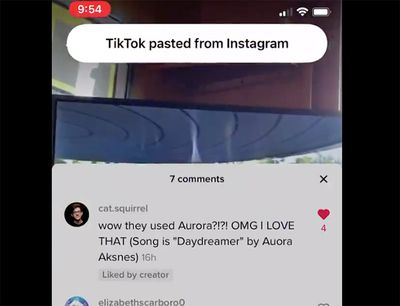
If secure paste is implemented, users can copy and paste from one app to another without being alerted through the clipboard notification that was introduced in iOS 14, giving them peace of mind that what they've copied is secure.

This feature sounds complicated, but it stems from a major privacy issue that surfaced last year. Back in March 2020, it came to light that many iPhone and iPad apps were "snooping" on pasteboard data, as developers could access whatever was on the pasteboard without the user being aware.

Apps like TikTok, Hotels.com, Reddit, Zillow and others could see whatever a user copied from another app, which was a concern because sometimes sensitive information like a password is copied.

Apple addressed this issue in iOS 14 by implementing a small banner that notifies you whenever an app accesses the clipboard, which means apps can no longer see the clipboard without your knowledge. iOS 15 takes it further with the secure paste feature that prevents developers from seeing the clipboard entirely unless you opt to copy something from one app and paste it into the app you're actively using.

With secure paste, developers can let users paste from a different app without having access to what was copied until the user takes action to paste it into their app. When developers use secure paste, users will be able to paste without being alerted via the pasteboard transparency notification, helping give them peace of mind.

After Apple first implemented the iOS 14 feature to unveil when apps were accessing the clipboard, many apps were found to be copying the clipboard on a frequent basis, though some apps like TikTok claimed that this was a mistake.


Related Forum: iOS 15

Popular Stories

Apple Logo Zoomed

Tim Cook Teases Plans for Apple's Upcoming 50th Anniversary

Thursday February 5, 2026 12:54 pm PST by
Apple turns 50 this year, and its CEO Tim Cook has promised to celebrate the milestone. The big day falls on April 1, 2026. "I've been unusually reflective lately about Apple because we have been working on what do we do to mark this moment," Cook told employees today, according to Bloomberg's Mark Gurman. "When you really stop and pause and think about the last 50 years, it makes your heart ...
wwdc sans text feature

Apple Rumored to Announce New Product on February 19

Thursday February 5, 2026 12:22 pm PST by
Apple plans to announce the iPhone 17e on Thursday, February 19, according to Macwelt, the German equivalent of Macworld. The report, citing industry sources, is available in English on Macworld. Apple announced the iPhone 16e on Wednesday, February 19 last year, so the iPhone 17e would be unveiled exactly one year later if this rumor is accurate. It is quite uncommon for Apple to unveil...
Finder Siri Feature

Why Apple's iOS 26.4 Siri Upgrade Will Be Bigger Than Originally Promised

Friday February 6, 2026 3:06 pm PST by
In the iOS 26.4 update that's coming this spring, Apple will introduce a new version of Siri that's going to overhaul how we interact with the personal assistant and what it's able to do. The iOS 26.4 version of Siri won't work like ChatGPT or Claude, but it will rely on large language models (LLMs) and has been updated from the ground up. Upgraded Architecture The next-generation...
iOS 26

iOS 26.3 and iOS 26.4 Will Add These New Features to Your iPhone

Tuesday February 3, 2026 7:47 am PST by
While the iOS 26.3 Release Candidate is now available ahead of a public release, the first iOS 26.4 beta is likely still at least a week away. Following beta testing, iOS 26.4 will likely be released to the general public in March or April. Below, we have recapped known or rumored iOS 26.3 and iOS 26.4 features so far. iOS 26.3 iPhone to Android Transfer Tool iOS 26.3 makes it easier...
iphone 17 pro dark blue 1

iPhone 18 Pro Max Rumored to Deliver Next-Level Battery Life

Friday February 6, 2026 5:14 am PST by
The iPhone 18 Pro Max will feature a bigger battery for continued best-in-class battery life, according to a known Weibo leaker. Citing supply chain information, the Weibo user known as "Digital Chat Station" said that the iPhone 18 Pro Max will have a battery capacity of 5,100 to 5,200 mAh. Combined with the efficiency improvements of the A20 Pro chip, made with TSMC's 2nm process, the...

Top Rated Comments

mazz0 Avatar
61 months ago
What a confusingly written article. I still have no idea what this feature means.
Score: 12 Votes (Like | Disagree)
FSMBP Avatar
61 months ago
I must be 100% naive because before iOS 14, I had no idea apps could 'see' what I had in my clipboard. Unless I pasted something, why should the app have access?

Edit: Grammar, spelling, carelessness.
Score: 6 Votes (Like | Disagree)
alexkli Avatar
61 months ago
To clarify what’s happening as far as I understand it:

1. In the old days before iOS 14 the clipboard api was completely open. Once an app ran it could read what was on the clipboard using some “read clipboard” api. Users could not see this happening it at all.

2. After some malicious use cases where detected, Apple made a simple change with iOS 14 where it would show a banner to the user whenever an app calls the “read clipboard” api. That was all, apps could still read the clipboard if they wanted, it simply started to become noticeable.

3. Now with iOS 15 Apple is adding a new alternative clipboard api. This new api means apps can’t read the clipboard when they want but only after a user clicks on “paste”. This is actually what is done in modern browsers with the javascript clipboard api. It requires an active user interaction where the user knowingly says “yes, I want to paste this into the app”. Afterwards the app has that piece of content. But it prevents it from reading it without user interaction. It seems this is opt-in for apps, as probably Apple can’t change the behavior of the existing clipboard api to be more restrictive without breaking too many (good) apps out there.

For a user that means to treat that banner as a warning of something bad happening. “Good” apps should be switching to the new api going forward, so that user interaction is always required and that banner never pops up. Also wouldn’t be surprised if Apple might disable the old api entirely in a few years.
Score: 6 Votes (Like | Disagree)
Apple_Robert Avatar
61 months ago

I was under the impression that password apps like 1Password already worked this way? For instance, on my Mac, I can paste something from 1Password but it doesn’t show up in the clipboard of the Paste app, which manages the clipboard. Another thing 1Password does by default is it clears your pasteboard a minute or so after you copy something from it (by default).
1Password is the exception because they made that action part of their app by default.
Score: 4 Votes (Like | Disagree)
mazz0 Avatar
61 months ago

From what I saw...

1) If you copy material from the current app you are using, the developer of the app has no way to see what you copied.

2) If you copy material from one app and paste it into another app, the app being used will be able to see what you copied from the clipboard.

The way I interpreted it, it means...

1) App ABC can't read what's on your clipboard directly...

2) ...UNLESS that clipboard content was copied from app ABC. E.G. If you copy something from app XYZ, app ABC can't read it.

I believe pasting into input fields works fine, but the app won't be able to read your clipboard directly without action on your part. E.G. if you paste into a search field, the app can read the search field, but it can't gain access to your clipboard content directly unless that content came from the same app.
To be honest I’m still unclear.

Let’s see what Apple says: (https://www.apple.com/newsroom/2021/06/apple-advances-its-privacy-leadership-with-ios-15-ipados-15-macos-monterey-and-watchos-8/)


* With secure paste, developers can let users paste from a different app without having access to what was copied until the user takes action to paste it into their app. When developers use secure paste, users will be able to paste without being alerted via the pasteboard transparency notification, helping give them peace of mind.

So, if I’m understanding that correctly, you can set a permission so that your app is not able to see the clipboard except when a user-initiated paste occurs, in which case the notification doesn’t appear.

That’s it? Seems pointless to me. Seeing that notification when I manually-paste is not an inconvenience (in fact it’s a reassuring reminder that that feature exists). In fact given that seeing that notification increases my peace of mind, this change will actual lower it!
Score: 3 Votes (Like | Disagree)
contacos Avatar
61 months ago
Why would THEY decide to actually implement something like that if it isn’t enforced
Score: 3 Votes (Like | Disagree)















