
Newer Macs Can Use Another Mac as an External Display on macOS Monterey - MacRumors
Skip to Content

Newer Macs Can Use Another Mac as an External Display on macOS Monterey

One of the key new features of macOS Monterey is the ability to AirPlay content to a Mac from other Apple devices, such as an iPhone, iPad, or another Mac. According to the macOS Monterey features page, AirPlay to Mac works works both wirelessly or wired using a USB cable, with Apple noting that a wired connection is useful when you want to ensure that there's no latency or don't have access to a Wi-Fi connection.
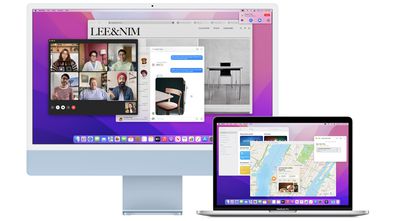
imac macbook pro macos monterey
AirPlay to Mac also allows users to extend or mirror an Apple device's display to a Mac, and we've confirmed this works on a Mac-to-Mac basis. This makes it possible for supported Macs to use another Mac as an external display, and with AirPlay to Mac working both wirelessly or with a wired connection, Apple has come close to reviving Target Display Mode, which allowed 2009 to 2014 iMac models to serve as another Mac's external display.

It's worth noting that these new AirPlay features do not serve as a complete Target Display Mode replacement, as we've been told that AirPlay compresses video sent from one Mac to another, and at least some latency might still be possible.

Starting with macOS Monterey, a supported Mac can also function as an AirPlay 2 speaker source, allowing users to wirelessly stream music or podcasts from an Apple device to a Mac or use the computer as a secondary speaker for multi-room audio.

AirPlay to Mac works with a 2018 or later MacBook Pro or MacBook Air, a 2019 or later iMac or Mac Pro, an iMac Pro, and the 2020 Mac mini.

macOS Monterey is available now in beta for developers, with a public beta to follow in July. The software update will likely be publicly released for all compatible Macs at some point between late September and early November.


Related Forum: macOS Monterey

Popular Stories

iOS 26

iOS 26.4 Adds Two New Features to CarPlay

Tuesday March 24, 2026 1:55 pm PDT by
iOS 26.4 was released today, and it includes a couple of new features for CarPlay: an Ambient Music widget and support for voice-based chatbot apps. To update your iPhone 11 or newer to iOS 26.4, open the Settings app and tap on General → Software Update. CarPlay will automatically offer the new features so long as the iPhone connected to your vehicle is running iOS 26.4 or later....
Apple Business hero

Apple Unveils 'Apple Business' All-in-One Platform

Tuesday March 24, 2026 8:53 am PDT by
Apple today announced Apple Business, a new all-in-one platform that unifies device management, productivity tools, and customer outreach features. The service is designed to be a consolidated replacement for several of Apple's existing business-focused offerings, including Apple Business Essentials, Apple Business Manager, and Apple Business Connect. It provides organizations with a single...
AirPods Pro Firmware Feature

Apple Releases New Firmware for AirPods Pro 3, AirPods Pro 2 and AirPods 4

Tuesday March 24, 2026 12:31 pm PDT by
Apple today released new firmware for the AirPods Pro 2, AirPods Pro 3, and the AirPods 4. The firmware has a version number of 8B39, up from 8B34 on the AirPods Pro 3, 8B28 on the AirPods Pro 2, and 8B21 on the AirPods 4. There is no word on what's included in the firmware, but Apple has a support document with limited notes. Most updates are limited to bug fixes and performance...

Top Rated Comments

iObama Avatar
63 months ago
Ugh. Wish I could use my 2017 4K iMac as an external display for my M1 Pro. It’s a beautiful monitor that now just sits on my desk, while I use a 24” 1080p monitor with my M1. Boo.
Score: 32 Votes (Like | Disagree)
63 months ago
Here are the supported devices since it didn't seem to be included in the article:


"Available on MacBook Pro (2018 and later), MacBook Air (2018 and later), iMac (2019 and later), iMac Pro (2017), Mac mini (2020 and later), Mac Pro (2019), iPhone 7 and later, iPad Pro (2nd generation and later), iPad Air (3rd generation and later), iPad (6th generation and later), and iPad mini (5th generation and later). Older iPhone, iPad, and Mac models may share content at a lower resolution to supported Mac models when “Allow AirPlay for” is set to “Everyone” or “Anyone on the same network” in Sharing preferences." (https://www.apple.com/macos/monterey-preview/features/#footnote-6)
This is great for my use, as I have wanted to use my 2020 iMac as a display for my work MacBook Pro when I'm at home (which is most of the time now). I tried out Luna Display, but it has some issues that don't work for me. My hope this works well, and with a hardwired connection the latency is not too bad.

Formatting the list better:

* MacBook Pro (2018 and later)
* MacBook Air (2018 and later)
* iMac (2019 and later)
* iMac Pro (2017)
* Mac mini (2020 and later)
* Mac Pro (2019)
* iPhone 7 and later
* iPad Pro (2nd generation and later)
* iPad Air (3rd generation and later)
* iPad (6th generation and later)
* iPad mini (5th generation and later)
Score: 13 Votes (Like | Disagree)
casperes1996 Avatar
63 months ago
Yeah, no I would've loved Target Display mode for my 2020 iMac to connect a PlayStation or something to it. This is alright for some things, but frankly I don't see myself using it
Score: 12 Votes (Like | Disagree)
EugW Avatar
63 months ago
I can still use my Target Display Mode 2010 iMac as a second display with any Mac, or even a Windows PC.

The main problem is that Apple has killed subpixel anti-aliasing, which makes any recent version of macOS look bad on non-Retina screens.
Score: 9 Votes (Like | Disagree)
63 months ago
For those getting a little too enthusiastic after reading the headline:

It's worth noting that these new AirPlay features do not serve as a complete Target Display Mode replacement, as we've been told that AirPlay compresses video sent from one Mac to another, and at least some latency might still be possible.
Plus, forget about connecting a PC, which you could do with non-Retina iMacs.
Score: 9 Votes (Like | Disagree)
JippaLippa Avatar
63 months ago
That's a very cool feature for people with desktop and a macbook on the side, for portable use.
Score: 9 Votes (Like | Disagree)















