iOS 15 Tidbits: Text Cursor Magnifier, New Dial Picker, Custom Text Size Per App, and More - MacRumors
Skip to Content

iOS 15 Tidbits: Text Cursor Magnifier, New Dial Picker, Custom Text Size Per App, and More

Apple this week released the first iOS 15 beta to developers, and away from the brouhaha surrounding its many tentpole features, many notable tweaks and improvements are continuing to be uncovered. Here, we've pulled out a few that we think are worth highlighting.
ios 15
Bear in mind that Apple hasn't mentioned all of these changes in its iOS 15 marketing, and there's no guarantee that they'll make the final cut when iOS 15 is released to the public in the fall.

Original Wheel Picker Returns

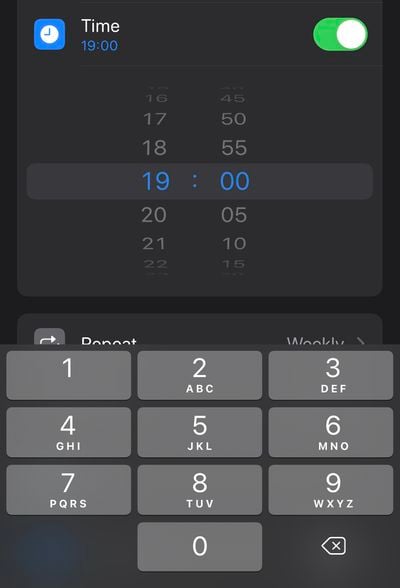
In iOS 14, Apple removed the original large wheel-style dial picker used for selecting times, and replaced it with a smaller dial picker that's sort of hidden behind a boxed number input field. This new design was supposed to unify the two selection modes, but it also made it somewhat slower to wheel through numbers.
ios 15 tidbits3
Happily, iOS 15 sees the return of the larger dial picker, but with a neater, more modern design. You can also tap the wheel to input digits with the number pad, so it basically retains the added functionality of the less-coveted version seen in iOS 14.

Custom Text Size Per App

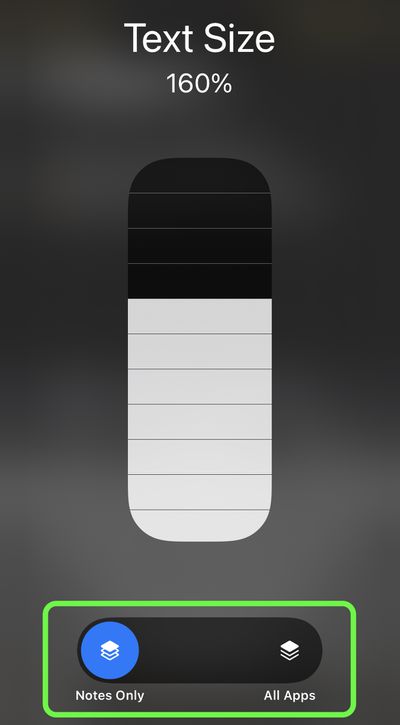
In iOS 14, you can add a button to the Control Center that allows you to change the text size on the screen on the fly. Any change that you make is reflected systemwide regardless of your preference, but in iOS 15 that's no longer the case.
ios 15 tidbits2
Bring up the Text Size selector in Control Center, and you'll see new options to apply the text size adjustment to the system, or just the app that's currently open. iOS 15 will also remember your selection, so you can exit out of the app to do something else and then return to it with your chosen text size for that particular app intact.

Text Selection Magnifier Returns

After its removal in iOS 13, Apple has reintroduced a new version of the magnifying glass for text selection. The new magnifier is a little smaller than the original one, but the fact that it has reappeared is likely to be welcomed.

ios 15 tidbits4
From a user perspective, removing the loupe felt like an odd decision on Apple's part, as it makes it harder to see where the cursor is situated under your finger. Fortunately, this tweak is likely to stay, since Apple lists it as a feature on its iOS 15 page.

Drag Apps From Spotlight to Home Screen

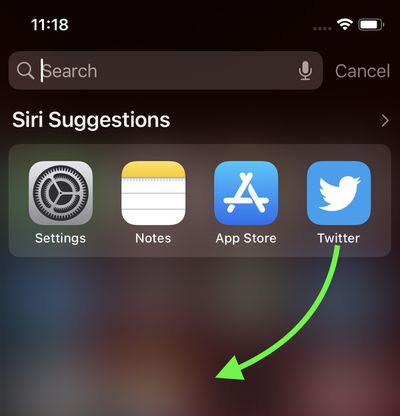
In iOS 14, the functionality of app icons that appear in Siri Suggestions and Spotlight search results is limited to opening the app. In iOS 15, however, it's possible to drag an app from Spotlight and place it right onto the Home Screen, which means you no longer need to continually drag app icons between ‌Home Screen‌ pages to rearrange them.

ios 15 tidbits1
You can also now directly delete apps from within Spotlight via a long-press Quick Action that wasn't available in previous versions of iOS, meaning you can make short work of any apps that have lain forgotten in your App Library.


Related Forum: iOS 15

Popular Stories

iOS 26

iOS 26.4 Adds Two New Features to CarPlay

Tuesday March 24, 2026 1:55 pm PDT by
iOS 26.4 was released today, and it includes a couple of new features for CarPlay: an Ambient Music widget and support for voice-based chatbot apps. To update your iPhone 11 or newer to iOS 26.4, open the Settings app and tap on General → Software Update. CarPlay will automatically offer the new features so long as the iPhone connected to your vehicle is running iOS 26.4 or later....
Apple Business hero

Apple Unveils 'Apple Business' All-in-One Platform

Tuesday March 24, 2026 8:53 am PDT by
Apple today announced Apple Business, a new all-in-one platform that unifies device management, productivity tools, and customer outreach features. The service is designed to be a consolidated replacement for several of Apple's existing business-focused offerings, including Apple Business Essentials, Apple Business Manager, and Apple Business Connect. It provides organizations with a single...
AirPods Pro Firmware Feature

Apple Releases New Firmware for AirPods Pro 3, AirPods Pro 2 and AirPods 4

Tuesday March 24, 2026 12:31 pm PDT by
Apple today released new firmware for the AirPods Pro 2, AirPods Pro 3, and the AirPods 4. The firmware has a version number of 8B39, up from 8B34 on the AirPods Pro 3, 8B28 on the AirPods Pro 2, and 8B21 on the AirPods 4. There is no word on what's included in the firmware, but Apple has a support document with limited notes. Most updates are limited to bug fixes and performance...

Top Rated Comments

gsmornot Avatar
63 months ago
My favorite on this list is text size per app. Now, away from home without readers, I can make the street names in maps readable. It’s driven me nuts over the years that when you zoom maps, the text stays the same small size all the way to full zoom. Now, I can see the street names. Woot woot.
Score: 17 Votes (Like | Disagree)
macintoshmac Avatar
63 months ago
Let’s remove some features and call it a new iOS release. Let’s add those features back with some tweaks and call it another iOS release.
Score: 14 Votes (Like | Disagree)
DinkThifferent Avatar
63 months ago
Thank goodness for the return of the magnifying glass! I missed that thing SO MUCH!
Score: 9 Votes (Like | Disagree)
meetajhu Avatar
63 months ago
Glad the magnifier is back. The 3d touch keyboard was manageable but the haptic touch keyboard just sucks to move the cursor.
Score: 9 Votes (Like | Disagree)
63 months ago
would be great if you could use custom dark mode per app.
Score: 8 Votes (Like | Disagree)
63 months ago

How does it work with the small iPhone screen?

View post on X
Score: 6 Votes (Like | Disagree)