macOS Monterey Automatically Resizes Windows Moved to a Secondary Display
Apple announced macOS Monterey this week, and one small but convenient feature that went unmentioned during the WWDC keynote is automatic window resizing.
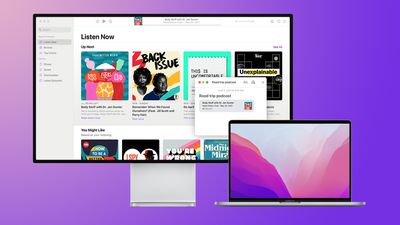
As explained on the macOS Monterey features page, windows now automatically resize when they are moved from a Mac's built-in display to a secondary display, including an external monitor, another Mac, or an iPad using Sidecar.
This feature should prove to be particularly useful when moving windows between a smaller MacBook display and a larger external monitor.
Another new window management feature in macOS Monterey is the option to display the menu bar at all times when an app is in full-screen mode, making it easy to view an app's various menus and other glanceable information at any time.
macOS Monterey is available now in beta for developers, with a public release likely to occur at some point between September and November.
Popular Stories
iOS 26.4 was released today, and it includes a couple of new features for CarPlay: an Ambient Music widget and support for voice-based chatbot apps.
To update your iPhone 11 or newer to iOS 26.4, open the Settings app and tap on General → Software Update. CarPlay will automatically offer the new features so long as the iPhone connected to your vehicle is running iOS 26.4 or later....
Apple today announced Apple Business, a new all-in-one platform that unifies device management, productivity tools, and customer outreach features.
The service is designed to be a consolidated replacement for several of Apple's existing business-focused offerings, including Apple Business Essentials, Apple Business Manager, and Apple Business Connect. It provides organizations with a single...
Apple today released new firmware for the AirPods Pro 2, AirPods Pro 3, and the AirPods 4. The firmware has a version number of 8B39, up from 8B34 on the AirPods Pro 3, 8B28 on the AirPods Pro 2, and 8B21 on the AirPods 4.
There is no word on what's included in the firmware, but Apple has a support document with limited notes. Most updates are limited to bug fixes and performance...
























