
iOS 15 Reminders Gains New 'Smart List' Feature for Easily Filtering Reminders Based on Locations, Tags, and More

In iOS 15, iPadOS 15, and macOS Monterey, Apple is expanding the features built into the stock Reminders app, which received a major overhaul in 2019. With the new updates shipping this fall, users will be able to create "Smart Lists" that corral reminders based on different filters, such as their location, due date, flag, priority, and more.
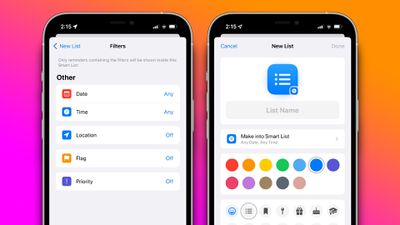
ios 15 reminders smart list feature
With the new functionality, users can create powerful lists that show reminders based only on several filters. For example, users may create a Smart List with a filter to show reminders due on the weekend, with their location set to home. Apple offers five filters as of the current betas for the software, including date, time, location, flag, and priority.

For date, users can select to show reminders only due on a specific date, a relative range, a specified range, such as over the weekend or longer, and reminders due on any date. Users can select a filter for any time of day or more granular options for morning, afternoon, evening, and night. The location filter allows users to see only reminders due in a specific location. Users can also select the flag filter to show only flagged reminders and the priority filter.

iOS 15, iPadOS 15, and macOS Monterey are all currently in beta testing for members of the Apple Developer Program, with public beta versions set to be released soon.

(Thanks, Rubèn)

Related Forum: iOS 15

Popular Stories

wwdc sans text feature

Apple Rumored to Announce New Product on February 19

Thursday February 5, 2026 12:22 pm PST by
Apple plans to announce the iPhone 17e on Thursday, February 19, according to Macwelt, the German equivalent of Macworld. The report, citing industry sources, is available in English on Macworld. Apple announced the iPhone 16e on Wednesday, February 19 last year, so the iPhone 17e would be unveiled exactly one year later if this rumor is accurate. It is quite uncommon for Apple to unveil...
Apple Logo Zoomed

Tim Cook Teases Plans for Apple's Upcoming 50th Anniversary

Thursday February 5, 2026 12:54 pm PST by
Apple turns 50 this year, and its CEO Tim Cook has promised to celebrate the milestone. The big day falls on April 1, 2026. "I've been unusually reflective lately about Apple because we have been working on what do we do to mark this moment," Cook told employees today, according to Bloomberg's Mark Gurman. "When you really stop and pause and think about the last 50 years, it makes your heart ...
Finder Siri Feature

Why Apple's iOS 26.4 Siri Upgrade Will Be Bigger Than Originally Promised

Friday February 6, 2026 3:06 pm PST by
In the iOS 26.4 update that's coming this spring, Apple will introduce a new version of Siri that's going to overhaul how we interact with the personal assistant and what it's able to do. The iOS 26.4 version of Siri won't work like ChatGPT or Claude, but it will rely on large language models (LLMs) and has been updated from the ground up. Upgraded Architecture The next-generation...
maxresdefault

Apple Shows Off a Key Reason to Upgrade to the iPhone 17

Saturday February 7, 2026 9:26 am PST by
Apple today shared an ad that shows how the upgraded Center Stage front camera on the latest iPhones improves the process of taking a group selfie. "Watch how the new front facing camera on iPhone 17 Pro takes group selfies that automatically expand and rotate as more people come into frame," says Apple. While the ad is focused on the iPhone 17 Pro and iPhone 17 Pro Max, the regular iPhone...
iOS 26

iOS 26.3 and iOS 26.4 Will Add These New Features to Your iPhone

Tuesday February 3, 2026 7:47 am PST by
While the iOS 26.3 Release Candidate is now available ahead of a public release, the first iOS 26.4 beta is likely still at least a week away. Following beta testing, iOS 26.4 will likely be released to the general public in March or April. Below, we have recapped known or rumored iOS 26.3 and iOS 26.4 features so far. iOS 26.3 iPhone to Android Transfer Tool iOS 26.3 makes it easier...

Top Rated Comments

ignatius345 Avatar
61 months ago
I hope they fix the way notifications sync. Presently, I find myself dismissing a notification three times: on my iPhone and then each of my Macs, because the dismissal of the notification isn't synced. [S]When I dismiss a notification in Things, by contrast, it disappears across all three devices.[/S] (Apparently I was wrong about Things doing this)
Score: 4 Votes (Like | Disagree)
amartinez1660 Avatar
61 months ago

The only thing preventing me from using reminders is that I cannot quickly add a reminder without opening the reminders app.
Like others have alluded to, Siri with a natural language works amazingly well.
“Hey Siri” (or long press the lock button or raise the Apple Watch close to you) followed by:
- “Remind me to pay the credit card bill next friday”
- “Remind me to watch Top Gear when I arrive back home (or leave/arrive from/to work/home/etc)”. This one relies on your own contacts work/home/etc addresses tags, don’t know what’s the extent of these… haven’t tried “buy things at my favorite supermarket (or closest Costco or gym)” for example.
- Remind me in 15mins that I left a coke can in the freezer.
- Suppose recycling trucks changed schedule: Remind me on Thursday’s weekly to take out the recycling bags.

The coke can in the freezer is an extreme example, for that I would probably just say “Hey Siri set a timer for 15mins” as the alarm is more chaotic (either louder sounds or taps on the wrist if a watch is being worn by the time it triggers) than a reminder. But hopefully won’t forget what the alarm was for.
Would be great to label a timer for when it triggers: “set a timer for 30mins, label it as ‘oven’ ”.

Between Reminders and Timers I get by daily chores and life quite more smoothly than without them.

My .002 cents for how it can work.
Score: 3 Votes (Like | Disagree)
Apple_Robert Avatar
61 months ago

The only thing preventing me from using reminders is that I cannot quickly add a reminder without opening the reminders app.
Using Siri works fairly well for creating reminders.
Score: 3 Votes (Like | Disagree)
coffeeplease Avatar
61 months ago

I hope they fix the way notifications sync. Presently, I find myself dismissing a notification three times: on my iPhone and then each of my Macs, because the dismissal of the notification isn't synced. When I dismiss a notification in Things, by contrast, it disappears across all three devices.
I have the same issue with Things. How do you get notifications to dismiss across all devices?
Score: 2 Votes (Like | Disagree)
Apple_Robert Avatar
61 months ago

I just wish Apple would buy Fantastical! The mix of events and reminders is perfect.
I wish Apple would work on natural language for events. Natural language with Reminders is not too bad (about 60% for me).
Score: 2 Votes (Like | Disagree)
Apple Knowledge Navigator Avatar
61 months ago
I’ll still go “Oh yeah” and avoid them (like everything else in my sad life), but anything to help me is appreciated.
Score: 2 Votes (Like | Disagree)
















