
macOS Monterey Tidbits: Animated Memoji on Login Screen, Change the Color of the Mouse Pointer, and More - MacRumors
Skip to Content

macOS Monterey Tidbits: Animated Memoji on Login Screen, Change the Color of the Mouse Pointer, and More

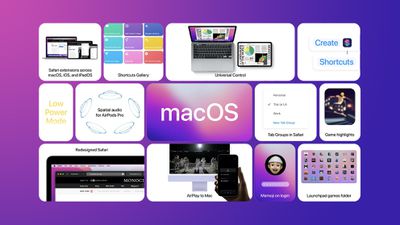
We've highlighted several new features coming in macOS Monterey, such as Low Power Mode and the option to erase a Mac without reinstalling the operating system, but there are some smaller tidbits that we wanted to share.
macos monterey tidbits feature copy

Animated Memoji on Login Screen

One small but fun new feature in macOS Monterey is the addition of a personalized Memoji on the login screen, complete with animated facial expressions.

Change the Color of the Mouse Pointer

A new Accessibility feature added to macOS Monterey is the ability to customize the outline and fill color of the mouse pointer so it's easier to recognize when it moves or changes to an insertion point, crosshair, hand, or other shape. The pointer can be customized in System Preferences under Accessibility > Display > Pointer.

'Go to Folder' Redesign in Finder

On macOS Monterey, the "Go to Folder" window in Finder has been redesigned and now features an improved autocompletion engine to help you get to the files or folder you're looking for more quickly, according to Apple. "Go to Folder" can be found under "Go" in the Finder menu bar, or by using the ⌘⇧G keyboard shortcut.

File Copying Enhancements

macOS Monterey features a new pie chart progress indicator when copying files. It is also now possible to stop or cancel a copy session and resume it later.

macOS Monterey is available now in beta for developers, with a public beta to follow in July. The software update will be released in the fall.


Related Forum: macOS Monterey

Popular Stories

iOS 26

iOS 26.4 Adds Two New Features to CarPlay

Tuesday March 24, 2026 1:55 pm PDT by
iOS 26.4 was released today, and it includes a couple of new features for CarPlay: an Ambient Music widget and support for voice-based chatbot apps. To update your iPhone 11 or newer to iOS 26.4, open the Settings app and tap on General → Software Update. CarPlay will automatically offer the new features so long as the iPhone connected to your vehicle is running iOS 26.4 or later....
Apple Business hero

Apple Unveils 'Apple Business' All-in-One Platform

Tuesday March 24, 2026 8:53 am PDT by
Apple today announced Apple Business, a new all-in-one platform that unifies device management, productivity tools, and customer outreach features. The service is designed to be a consolidated replacement for several of Apple's existing business-focused offerings, including Apple Business Essentials, Apple Business Manager, and Apple Business Connect. It provides organizations with a single...
AirPods Pro Firmware Feature

Apple Releases New Firmware for AirPods Pro 3, AirPods Pro 2 and AirPods 4

Tuesday March 24, 2026 12:31 pm PDT by
Apple today released new firmware for the AirPods Pro 2, AirPods Pro 3, and the AirPods 4. The firmware has a version number of 8B39, up from 8B34 on the AirPods Pro 3, 8B28 on the AirPods Pro 2, and 8B21 on the AirPods 4. There is no word on what's included in the firmware, but Apple has a support document with limited notes. Most updates are limited to bug fixes and performance...

Top Rated Comments

Digital Dude Avatar
63 months ago
I'm soOoo sick of this Memoji craze. When I saw the WWDC splash page full of those damn things' I was embarrassed that I'm an Apple guy. Made me feel like we should all be about eight years old to appreciate them. Okay, let the poison pens fly.
Score: 18 Votes (Like | Disagree)
63 months ago

Memoji at login. Why? It's stupid stuff like this that make macos bloated. Again, my 9 year old rMBP shouldn't run Windows 10 better than Catalina.
Not everything in computing needs to be so serious. I enjoy fun things to make my computing experience enjoyable. You saying it makes the system bloated? Where's your proof on that?
Score: 14 Votes (Like | Disagree)
Bug-Creator Avatar
63 months ago
Well lets see:

- the code to display short animations is used elsewhere, so a whole lotta nothing
- if you created no Memoji there is no Memoji
- displaying that Meomji on the login-screen, about 10 lines of Swift (being generous) resulting in 10k of extra binary size (which hopefully gets discarded after you logged in)
- whatever 1st year entry level developer did it in about 30min wouldn't have been of much use in areas that matter anyways

Yeap, 3 metric tons of bloat on this one....
Score: 13 Votes (Like | Disagree)
63 months ago

Memoji at login. Why? It's stupid stuff like this that make macos bloated. Again, my 9 year old rMBP shouldn't run Windows 10 better than Catalina.
Does Apple force you to use it? And what exactly about it makes macos bloated?
Score: 11 Votes (Like | Disagree)
Apple Knowledge Navigator Avatar
63 months ago

Memoji at login. Why? It's stupid stuff like this that make macos bloated.
Could you explain, in purely technical terms, how a small animated image on the login screen 'bloats' the operating system?
Score: 10 Votes (Like | Disagree)
63 months ago

Does Apple force you to use it? And what exactly about it makes macos bloated?
no.
There's extra superfluous code for "eye candy" things, therefore the codebase has got larger. I think most of the users would like to to see bugs fixed and more useful features added to the system.
Score: 9 Votes (Like | Disagree)















