MacRumors Giveaway: Win a Magnetic iPad Stand From Lululook - MacRumors
Skip to Content

MacRumors Giveaway: Win a Magnetic iPad Stand From Lululook

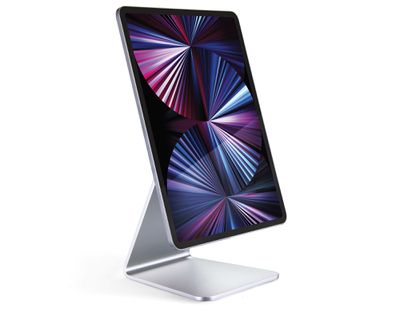
For this week's giveaway, we've teamed up with Lululook to offer MacRumors readers a chance to win a Magnetic iPad Stand that's great for hands-free iPad use.
lululook ipad stand 1
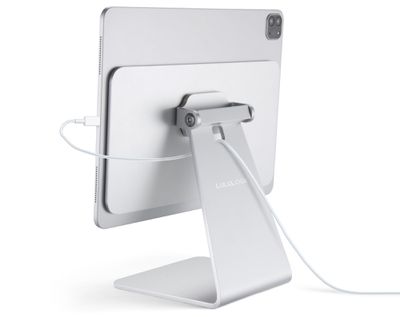
Priced at $55, the Lululook Magnetic ‌iPad‌ Stand is an adjustable mount for the ‌iPad‌. Apple's modern iPads attach magnetically to the stand, putting the ‌iPad‌ at an ideal viewing angle for pairing with a keyboard, drawing, watching shows, and more.

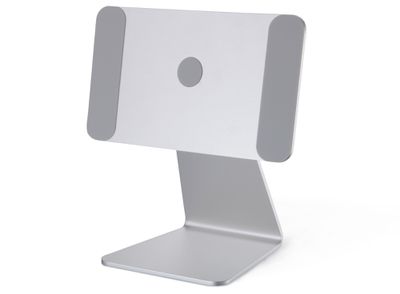
The stand features strong built-in magnets that ensure the ‌iPad‌ is perfectly aligned when it's put in place, and anti-slip silicone keeps the ‌iPad‌ from being scratched.

lululook ipad stand 2
You can use the Magnetic ‌iPad‌ Stand in either landscape or portrait mode, and it has a 360-degree adjustable angle so you can position it any way that you want.

Design wise, the Magnetic ‌iPad‌ Stand is made from an aluminum alloy material that matches well with Apple devices, so it looks good on a desk or table. Non-slip feet at the bottom of the stand keep it stable and make sure that it's not going to move around while in use.
lululook ipad stand 3
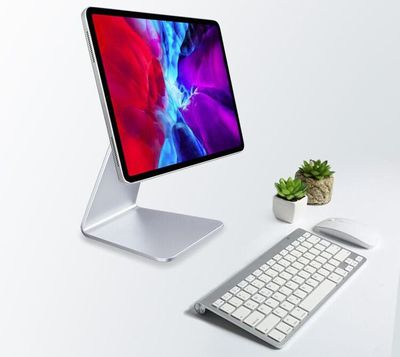
The Magnetic ‌iPad‌ Stand works well with double-sided magnetic cases, but in most cases, it's best to use it with a naked ‌iPad‌ as a case without a magnet weakens the connection. This is a great solution if you're looking for a more affordable alternative to something like Apple's Magic Keyboard because you can use the Magnetic ‌iPad‌ Stand with any Bluetooth keyboard that you have on hand.

The Magnetic ‌iPad‌ Stand is compatible with all 11-inch iPad Pro models, the third, fourth, and fifth-generation 12.9-inch ‌iPad Pro‌ models, and the fourth-generation iPad Air models. Those are all of Apple's most recent iPads, including the versions that came out in 2020 and 2021.
lululook ipad stand 4
We have 10 Magnetic ‌iPad‌ Stands to give away to MacRumors readers. To enter to win, use the Gleam.io widget below and enter an email address. Email addresses will be used solely for contact purposes to reach the winners and send the prizes. You can earn additional entries by subscribing to our weekly newsletter, subscribing to our YouTube channel, following us on Twitter, following us on Instagram, or visiting the MacRumors Facebook page.

Due to the complexities of international laws regarding giveaways, only U.S. residents who are 18 years or older and Canadian residents (excluding Quebec) who have reached the age of majority in their province or territory are eligible to enter. To offer feedback or get more information on the giveaway restrictions, please refer to our Site Feedback section, as that is where discussion of the rules will be redirected.

The contest will run from today (June 11) at 11:00 a.m. Pacific Time through 11:00 a.m. Pacific Time on June 18. The winners will be chosen randomly on June 18 and will be contacted by email. The winners will have 48 hours to respond and provide a shipping address before new winners are chosen.



Popular Stories

iOS 26

iOS 26.4 Adds Two New Features to CarPlay

Tuesday March 24, 2026 1:55 pm PDT by
iOS 26.4 was released today, and it includes a couple of new features for CarPlay: an Ambient Music widget and support for voice-based chatbot apps. To update your iPhone 11 or newer to iOS 26.4, open the Settings app and tap on General → Software Update. CarPlay will automatically offer the new features so long as the iPhone connected to your vehicle is running iOS 26.4 or later....
Apple Business hero

Apple Unveils 'Apple Business' All-in-One Platform

Tuesday March 24, 2026 8:53 am PDT by
Apple today announced Apple Business, a new all-in-one platform that unifies device management, productivity tools, and customer outreach features. The service is designed to be a consolidated replacement for several of Apple's existing business-focused offerings, including Apple Business Essentials, Apple Business Manager, and Apple Business Connect. It provides organizations with a single...
AirPods Pro Firmware Feature

Apple Releases New Firmware for AirPods Pro 3, AirPods Pro 2 and AirPods 4

Tuesday March 24, 2026 12:31 pm PDT by
Apple today released new firmware for the AirPods Pro 2, AirPods Pro 3, and the AirPods 4. The firmware has a version number of 8B39, up from 8B34 on the AirPods Pro 3, 8B28 on the AirPods Pro 2, and 8B21 on the AirPods 4. There is no word on what's included in the firmware, but Apple has a support document with limited notes. Most updates are limited to bug fixes and performance...

Top Rated Comments

torontotim Avatar
63 months ago

Why is Quebec not eligible for the giveaway?
Elect new lawmakers.
Score: 2 Votes (Like | Disagree)
63 months ago
Wouldn’t it be great if they used the charging connectors on the back of the iPad so that, gee I dono, you don’t have to manually connect the ugly stick out cable whenever you attach the iPad and need power. 🤔
Score: 1 Votes (Like | Disagree)
pdaholic Avatar
63 months ago

Was tempted to get this, but will stick with what i have, using my old Rain macbook stand and keyboard/trackpad i kept from selling a iMac. Not as clean looking setup but i can take the iPad with keyboard and go or just the iPad, or use at my desk, has better height too.


I’ve got the exact same setup. It’s so versatile!
Score: 1 Votes (Like | Disagree)
SFjohn Avatar
63 months ago
Looks cool, but usability without a keyboard & trackpad would be a nightmare.
Score: 1 Votes (Like | Disagree)
63 months ago

I definitely like this solution over magic keyboard. I generally do have a thin case on the iPad, and don't want to load it with the heavy magic keyboard, since I do use it for painting. But at the same time, I'd like to be able to pair it with a bt keyboard for the occassional productivity apps. Would be great if these were reliable with a case.
I've had one of these since January. I have the ESR rebound case (the magnetic one) on my 2020 12.9" iPP. Worked perfectly and very reliably the week I tested it (only issue was where to put the cover part... I didn't like it hanging underneath but I didn't want to start putting my iPad with volume controls on the bottom and flipping the cover over the top of the unit. I'm sure that would have worked fine though, just not for me (in terms of where the iPP port is and my desk setup).
Score: 1 Votes (Like | Disagree)
rickpoet Avatar
63 months ago
Haha naked ipad.
Score: 1 Votes (Like | Disagree)