
iOS 15 Tidbits: Per-App Settings, Notification Summaries, New Calendar Widget, and More - MacRumors
Skip to Content

iOS 15 Tidbits: Per-App Settings, Notification Summaries, New Calendar Widget, and More

We've highlighted several new features coming in iOS 15, like the return of the text cursor magnifier and the ability to rearrange Home Screen pages, but additional tidbits continue to surface that we think readers will find noteworthy.
iOS 15 General Feature Blue

Per-App Accessibility Settings

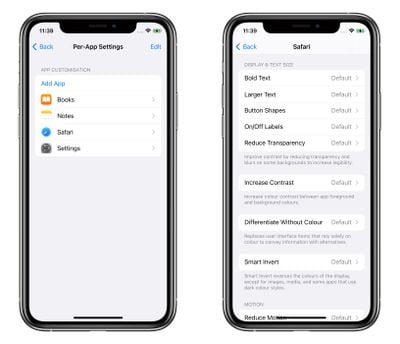
Last week, we highlighted a new Control Center option that lets you set the text size for individual apps. But per-app accessibility settings don't end there.
settings
Individual app customizations also include adjustments to bold text, button shapes, toggle switches, transparency, contrast, color, motion, and more, allowing you to effectively remodel many app elements that you find particularly burdensome to use.

Small Calendar Month Widget

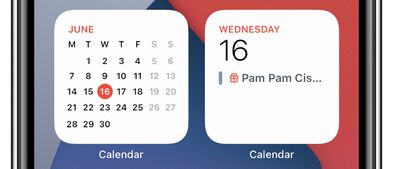
Annoyingly for many iOS 14 users, the square Calendar widget only shows the current day and any events, rather than the full calendar month, which can only be displayed in the larger 2x4 widget.
calendar

New 2x2 Calendar widget (left) versus original 2x2 widget

This always felt like a poor use of widget space, but fortunately iOS 15 adds a new 2x2 widget that displays the full calendar month with the current day highlighted. In another related change, you can now make a calendar a custom color using the color picker, in addition to the seven default color options that the Calendar app offers.

Improved Siri Suggestions

Apple continues to work hard to improve Siri in iOS 15, not only in terms of voice requests, which now get processed on your device instead of being sent to the cloud, but also when it comes to ‌Siri‌ suggestions, as evidenced by the following suggestion spotted by a Redditor.

siri suggestion birthday ios 15
The user had simply wished someone in their contacts a happy birthday during a Messages conversation, which resulted in the notification "‌Siri‌ Found a Birthday" and the option to update that contact card with their birth date. This is similar to the existing suggestion to add someone to your contacts if they say their name or have Share Name and Photo turned on, but adds another layer of contextual awareness.

Custom Frequency of Notification Summaries

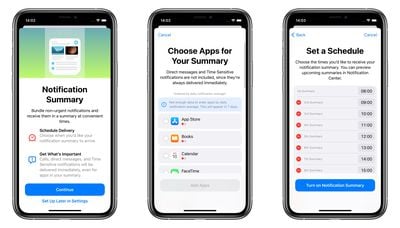
In iOS 15, notifications have been redesigned, and Apple now also includes a Notification Summary option that uses on-device machine learning to automatically populate notifications based on priority in a new lock screen design.
notification summary ios 15
You can select which apps are included in these summaries, which are delivered to your lock screen at a time of your choosing. For example, you could opt to have them delivered during your lunch break, after dinner, or last thing before bedtime. If that sounds a little too infrequent, no problem – you can have up to 12 individual notification summaries within a 24-hour period, which could be timed hourly over the course of a working day, for instance.

Along with macOS Monterey and iPad iOS 15, iOS 15 is currently in developer beta with a public beta due next month and an official release sometime in the fall.


Related Forum: iOS 15

Popular Stories

iOS 26

iOS 26.4 Adds Two New Features to CarPlay

Tuesday March 24, 2026 1:55 pm PDT by
iOS 26.4 was released today, and it includes a couple of new features for CarPlay: an Ambient Music widget and support for voice-based chatbot apps. To update your iPhone 11 or newer to iOS 26.4, open the Settings app and tap on General → Software Update. CarPlay will automatically offer the new features so long as the iPhone connected to your vehicle is running iOS 26.4 or later....
Apple Business hero

Apple Unveils 'Apple Business' All-in-One Platform

Tuesday March 24, 2026 8:53 am PDT by
Apple today announced Apple Business, a new all-in-one platform that unifies device management, productivity tools, and customer outreach features. The service is designed to be a consolidated replacement for several of Apple's existing business-focused offerings, including Apple Business Essentials, Apple Business Manager, and Apple Business Connect. It provides organizations with a single...
AirPods Pro Firmware Feature

Apple Releases New Firmware for AirPods Pro 3, AirPods Pro 2 and AirPods 4

Tuesday March 24, 2026 12:31 pm PDT by
Apple today released new firmware for the AirPods Pro 2, AirPods Pro 3, and the AirPods 4. The firmware has a version number of 8B39, up from 8B34 on the AirPods Pro 3, 8B28 on the AirPods Pro 2, and 8B21 on the AirPods 4. There is no word on what's included in the firmware, but Apple has a support document with limited notes. Most updates are limited to bug fixes and performance...

Top Rated Comments

Dekema2 Avatar
62 months ago
Would be nice if there was an option to "Disable Opening in App" for webpages and their corresponding apps.
Score: 12 Votes (Like | Disagree)
gwhizkids Avatar
62 months ago
I know these changes are not the red meat many were looking for, but in many ways they make the iPhone a more functional, more usable product.
Score: 11 Votes (Like | Disagree)
motm95 Avatar
62 months ago
Please, Apple, let us finally put icons or widgets wherever we want without being forced into the grid layout.
Score: 5 Votes (Like | Disagree)
gwhizkids Avatar
62 months ago
I switched to Android at the beginning of the year after being on the iPhone since the first one in 2007. I was blown away at how much better the Android OS is.

I had no idea what I was missing with interactive widgets. I can't belive Apple hasn't given this to their users yet.

Also, the standard grid layout with iOS always annoyed me because there is so much wasted space on the iPhone screen. Android allowed me to add a row and a column, easy peasy. So much better!

Those are two simple things but they make my phone usage much, much better. I couldn't possibly go back to iOS now that I know what I've been missing. Not being restricted to only the apps Apple deems suitable for me is another huge advantage, the camera on the S21 ultra is insane also.

iOS 15 doesn't have a single thing in it that would woo me back. Even my wife is starting to hate her iPhone now. I keep laughing saying the screen looks like a child's toy.
Thank you for sharing your happiness with us. We wish you well. It is good to find something you like.
Score: 3 Votes (Like | Disagree)
Wando64 Avatar
62 months ago

I switched to Android at the beginning of the year after being on the iPhone since the first one in 2007. I was blown away at how much better the Android OS is.

I had no idea what I was missing with interactive widgets. I can't belive Apple hasn't given this to their users yet.

Also, the standard grid layout with iOS always annoyed me because there is so much wasted space on the iPhone screen. Android allowed me to add a row and a column, easy peasy. So much better!

Those are two simple things but they make my phone usage much, much better. I couldn't possibly go back to iOS now that I know what I've been missing. Not being restricted to only the apps Apple deems suitable for me is another huge advantage, the camera on the S21 ultra is insane also.

iOS 15 doesn't have a single thing in it that would woo me back. Even my wife is starting to hate her iPhone now. I keep laughing saying the screen looks like a child's toy.
That’s right. As long as it looks pretty, who cares about security, privacy and seamless ecosystem integration.
Score: 2 Votes (Like | Disagree)
62 months ago
It's nice Apple is making Siri detectors smarter: up until now I see one every 3 months I guess. Apple should make them far more available across the board. And they should be less picky on formats: at least in my region we use several time and phone formats, and I guess Siri just doesn't recognise them. Also addresses and appointments remain missing in action.

And the most important one: make Siri recognise addresses in Safari so we can click and open them in Maps, instead of always being redirected to Google Maps. It's so annoying to select/copy/paste addresses.
Score: 2 Votes (Like | Disagree)















