
Pixelmator Pro 2.1 Coral Brings AI-Driven Cropping, Quick Fill and Stroke With Brush Features, and More - MacRumors
Skip to Content

Pixelmator Pro 2.1 Coral Brings AI-Driven Cropping, Quick Fill and Stroke With Brush Features, and More

Pixelmator Pro 2.1 Coral got its public release today. The latest major update to Pixelmator Pro adds a number of notable new features, including the ability to improve the composition of photos with machine learning, a new Quick Fill feature, improved painting tools, and more.
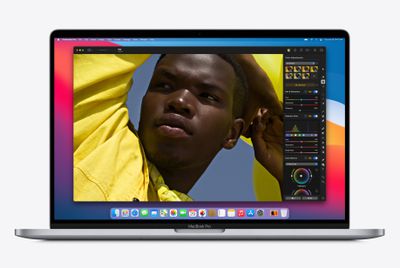
Pixelmator Pro 2
Powered by Core ML, the new ML Crop feature lets users automatically crop photos with a single click. According to the developers, the machine learning algorithm powering this feature has been trained to crop photos in a way that makes them more striking and eye-catching, making it a useful way to get a different perspective on cropping photos.
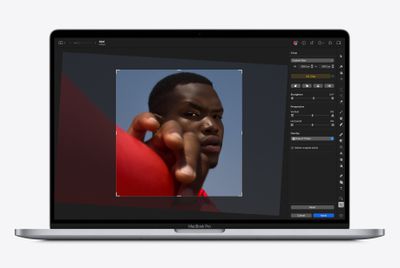
Pixelmator Pro 2
With ML Crop turned on, hovering over different aspects ratio presets will preview them with ML Crop's suggestions, which are generated by on-device processing to ensure high performance and privacy. In addition, the Crop tool has been redesigned to include perspective correction, crop overlays, and more.
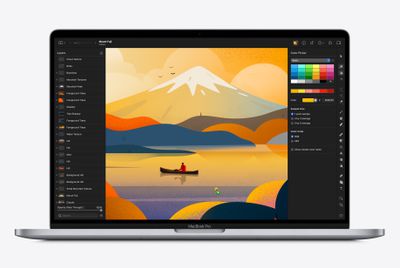
Pixelmator Pro 2
Meanwhile, the new Quick Fill feature lets users change the look of objects in compositions via simple drag and drop. Just drag a color from the new color well in the Pixelmator Pro toolbar and drop it onto any object in your image to change its color. The Quick Fill feature works with every layer type in Pixelmator Pro, including images, shapes, and text layers.
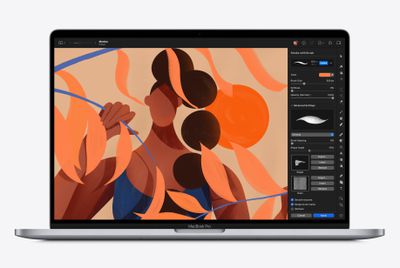
Pixelmator Pro 2
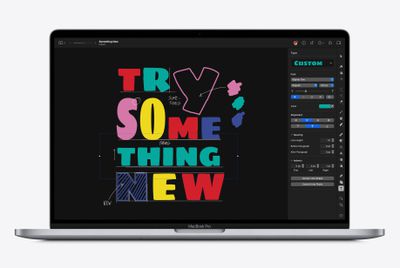
Elsewhere, thanks to the new Stroke with Brush feature, users can now paint brush strokes along paths and around layers with ease. Customizing the look of a brush causes a live preview of its stroke to appear right on the canvas. Brush strokes can be painted around image, shape, and text layers, as well as along vector paths

A new text size slider also means there are now five different ways to change the size of text, while the update also brings advanced paragraph spacing options and the ability to adjust paragraph indents.
Pixelmator Pro 2
The update lands while Pixelmator Pro is still on sale for $19.99, offering customers 50% off the usual $39.99 price, although the sale ends on July 6th. Pixelmator Pro 2.1 Coral is a Universal app, so it runs natively on both ‌M1‌ and Intel-based Macs. Updates to the image editing app are free for existing users of Pixelmator Pro, which can be downloaded directly from the Mac App Store.


Popular Stories

iOS 26

iOS 26.4 Adds Two New Features to CarPlay

Tuesday March 24, 2026 1:55 pm PDT by
iOS 26.4 was released today, and it includes a couple of new features for CarPlay: an Ambient Music widget and support for voice-based chatbot apps. To update your iPhone 11 or newer to iOS 26.4, open the Settings app and tap on General → Software Update. CarPlay will automatically offer the new features so long as the iPhone connected to your vehicle is running iOS 26.4 or later....
Apple Business hero

Apple Unveils 'Apple Business' All-in-One Platform

Tuesday March 24, 2026 8:53 am PDT by
Apple today announced Apple Business, a new all-in-one platform that unifies device management, productivity tools, and customer outreach features. The service is designed to be a consolidated replacement for several of Apple's existing business-focused offerings, including Apple Business Essentials, Apple Business Manager, and Apple Business Connect. It provides organizations with a single...
AirPods Pro Firmware Feature

Apple Releases New Firmware for AirPods Pro 3, AirPods Pro 2 and AirPods 4

Tuesday March 24, 2026 12:31 pm PDT by
Apple today released new firmware for the AirPods Pro 2, AirPods Pro 3, and the AirPods 4. The firmware has a version number of 8B39, up from 8B34 on the AirPods Pro 3, 8B28 on the AirPods Pro 2, and 8B21 on the AirPods 4. There is no word on what's included in the firmware, but Apple has a support document with limited notes. Most updates are limited to bug fixes and performance...

Top Rated Comments

Pakaku Avatar
62 months ago

Amazing features. Apple should incorporate these into the stock photo app. The current editing functions are so crap that it's pathetic. There should at least be color fill functions, Content Aware (similar to Photoshop), and much more advanced editing options based on ML and the power of the Neural Engine built right into the default photos app. I shouldn't have to go to these third party apps just to edit pictures.
Not sure why it's Apple's responsibility, or why using a (very good) third-party app is an issue...
Score: 12 Votes (Like | Disagree)
Mr Lizard Avatar
62 months ago

Amazing features. Apple should incorporate these into the stock photo app. The current editing functions are so crap that it's pathetic. There should at least be color fill functions, Content Aware (similar to Photoshop), and much more advanced editing options based on ML and the power of the Neural Engine built right into the default photos app. I shouldn't have to go to these third party apps just to edit pictures.
What’s wrong with using a third party app? The point of an OS’s included app set isn’t to incorporate everything imaginable. It’s to provide some level of functionality, yes, but importantly to be a platform on which other developers can build apps.
Score: 8 Votes (Like | Disagree)
japanime Avatar
62 months ago
Pixelmator is a decent app, and it was part of my workflow for more than a decade.

But Affinity Photo, which I've been using as my main photo editor for the past two years, doesn't cost a whole lot more than Pixelmator yet runs circles around it.
Score: 6 Votes (Like | Disagree)
Bustycat Avatar
62 months ago
A third-party macOS app that is more Apple than Apple’s.
Score: 5 Votes (Like | Disagree)
PsykX Avatar
62 months ago
With apps as powerful as these, I don't know how Adobe gets away by making Photoshop still so expensive.

Just one month of renting Photoshop pays for being the owner of Pixelmator Pro forever.
Score: 3 Votes (Like | Disagree)
BigSmurf Avatar
62 months ago

Back when Pixelmator came out in 2008-or-so I did always wonder why Apple didn’t buy them and integrate it into iLife.

I’m still waiting on iDVD and iWeb for the iPad. I’d love to be able to connect a USB-C DVD drive and burn videos to disk and a good website builder would let me sidestep the likes of Wordpress or Wix.
iDVD? It has been ages since I last heard that. Will never happen. The age of DVD is past. You can use tools like Handbrake etc.
Score: 2 Votes (Like | Disagree)















