
Everything New in iOS 15 Beta 4: Safari Tweaks, MagSafe Battery Pack Support, Notification Updates and More

Apple today released the fourth betas of iOS 15 and iPadOS 15, introducing additional refinements to the new features that are coming in the software updates. In these betas, Apple has introduced changes for Safari, Notifications, Focus mode, and more.
iOS 15 General Feature Purple

Safari Updates

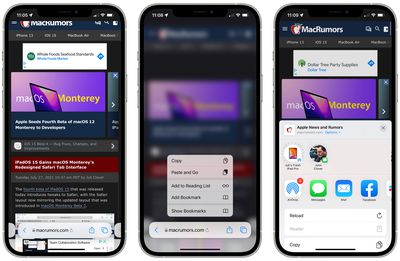
Apple is continuing to refine the design of Safari on the iPhone, and in iOS 15, there are tweaks to improve usability.
ios 15 safari changes beta 4

Share Button

The dedicated Share button for sending an article to someone has been relocated to the tab bar again, replacing the prior info button.

Reload

There's once again a reload button available next to the domain name for quick access to reloading a page. Apple had removed this in a prior beta and made it a long press gesture. Reload can also be accessed through the Share button.

Show Bookmarks

When you long press on the URL bar, there's now an option to "Show Bookmarks," which makes it much easier to get to your bookmarks.

Reader Mode

When Reader Mode is available on a website, there's now a little icon that can be tapped to enter into it. Reader mode is also accessible through the Share interface.

iPadOS 15

Apple has also updated the design of Safari on the iPad, bringing it in line with the macOS Monterey Safari design. macOS Monterey on Safari now includes a separate tab bar option.

safari redesign ipados 15 beta 4

MagSafe Battery Pack Support

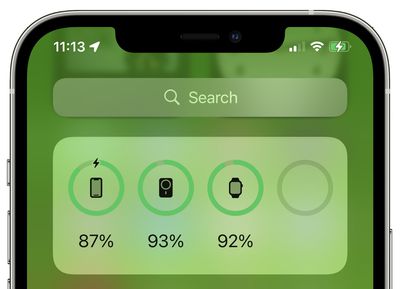
Support for the MagSafe Battery Pack has been added in iOS 15 beta 4, so if you have one of the new accessories, it now shows up in the Battery widget and in the Settings app.
magsafe battery pack support ios 15

Lock Screen Camera Icon

Apple has very slightly tweaked the design of the Lock Screen Camera icon, removing the button on the left side and increasing the size of the flash and the lens ring. The Settings icon has also been updated.

ios 15 lock screen camera icon

Old icon on left, new icon on right

Shortcuts

Shortcuts has gained a "Return to Home Screen" action that can be used in automations.

Notifications

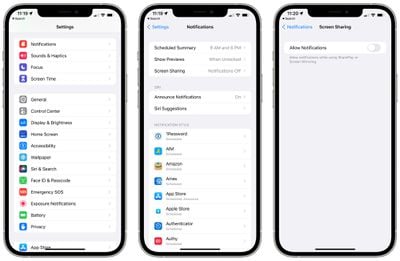
The Notifications icon in the Settings app has been updated with a new look.
ios 15 notification updates
Apple has also added a new toggle for disabling notifications when Screen Sharing or Screen Mirroring.

Share Focus Status

In the Messages app, you can tap on a contact's name and choose whether or not to share your Focus status with them.
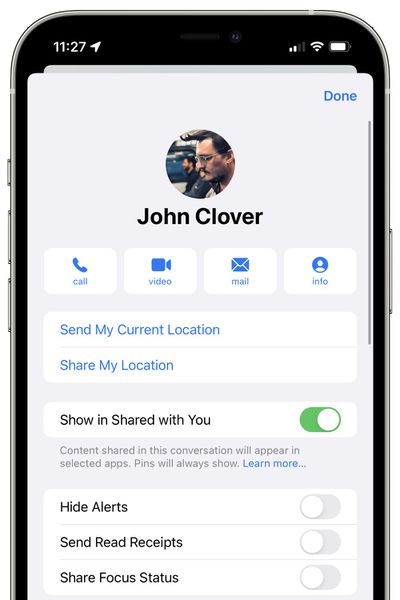
messages share focus status ios 15

App Store Account Design

Apple is now using its new settings layout in for the App Store account section, with rounded edges and separate sections for each account option.
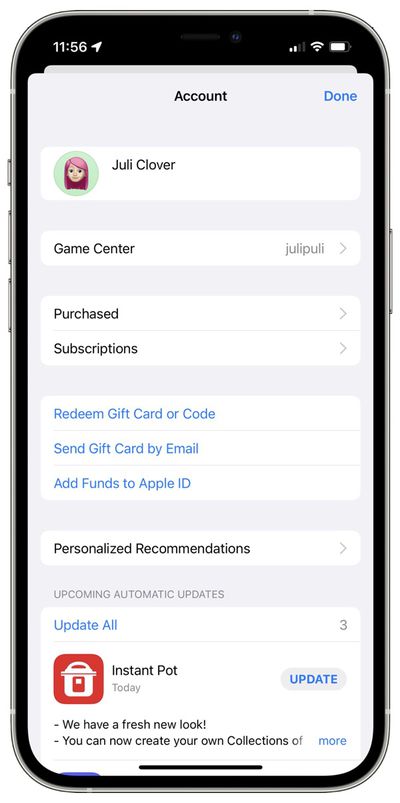
app store account design

Photos Memory Sharing

There's now a functional interface for sharing Memories in Photos, with an option to choose a song that's appropriate for sharing if an Apple Music song is not available to be shared for copyright reasons.
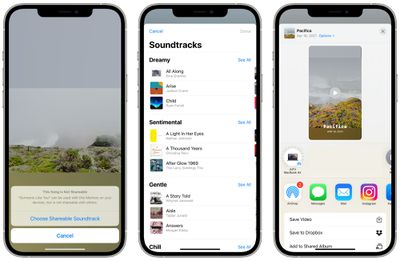
photos memories share interface

More Features

Know of a feature that we left out? Let us know in the comments.

Related Forum: iOS 15

Popular Stories

wwdc sans text feature

Apple Rumored to Announce New Product on February 19

Thursday February 5, 2026 12:22 pm PST by
Apple plans to announce the iPhone 17e on Thursday, February 19, according to Macwelt, the German equivalent of Macworld. The report, citing industry sources, is available in English on Macworld. Apple announced the iPhone 16e on Wednesday, February 19 last year, so the iPhone 17e would be unveiled exactly one year later if this rumor is accurate. It is quite uncommon for Apple to unveil...
maxresdefault

Apple Shows Off a Key Reason to Upgrade to the iPhone 17

Saturday February 7, 2026 9:26 am PST by
Apple today shared an ad that shows how the upgraded Center Stage front camera on the latest iPhones improves the process of taking a group selfie. "Watch how the new front facing camera on iPhone 17 Pro takes group selfies that automatically expand and rotate as more people come into frame," says Apple. While the ad is focused on the iPhone 17 Pro and iPhone 17 Pro Max, the regular iPhone...
Apple Logo Zoomed

Tim Cook Teases Plans for Apple's Upcoming 50th Anniversary

Thursday February 5, 2026 12:54 pm PST by
Apple turns 50 this year, and its CEO Tim Cook has promised to celebrate the milestone. The big day falls on April 1, 2026. "I've been unusually reflective lately about Apple because we have been working on what do we do to mark this moment," Cook told employees today, according to Bloomberg's Mark Gurman. "When you really stop and pause and think about the last 50 years, it makes your heart ...
Finder Siri Feature

Why Apple's iOS 26.4 Siri Upgrade Will Be Bigger Than Originally Promised

Friday February 6, 2026 3:06 pm PST by
In the iOS 26.4 update that's coming this spring, Apple will introduce a new version of Siri that's going to overhaul how we interact with the personal assistant and what it's able to do. The iOS 26.4 version of Siri won't work like ChatGPT or Claude, but it will rely on large language models (LLMs) and has been updated from the ground up. Upgraded Architecture The next-generation...
iOS 26

iOS 26.3 and iOS 26.4 Will Add These New Features to Your iPhone

Tuesday February 3, 2026 7:47 am PST by
While the iOS 26.3 Release Candidate is now available ahead of a public release, the first iOS 26.4 beta is likely still at least a week away. Following beta testing, iOS 26.4 will likely be released to the general public in March or April. Below, we have recapped known or rumored iOS 26.3 and iOS 26.4 features so far. iOS 26.3 iPhone to Android Transfer Tool iOS 26.3 makes it easier...

Top Rated Comments

sniffies Avatar
59 months ago
Hallelujah for the permanent refresh button in Safari ?
Score: 12 Votes (Like | Disagree)
LFC2020 Avatar
59 months ago
It's 2021 and we still can't change the camera and flash shortcuts on the Lock Screen, instead we get this. ?‍♂️??


Attachment Image
Score: 11 Votes (Like | Disagree)
LFC2020 Avatar
59 months ago

Still wondering who thought it was a good idea to hide everything behind menus. This looks wayy to over-simplified in my opinion. I’m sure if they leave it like this I’ll get used to it, but it’s just such a radical change.
It's called courage. ??
Score: 10 Votes (Like | Disagree)
trvs Avatar
59 months ago
The only way to improve Safari in iOS 15 is to roll it back to iOS 14 Safari.
Score: 7 Votes (Like | Disagree)
Knowlege Bomb Avatar
59 months ago
It's crazy to me that they're modifying the lock screen camera quick access button rather than replacing it with something that isn't 100% redundant.

Edit: those that disagree, please take a moment and explain how having a quick access button AND swiping right for the same thing makes sense.
Score: 6 Votes (Like | Disagree)
Mac Fly (film) Avatar
59 months ago
Safari UI on macOS and iOS is worse than last year.
Score: 6 Votes (Like | Disagree)
















