
Everything New in iOS 15 and iPadOS 15 Beta 5 - MacRumors
Skip to Content

Everything New in iOS 15 and iPadOS 15 Beta 5

Apple today released the fifth betas of iOS and iPadOS 15 to developers, introducing additional tweaks to the new operating system that's launching this fall.


As we get further into the beta testing process, the changes that are introduced are getting smaller as Apple begins to finalize its design plans for the update. Today's beta focuses on small changes and refinements to iOS and iPadOS 15 features.

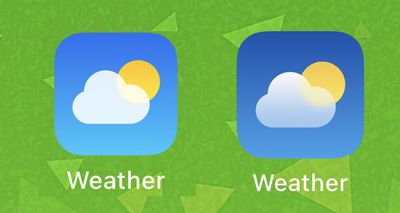
Weather App Icon

The design of the Weather app icon has been tweaked slightly. It's a darker blue than the prior version.
weather app icon ios 15

iOS 15 b4 Weather app icon on left, iOS 15 b5 Weather app icon on right

Safari Reload Icon

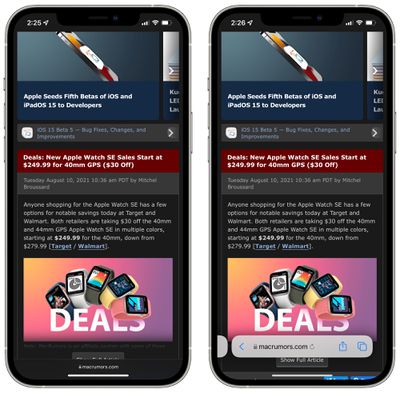
In Safari, when the address bar is collapsed while in the full web page view, the reload icon has been removed from the URL bar. The reload icon still shows in the standard view.
ios 15 reload icon
In the prior beta, the reload icon was shown in both views that are demonstrated in the screenshot above. In the current beta, it only shows in the standard view.

iPadOS 15 Safari

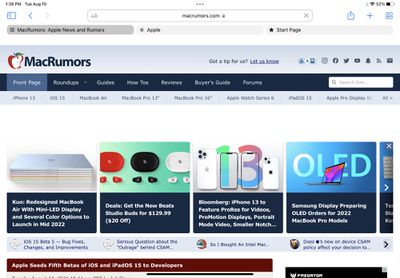
In iPadOS 15, today's beta changes the shading of the tab interface in Safari in an effort to make it more clear which tab is the active tab.
ipados 15 safari design b5

iPadOS 15 Home Screen Settings

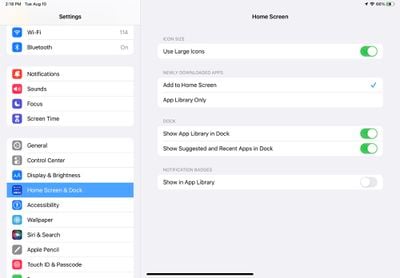
In the Settings app under Home Screen & Dock, there's now an option on the iPad to use large icons.
ipados 15 use large icons
With the feature enabled, icons take up more space on the screen so there's less empty area, and it's also easier to tap on the app icon that you need.
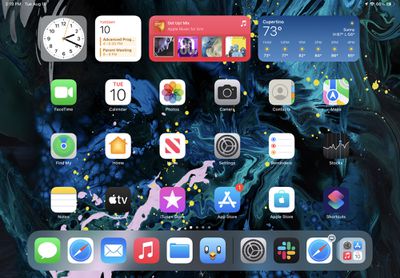
ipados 15 large icons

Control Center Camera Icon

Apple in an earlier beta refined the icon for the Camera app, and in iOS 15 beta 5, the camera icon in the Control Center is using the newly updated icon rather than the old icon.
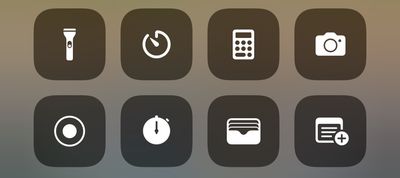
control center camera icon ios 15
Design wise, the new icon does away with the shutter button.

ios 15 lock screen camera icon

Old camera icon on left, new camera icon on right

Control Center Sound Recognition Icon

Apple has also changed the icon for the Sound Recognition feature in the Control Center. It was previously a sound wave in a square, but now it is a sound wave with a little magnifying glass search icon.
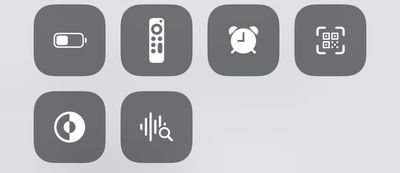
sound recognition icon

iPhone Power Off

When turning off the iPhone, there's now a tappable warning that the iPhone will remain findable after it's turned off. If you tap on it, there's an option to "Temporarily Turn Off Finding."
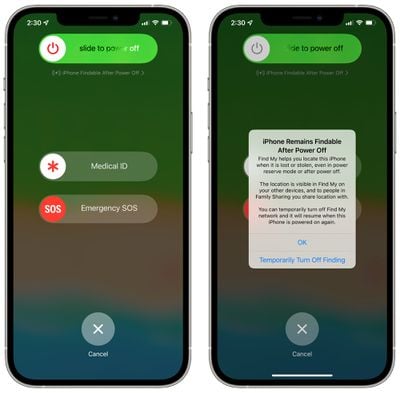
iphone power off find my

Splash Screens

Apple has added new splash screens with feature descriptions for apps like Photos, Reminders, Home, and Maps.
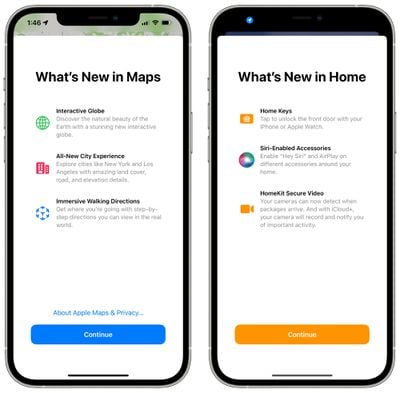
ios 15 splash screens

Background Sounds

There's a new option to turn off Background Sounds when an iPhone is locked, which can be found under Settings > Accessibility > Audio and Visual> Background Sounds.

TestFlight Info in App Store

When you look up an app in the App Store, if you have the TestFlight version installed from a developer, the ‌App Store‌ listing will display the TestFlight version that you have installed and will offer a link to open the TestFlight app.
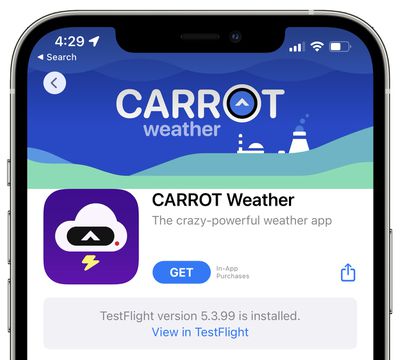
ios 15 testflight

Legacy Contacts

According to Apple's release notes for the update, Legacy Contacts has been removed in beta 5 and will be re-added in a later update.

Other New Features

Know of something new in the beta that we left out? Let us know in the comments below.

Related Forum: iOS 15

Popular Stories

iOS 26

iOS 26.4 Adds Two New Features to CarPlay

Tuesday March 24, 2026 1:55 pm PDT by
iOS 26.4 was released today, and it includes a couple of new features for CarPlay: an Ambient Music widget and support for voice-based chatbot apps. To update your iPhone 11 or newer to iOS 26.4, open the Settings app and tap on General → Software Update. CarPlay will automatically offer the new features so long as the iPhone connected to your vehicle is running iOS 26.4 or later....
Apple Business hero

Apple Unveils 'Apple Business' All-in-One Platform

Tuesday March 24, 2026 8:53 am PDT by
Apple today announced Apple Business, a new all-in-one platform that unifies device management, productivity tools, and customer outreach features. The service is designed to be a consolidated replacement for several of Apple's existing business-focused offerings, including Apple Business Essentials, Apple Business Manager, and Apple Business Connect. It provides organizations with a single...
AirPods Pro Firmware Feature

Apple Releases New Firmware for AirPods Pro 3, AirPods Pro 2 and AirPods 4

Tuesday March 24, 2026 12:31 pm PDT by
Apple today released new firmware for the AirPods Pro 2, AirPods Pro 3, and the AirPods 4. The firmware has a version number of 8B39, up from 8B34 on the AirPods Pro 3, 8B28 on the AirPods Pro 2, and 8B21 on the AirPods 4. There is no word on what's included in the firmware, but Apple has a support document with limited notes. Most updates are limited to bug fixes and performance...

Top Rated Comments

Expos of 1969 Avatar
60 months ago
Look everyone. ... the weather app is a bit darker blue.

But what about my photos being scanned? Shut up and look at the darker blue!
Score: 69 Votes (Like | Disagree)
Canubis Avatar
60 months ago
Can we please just go back to the old Safari tab layout. Stop this waste of space and time to reinvent designs just for the sake of it…
Score: 18 Votes (Like | Disagree)
60 months ago

Are we sure it doesn't require you to know your iCloud password like if we turn Find My off in the phone? I would have thought that disabling it (even temporarily) would require you to input some sort of verification that you are the owner of the phone.
In order to temporarily disable it you have to enter your passcode. I just tried it.
Score: 17 Votes (Like | Disagree)
WWPD Avatar
60 months ago
New weather icon is a game changer.
Score: 17 Votes (Like | Disagree)
ghostface147 Avatar
60 months ago
What are legacy contacts?
Score: 17 Votes (Like | Disagree)
60 months ago

Legacy Contact, you can designate one or more people to have access to your data when you die. Your legacy contact will need to provide an access key and a copy of your death certificate to Apple in order to access data from your account
****…we’d better not die before Beta 6, then.
Score: 15 Votes (Like | Disagree)
















