A long-time alternative to Apple's Files app has been Documents, developed by Readdle. Today, the company is launching "Documents X," intending to speed up everyday productivity tasks and offer users a refreshed design.
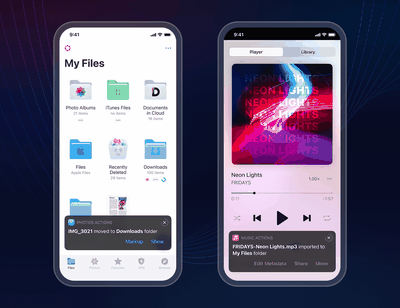
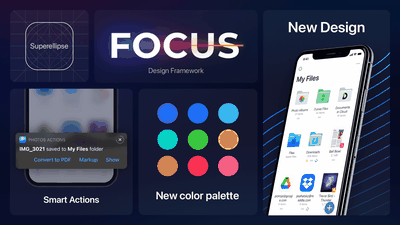
At the heart of Documents X is a feature Readdle is calling "Smart Actions." Smart Actions are contextual actions that are recommended to users depending on an action they just took. For example, if a user uploads a file to Dropbox or Google Drive, the app may suggest that the user shares the link. If a user downloads a music video, they may get presented with a Smart Action to extract the audio from the video.
The number of Smart Actions is rather extensive and is built directly into the app without launching external apps or services to perform them. Readdle says all the actions are "performed locally, which means that your files and activities don’t leave the device."
Documents X is also built on an updated design philosophy Readdle is calling "FOCUS." FOCUS aims to reduce complexity for the in-app experience while maintaining a high level of attention to detail and simplicity. The new design includes updated colors, icons, menus, controls, and more that have been "thoughtfully designed."
iOS 26.4 was released today, and it includes a couple of new features for CarPlay: an Ambient Music widget and support for voice-based chatbot apps.
To update your iPhone 11 or newer to iOS 26.4, open the Settings app and tap on General → Software Update. CarPlay will automatically offer the new features so long as the iPhone connected to your vehicle is running iOS 26.4 or later....
Apple today announced Apple Business, a new all-in-one platform that unifies device management, productivity tools, and customer outreach features.
The service is designed to be a consolidated replacement for several of Apple's existing business-focused offerings, including Apple Business Essentials, Apple Business Manager, and Apple Business Connect. It provides organizations with a single...
Tuesday March 24, 2026 12:31 pm PDT by Juli Clover
Apple today released new firmware for the AirPods Pro 2, AirPods Pro 3, and the AirPods 4. The firmware has a version number of 8B39, up from 8B34 on the AirPods Pro 3, 8B28 on the AirPods Pro 2, and 8B21 on the AirPods 4.
There is no word on what's included in the firmware, but Apple has a support document with limited notes. Most updates are limited to bug fixes and performance...
Since I can't seem to find it on my iPhone app store search right now - is it really free, or free with in-app purchases?
Hi there! Glad to inform you that our Documents app is free. The only paid features are PDF Editor and Unlimited VPN, however, you can browse and annotate PDFs and use 50 Mb in VPN per day without any subscription.
PDF Editor? I’m curious.. since Readdle has another PDF app called PDF Expert, what would be the reason to buy both subscription?
PDF Editor in Documents is basically an integrated PDF Expert. You are absolutely right, there is no need to subscribe to both apps, it is a matter of choice whether you need an app solely for editing/annotating PDF files or a super app for everything :)
My only gripe with this app is the video player doesn’t support H265 hardware decoding (everything else works great). No improvements with the new “Documents X” either. 4K movies stutter and the colors are all off. FE File Explorer ('https://apps.apple.com/us/app/fe-file-explorer-pro/id499470113') still holds the crown in this regard.
Thanks for the insights! I've created a request in our app wishlist so we can improve hardware coding in the future and also shared your feedback with our dev team.