Apple today released Safari 15 for macOS Big Sur and macOS Catalina devices, with Apple introducing support for features that are going to be coming in the macOS Monterey update set to be released later this year.
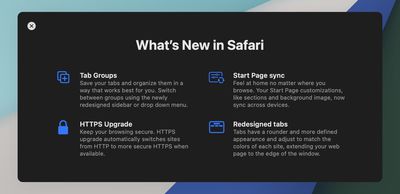
Safari 15 introduces a new look for Safari with rounded, more defined tabs and support for transparency, a compact tab bar option that can be toggled on or off, and Tab Groups. Apple's notes for the update are below:
Safari 15 delivers faster performance, improved security, and the following new features: - Tab Groups help you save and organize your tabs and easily access them across devices - Redesigned tabs have a rounder and more defined appearance and take on the color of the webpage - Compact tab bar option shows more of your web page on screen - HTTPS upgrade automatically switches sites from HTTP to more secure HTTPS when available
Safari 15 can be downloaded by opening up the System Preferences interface and selecting the Software Update option. There is no word yet on when macOS Monterey will be released, but it could come in October alongside new Macs as Apple is expected to hold a Mac-centric event this fall to debut new 14 and 16-inch MacBook Pro models.
iOS 26.4 was released today, and it includes a couple of new features for CarPlay: an Ambient Music widget and support for voice-based chatbot apps.
To update your iPhone 11 or newer to iOS 26.4, open the Settings app and tap on General → Software Update. CarPlay will automatically offer the new features so long as the iPhone connected to your vehicle is running iOS 26.4 or later....
Apple today announced Apple Business, a new all-in-one platform that unifies device management, productivity tools, and customer outreach features.
The service is designed to be a consolidated replacement for several of Apple's existing business-focused offerings, including Apple Business Essentials, Apple Business Manager, and Apple Business Connect. It provides organizations with a single...
Tuesday March 24, 2026 12:31 pm PDT by Juli Clover
Apple today released new firmware for the AirPods Pro 2, AirPods Pro 3, and the AirPods 4. The firmware has a version number of 8B39, up from 8B34 on the AirPods Pro 3, 8B28 on the AirPods Pro 2, and 8B21 on the AirPods 4.
There is no word on what's included in the firmware, but Apple has a support document with limited notes. Most updates are limited to bug fixes and performance...
My one complaint is...doesn't *dark gray* usually mean something like "inactive"? I'm having trouble figuring out which tab I'm in when I only have 2 or 3 open because I keep thinking the *lighter* colored tab is the active one, not the *darker* one.
Guys if you don't like Safari don't use it. Apple is too controlling. Things are beautiful on the other side, using FireFox ('http://www.firefox.com') and Brave ('http://www.brave.com') (Chrome without Google surveillance code) both of which are open source which is so much better for you on the privacy side and they let you do much more than Safari with extensions. Most problems I have with websites are Safari and its webkit engine anyway.
If you are looking for webkit engine and something that gives the same cool and quite performance of Safari, there is a new browser in beta called Orion ('https://browser.kagi.com') , its webkit based, get updates for older MacOS versions unlike Safari, and allows use of Firefox and Chrome extensions! Signup and you will receive an invitation link in some days.
Why what happened?
FOSS FTW!
I have been bitten before.
There are options in the browsers under bookmarks where you can book mark ALL opened tabs in each Window. You can save a copy. There is also an export option under File to user with other browsers too.
Have been using Safari for a while and it has replaced Chrome in daily browsing. Sometimes, also when developing, as I find errors faster, as Chrome is more error forgiving which tends to bite you in the end. Safari is generally faster and no noice from the fans.