
Apple Says Scanner Permission Error Fixed in macOS 11.6

In an updated support document, Apple has indicated that a permission-related error when using a scanner on a Mac has been fixed as of macOS 11.6.
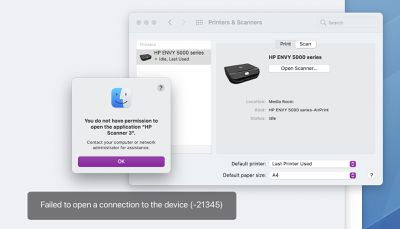
mac scanner permission error
When attempting to use a scanner with a Mac, Apple said users might have received an error message indicating they did not have permission to open the application. The error message said to contact a computer or network administrator for assistance, or indicated that the Mac failed to open a connection to the device.

Users may have encountered the error in the Image Capture app, Preview app, or the Printers & Scanners section of System Preferences, according to Apple.

For users who elect not to update to macOS 11.6 at this time, Apple previously shared step-by-step instructions on how to temporarily resolve the issue:

  1. Quit any apps that are open.
  2. From the menu bar in the Finder, choose Go > Go to Folder.
  3. Type /Library/Image Capture/Devices, then press Return.
  4. In the window that opens, double-click the app named in the error message. It's the name of your scanner driver. Nothing should happen when you open it.
  5. Close the window and open the app you were using to scan. A new scan should proceed normally. If you later choose to scan from a different app and get the same error, repeat these steps.

The issue has presumably also been fixed in the latest macOS Monterey beta.

Related Forum: macOS Big Sur

Popular Stories

Apple Logo Zoomed

Tim Cook Teases Plans for Apple's Upcoming 50th Anniversary

Thursday February 5, 2026 12:54 pm PST by
Apple turns 50 this year, and its CEO Tim Cook has promised to celebrate the milestone. The big day falls on April 1, 2026. "I've been unusually reflective lately about Apple because we have been working on what do we do to mark this moment," Cook told employees today, according to Bloomberg's Mark Gurman. "When you really stop and pause and think about the last 50 years, it makes your heart ...
wwdc sans text feature

Apple Rumored to Announce New Product on February 19

Thursday February 5, 2026 12:22 pm PST by
Apple plans to announce the iPhone 17e on Thursday, February 19, according to Macwelt, the German equivalent of Macworld. The report, citing industry sources, is available in English on Macworld. Apple announced the iPhone 16e on Wednesday, February 19 last year, so the iPhone 17e would be unveiled exactly one year later if this rumor is accurate. It is quite uncommon for Apple to unveil...
Finder Siri Feature

Why Apple's iOS 26.4 Siri Upgrade Will Be Bigger Than Originally Promised

Friday February 6, 2026 3:06 pm PST by
In the iOS 26.4 update that's coming this spring, Apple will introduce a new version of Siri that's going to overhaul how we interact with the personal assistant and what it's able to do. The iOS 26.4 version of Siri won't work like ChatGPT or Claude, but it will rely on large language models (LLMs) and has been updated from the ground up. Upgraded Architecture The next-generation...
iOS 26

iOS 26.3 and iOS 26.4 Will Add These New Features to Your iPhone

Tuesday February 3, 2026 7:47 am PST by
While the iOS 26.3 Release Candidate is now available ahead of a public release, the first iOS 26.4 beta is likely still at least a week away. Following beta testing, iOS 26.4 will likely be released to the general public in March or April. Below, we have recapped known or rumored iOS 26.3 and iOS 26.4 features so far. iOS 26.3 iPhone to Android Transfer Tool iOS 26.3 makes it easier...
iphone 17 pro dark blue 1

iPhone 18 Pro Max Rumored to Deliver Next-Level Battery Life

Friday February 6, 2026 5:14 am PST by
The iPhone 18 Pro Max will feature a bigger battery for continued best-in-class battery life, according to a known Weibo leaker. Citing supply chain information, the Weibo user known as "Digital Chat Station" said that the iPhone 18 Pro Max will have a battery capacity of 5,100 to 5,200 mAh. Combined with the efficiency improvements of the A20 Pro chip, made with TSMC's 2nm process, the...

Top Rated Comments

CheesePuff Avatar
57 months ago

Because maybe they just found out about it?
You're not making any sense... this was acknowledged that it was a bug by Apple prior to 11.6, they said it will be fixed in a future release, and then they released 11.6 with no release notes other then the standard 'bug fixes and general enhancements' boilerplate message they always use. Do you think it was just magically fixed in 11.6 and they don't QA their work and then were amazed when they randomly found out it was fixed?
Score: 4 Votes (Like | Disagree)
CheesePuff Avatar
57 months ago
This is why Apple should include actual release notes in updates. Not to find out weeks later through a support doc.
Score: 4 Votes (Like | Disagree)
jefhai Avatar
57 months ago
A lot of printers flat out don’t work on Arm Macs
Score: 3 Votes (Like | Disagree)
Thebrochure Avatar
57 months ago
Armageddon averted.
Score: 1 Votes (Like | Disagree)
PinkyMacGodess Avatar
57 months ago

Lol you have zero clue how software development works then.
And I've been a programmer for over 40 years.

I've only peripherally read this thread, but can say that scanners have always been a PITA with macs. I've always had HP scanners, and my history started with the hideously expensive flat bed scanner I owned. Eventually Apple/HP just stopped even trying to pretend they supported it. The next scanner I bought was a very beautiful standup scanner, all glass, and amazing, and it lasted a year or so, then another scanner, *POOP* stopped working with every update, and took either major gyrations or waiting for software support many times. Then I got an expensive 'all-in-one', and it had features dripping off of it, and most of them don't/won't work, and the same fun started with updates and it not working. Now, it works on mine, but refuses to scan on the wife's. (She actually thinks it works for me because it's afraid of what will happen to it if it fails. SCRAPPED)

I haven't had many printers fail to work after an update, but had a client that had to reload all their drivers, and I have had to reset the printer software system on a mac at least a few times back in the day.

So Apple has a problem with testing their updates. Apple has a problem with their contracted (most likely) programmers breaking things that worked previously. Apple is guilty of a lot of things, and attention to detail in testing 'their' software and updates is the biggest one in my mind. So permission errors in trying to scan makes me laugh. Apple appears to be unable to learn from their massive wake of screw ups in previous versions of macOS.

So how that makes me ignorant on 'how software development works' is kind of a reach, isn't it?

Apple *should* know when their software breaks things. Apple *should* know when previous fixes break from installing their updates. Apple *should* be doing a lot more testing than they obviously don't do.
Score: 1 Votes (Like | Disagree)
randomgeeza Avatar
57 months ago

Is it only fixed for HP scanners? HP printers have been having this error ever since Big Sur with no resolution!
No it was doing it with my Epson printer...
Score: 1 Votes (Like | Disagree)
















