
Safari 15 Extension for Mac Helps You Tell Which Tab Is Active - MacRumors
Skip to Content

Safari 15 Extension for Mac Helps You Tell Which Tab Is Active

Safari 15 has faced a barrage of complaints about its controversial new design, and while Apple has listened to user feedback and reversed some changes or made them optional, many users still struggle to discern an active tab from a background tab on the Mac browser because of the inverted shading.
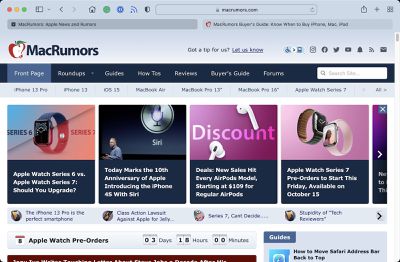
safari 15 tabs
Unfortunately for users who do not like the new design, Apple has not made any changes to the shading of tabs in either the Safari 15.1 beta or the latest version of the experimental Safari Technology Preview browser.

Fortunately however, developer Zhenyi Tan was inspired by John Gruber's Daring Fireball article about the issue and has since come up with a simple Safari extension called ActiveTab that provides a solution.

ActiveTab simply makes it easier to spot the active tab in Safari on Mac by drawing a line underneath it. There are eight colors to choose from, and the line below the tab can be customized to be between 1 and 7 pixels wide.
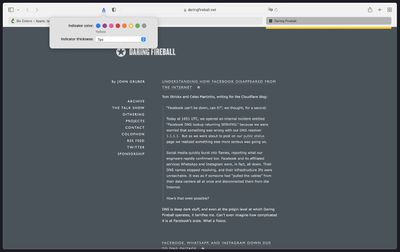
active tabs
As Zhenyi notes, the extension works best with the "Separate" tab layout selected and "Show color in tab bar" disabled in the Tab section of Safari's Preferences. Zhenyi also cautions that ActiveTab will not work reliably if you have so many tabs in a window that the tab bar becomes scrollable.

ActiveTab is available for $1.99 on the Mac App Store, with no in-app purchases, no ads, and no tracking.

(H/T MacStories.)

Tag: Safari

Popular Stories

iOS 26

iOS 26.4 Adds Two New Features to CarPlay

Tuesday March 24, 2026 1:55 pm PDT by
iOS 26.4 was released today, and it includes a couple of new features for CarPlay: an Ambient Music widget and support for voice-based chatbot apps. To update your iPhone 11 or newer to iOS 26.4, open the Settings app and tap on General → Software Update. CarPlay will automatically offer the new features so long as the iPhone connected to your vehicle is running iOS 26.4 or later....
Apple Business hero

Apple Unveils 'Apple Business' All-in-One Platform

Tuesday March 24, 2026 8:53 am PDT by
Apple today announced Apple Business, a new all-in-one platform that unifies device management, productivity tools, and customer outreach features. The service is designed to be a consolidated replacement for several of Apple's existing business-focused offerings, including Apple Business Essentials, Apple Business Manager, and Apple Business Connect. It provides organizations with a single...
AirPods Pro Firmware Feature

Apple Releases New Firmware for AirPods Pro 3, AirPods Pro 2 and AirPods 4

Tuesday March 24, 2026 12:31 pm PDT by
Apple today released new firmware for the AirPods Pro 2, AirPods Pro 3, and the AirPods 4. The firmware has a version number of 8B39, up from 8B34 on the AirPods Pro 3, 8B28 on the AirPods Pro 2, and 8B21 on the AirPods 4. There is no word on what's included in the firmware, but Apple has a support document with limited notes. Most updates are limited to bug fixes and performance...

Top Rated Comments

karranz Avatar
58 months ago
OK so in 2021 I need an independent developer (thanks Zhenyi!) to fix Safari.
Score: 27 Votes (Like | Disagree)
Mac Fly (film) Avatar
58 months ago
Hahaha. Great design, Apple 😂

Safari 14 tabs were a better UX design in every way: more attractive, more intuitive, more minimal, a more efficient use of available screen space, more drag-able and tab-like.
Score: 26 Votes (Like | Disagree)
arvinsim Avatar
58 months ago
A company that is renowned for its user experience has to rely on a third party to fix their browser product o_O
Score: 14 Votes (Like | Disagree)
58 months ago
Lighter tabs are lighter because they are in the foregrounds - there is more light on them; darker tabs are darker because they are in the background - there is less light on them. It is 101. I can't understand why a designer at Apple would go the opposite way to this. There have been other controls in Mac OS / iOS that have done the same thing, and it is always confusing what the currently selection option is. Design is supposed to get out of the way, it should be 'invisible' so that we can use something without having to think about it.
Score: 13 Votes (Like | Disagree)
baryon Avatar
58 months ago
I use auto dark/light mode: light during the day, dark at night. In dark mode, the lighter tab is active. In light mode, the darker tab is active. When the mouse hovers over a tab, it becomes the same color as the active tab. It's terrible design! Even in DOS things were more visible.
Score: 10 Votes (Like | Disagree)
58 months ago

Don't most people run dark mode? Well, I do and my safari looks fine. The active tab is lighter than the inactive ones, just as you'd expect.
It should be the same on light mode but it's not. That's the problem. When I switch to dark mode I'm even more confused. Suddenly active tab is lighter than inactive @@
Score: 10 Votes (Like | Disagree)
















