
Hyper's Latest Hubs Let You Connect Two 4K Displays to an M1 MacBook Using a Single Port - MacRumors
Skip to Content

Hyper's Latest Hubs Let You Connect Two 4K Displays to an M1 MacBook Using a Single Port

Hyper today announced the release of two new HyperDrive hubs that allow M1 models of the MacBook Air and 13-inch MacBook Pro to connect to two 4K displays over HDMI in a plug-and-play manner with no drivers required.
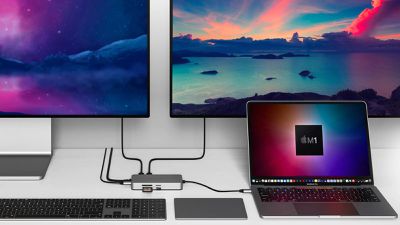
hyperdrive dual 4k display hdmi hubs
There is a 3-in-1 version of the hub with two HDMI ports and a USB-C Power Delivery port for up to 100W of pass-through charging, and a 10-in-1 version of the hub that offers those same ports with the addition of another USB-C port, two USB-A ports, a Gigabit Ethernet port, microSD and SD card slots, and a 3.5mm headphone jack.

Hyper says both hubs deliver dual 4K HDMI video output over a single USB-C connection to M1 MacBook models by using a combination of both DisplayPort Alt Mode and SiliconMotion InstantView plug-and-play video technology. After connecting the hub to the Mac, users must open the HyperDisplay app that appears on the desktop.

Keep in mind that on both of the hubs, one HDMI port supports 60Hz and the other is limited to 30Hz, which may be a dealbreaker for some users.

The 3-in-1 hub is priced at $129.99 in the United States and is available on Hyper's website, while the 10-in-1 hub runs for $199.99.

Note: MacRumors is an affiliate partner with Hyper. When you click a link and make a purchase, we may receive a small payment, which helps us keep the site running.


Tag: Hyper

Popular Stories

iOS 26

iOS 26.4 Adds Two New Features to CarPlay

Tuesday March 24, 2026 1:55 pm PDT by
iOS 26.4 was released today, and it includes a couple of new features for CarPlay: an Ambient Music widget and support for voice-based chatbot apps. To update your iPhone 11 or newer to iOS 26.4, open the Settings app and tap on General → Software Update. CarPlay will automatically offer the new features so long as the iPhone connected to your vehicle is running iOS 26.4 or later....
Apple Business hero

Apple Unveils 'Apple Business' All-in-One Platform

Tuesday March 24, 2026 8:53 am PDT by
Apple today announced Apple Business, a new all-in-one platform that unifies device management, productivity tools, and customer outreach features. The service is designed to be a consolidated replacement for several of Apple's existing business-focused offerings, including Apple Business Essentials, Apple Business Manager, and Apple Business Connect. It provides organizations with a single...
AirPods Pro Firmware Feature

Apple Releases New Firmware for AirPods Pro 3, AirPods Pro 2 and AirPods 4

Tuesday March 24, 2026 12:31 pm PDT by
Apple today released new firmware for the AirPods Pro 2, AirPods Pro 3, and the AirPods 4. The firmware has a version number of 8B39, up from 8B34 on the AirPods Pro 3, 8B28 on the AirPods Pro 2, and 8B21 on the AirPods 4. There is no word on what's included in the firmware, but Apple has a support document with limited notes. Most updates are limited to bug fixes and performance...

Top Rated Comments

58 months ago
If MacOS properly supported the DisplayPort MST industry standard, Mac users would be able to daisy chain DP monitors or use any of the available MST hubs on the market. When looking at DP MST hubs from different manufacturers, there is usually a “Not compatible with Mac” warning on the page.

This is not a hardware compatibility issue since an Intel Mac booted into Windows works with MST just fine. What is Apple’s reason for still not supporting MST after all these years? It is some petty attempt to “convince” people to buy Thunderbolt monitors?
Score: 12 Votes (Like | Disagree)
58 months ago
Forget the hub. Where can I buy cables like that? No snaking and curling and overlapping. They just sit there in perfectly straight paths, without tape or clips or anything, and at the perfect length! Wow! The future is now.
Score: 6 Votes (Like | Disagree)
Joe Rossignol Avatar
58 months ago

Only one HDMI port offers 60Hz 4K, the other is 30Hz. Can the M1 Macbook Air/Pro even power 2 x 60Hz 4K displays?

One of the 2 displays being limited to 30Hz should make this a non-starter for most people.

30Hz vs 60Hz for a computer monitor is a big deal. This technical compromise should not be underestimated. It should be mentioned in the article IMO.

EDIT: Also, I'd be interested in learning more about this "InstantView" technology. The official website doesn't properly explain what it is. Does it compress the image? If so, is the compression lossy? Should be a pretty important factor in your buying decision as well.
Updated article with: Keep in mind that on both of the hubs, one HDMI port supports 60Hz and the other is limited to 30Hz, which may be a dealbreaker for some users.
Score: 6 Votes (Like | Disagree)
58 months ago

One of the 2 displays being limited to 30Hz should make this a non-starter for most people.

30Hz vs 60Hz for a computer monitor is a big deal. This technical compromise should not be underestimated. It should be mentioned in the article IMO.
I agree. 4K at 30Hz is absolutely horrible.
Score: 6 Votes (Like | Disagree)
pgiguere1 Avatar
58 months ago
One of the 2 displays being limited to 30Hz should make this a non-starter for most people.

30Hz vs 60Hz for a computer monitor is a big deal. This technical compromise should not be underestimated. It should be mentioned in the article IMO.

EDIT: Also, I'd be interested in learning more about this "InstantView" technology. The official website doesn't properly explain what it is. Does it compress the image? If so, is the compression lossy? Should be a pretty important factor in your buying decision as well.
Score: 4 Votes (Like | Disagree)
58 months ago

Is there any details on HOW they're doing this?

Given that nothing has come up before, I have difficulty believing that they're actually getting the OS to output a 3rd display without additional drivers.

Now, what they *could* be doing is: The M1 can output 6K 60Hz (20,358,144 pixels), which is sufficient to run TWO 4K monitors (8,294,400 pixels each, 16,588,800 pixels total) worth as a *single display*, and their hardware is then chopping that display down to TWO separate monitors? Perhaps the 30Hz is a limitation of their chopping silicon that breaks the single display into two???

Hyper says both hubs deliver dual 4K HDMI video output over a single USB-C connection to M1 MacBook models by using a combination of both DisplayPort Alt Mode and SiliconMotion InstantView plug-and-play video technology ('https://www.siliconmotion.com/events/instantview/'). After connecting the hub to the Mac, users must open the HyperDisplay app that appears on the desktop.
It's using USB data for the second HDMI port, the first uses DP Alt mode. So with the M1 you're using up the 1 external display limit on DP Alt, and the other is a virtual graphics card connected over USB.
Score: 3 Votes (Like | Disagree)















