
14-inch MacBook Pro Can Fast Charge Via Thunderbolt, But Fast Charge Limited to MagSafe in 16-inch Model - MacRumors
Skip to Content

14-inch MacBook Pro Can Fast Charge Via Thunderbolt, But Fast Charge Limited to MagSafe in 16-inch Model

With the debut of the new 14-inch and 16-inch MacBook Pro models, Apple has brought a fast charge capability to the Mac for the first time, allowing users to charge the laptop battery up to 50% in just 30 minutes.
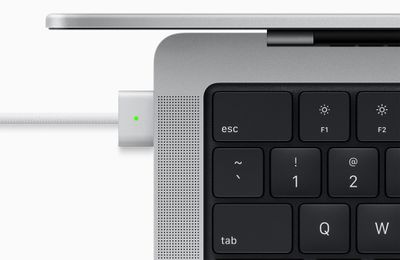
macbook pro magsafe 3 charging
But there's a difference between models with this feature that Apple didn't really mention. While both models can be charged over Thunderbolt or MagSafe, only the 14-inch MacBook Pro can fast charge over the USB-C/Thunderbolt 4 ports as well as ‌MagSafe‌.

By contrast, the 16-inch ‌MacBook Pro‌ is limited to fast charging over the ‌MagSafe‌ port. The reason is likely down to the fact that the Thunderbolt 4 ports are capable of charging at a maximum of 100W, and the 16-inch ‌MacBook Pro‌ uses a 140W power adapter, so the same fast charging speed can't be claimed. Meanwhile, the 14-inch model uses a 67W power adapter for the 8-core machine and a 96W power adapter for the 10-core machine, so it doesn't reach the maximum TB4 power delivery.

This limitation on the 16-inch ‌MacBook Pro‌ is unlikely to be a big deal for most users, as the ‌MagSafe‌ 3 port is made exclusively for charging and won't be engaged for any other reason. That said, this difference between the two seems worth highlighting given the various cable/dock setups prospective owners could be envisioning for their workflow.

The new ‌MacBook Pro‌ models can be ordered now, with pricing starting at $1,999 for the 14-inch model and at $2,499 for the 16-inch model. The notebooks will begin arriving to customers and launch in stores on Tuesday, October 26.


Related Roundup: MacBook Pro
Buyer's Guide: MacBook Pro (Buy Now)
Related Forum: MacBook Pro

Popular Stories

iOS 26

iOS 26.4 Adds Two New Features to CarPlay

Tuesday March 24, 2026 1:55 pm PDT by
iOS 26.4 was released today, and it includes a couple of new features for CarPlay: an Ambient Music widget and support for voice-based chatbot apps. To update your iPhone 11 or newer to iOS 26.4, open the Settings app and tap on General → Software Update. CarPlay will automatically offer the new features so long as the iPhone connected to your vehicle is running iOS 26.4 or later....
Apple Business hero

Apple Unveils 'Apple Business' All-in-One Platform

Tuesday March 24, 2026 8:53 am PDT by
Apple today announced Apple Business, a new all-in-one platform that unifies device management, productivity tools, and customer outreach features. The service is designed to be a consolidated replacement for several of Apple's existing business-focused offerings, including Apple Business Essentials, Apple Business Manager, and Apple Business Connect. It provides organizations with a single...
AirPods Pro Firmware Feature

Apple Releases New Firmware for AirPods Pro 3, AirPods Pro 2 and AirPods 4

Tuesday March 24, 2026 12:31 pm PDT by
Apple today released new firmware for the AirPods Pro 2, AirPods Pro 3, and the AirPods 4. The firmware has a version number of 8B39, up from 8B34 on the AirPods Pro 3, 8B28 on the AirPods Pro 2, and 8B21 on the AirPods 4. There is no word on what's included in the firmware, but Apple has a support document with limited notes. Most updates are limited to bug fixes and performance...

Top Rated Comments

58 months ago
Ofc, since the usbC can charge max cap at 100W...so 100W for the 14" battery can work...but for the 16" it needs that 140W
Score: 11 Votes (Like | Disagree)
Kuckuckstein Avatar
58 months ago
I would not call this a caveat. There is now again a dedicated power supply port with the beloved mag safe feature and it can do the work it is intended for.
It is a nice add on that USB C can also provide power and charging, but I have always been happy with the charging speed of my old MacBooks, and if USB C provides that as well I think users will be in charging heaven: fast through mag safe, normal if needed through USB C.
Score: 9 Votes (Like | Disagree)
Bug-Creator Avatar
58 months ago

I’m not understanding and sure why fast charging is limited to 16" only?
Cos you didn't understand what this is about.

TB is limited to 100W on both MBPs, for the 14" with the smaller battery thats already considered fast charging, while the bigger battery in the 16" can take up to 140W which can only be supplied via MagSafe.
Score: 7 Votes (Like | Disagree)
Kuckuckstein Avatar
58 months ago

I wonder if can you disable fast charging to protect battery health/longevity ?
Use a power supply that would not be powerful enough?
Score: 4 Votes (Like | Disagree)
notabadname Avatar
58 months ago
I wonder if can you disable fast charging to protect battery health/longevity ?
Score: 4 Votes (Like | Disagree)
jlc1978 Avatar
54 months ago


I guess that the whole 100% of the 20000mah powerbank, could just transfer about 10% of power in mbp,
before it completely runs out of power.
Digging deep into my memory of EE, there are several things at play:

The power bank has a smaller capacity than the MBP, so it is only going to charge it to the power bank capacity. Capicity is the water tank, if you will.

The other is how much current can it deliver. An 18W, at the same voltage as a 64W PS, can only deliver about 1/3 or so the current. That is enough to charge when not in use, but slowly, since the computers power use is less than the charging current. Curent amps is the amount of water flowing.

A smaller tank and smaller hose will take longer to fill a pool to a certain level than say a firehose...
Score: 2 Votes (Like | Disagree)















