
Apple Now Issues Mac-iOS Device Syncing Updates Via Software Update - MacRumors
Skip to Content

Apple Now Issues Mac-iOS Device Syncing Updates Via Software Update

Late last month, Apple issued an unusual standalone software update to macOS users called "Device Support Update," which it said was to "ensure proper updating and restoring for iOS and iPadOS devices with Mac."
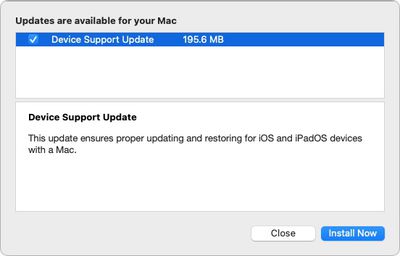
Device Software Update
While no other details were provided, it was assumed that the update added support for recently released devices, including iPhone 13 models, the new iPad mini, and the ninth-generation iPad. Still, the update was the first of its kind to come through System Preferences -> Software Update, which made some users curious about it.

Usually when you connect an iPhone, ‌iPad‌, or iPod touch to a Mac, a dialog pops up from an app called MobileDeviceUpdater that says "A software update is required to connect" to your iOS device. This normally happens when the device has been independently updated with a newer version of iOS or iPadOS that the Mac doesn't recognize, indicating that the download is required for your Mac to communicate with the device.

It looks as if Apple has now chosen to reduce the reliance on MobileDeviceUpdater by automatically delivering these downloads when they are ready via Software Update, so users no longer have to wait until they plug in an iOS device to get what is now referred to as a "Device Support Update." The change is likely an effort to reduce the frequency of the MobileDeviceUpdater dialog popping up upon connecting a device, which may strike some users as some sort of malware.
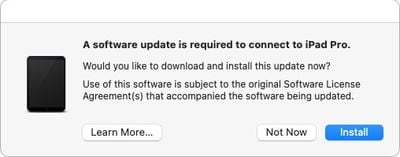
MobileDeviceUpdater dialog 1
The change was helpfully confirmed by Tidbits' Adam Engst, who sat on the mysterious Device Support Update for a week or two to verify what it was.

I got that chance today when I plugged in my iPad Pro and got the usual MobileDeviceUpdater dialog. I made sure that Software Update was still offering me Device Support Update, and then I allowed the MobileDeviceUpdater dialog to update my Mac. After closing and reopening Software Update, the Device Support Update option was gone, confirming that they're one and the same.

As Engst notes, this isn't an earth-shattering discovery, but it's good to know what happens when installing future Device Support Updates from Software Update: They don't require a reboot, and users will still get a MobileDeviceUpdate dialog the next time they plug in their device if they haven't got around to installing the update.


Related Forum: macOS Big Sur

Popular Stories

iOS 26

iOS 26.4 Adds Two New Features to CarPlay

Tuesday March 24, 2026 1:55 pm PDT by
iOS 26.4 was released today, and it includes a couple of new features for CarPlay: an Ambient Music widget and support for voice-based chatbot apps. To update your iPhone 11 or newer to iOS 26.4, open the Settings app and tap on General → Software Update. CarPlay will automatically offer the new features so long as the iPhone connected to your vehicle is running iOS 26.4 or later....
Apple Business hero

Apple Unveils 'Apple Business' All-in-One Platform

Tuesday March 24, 2026 8:53 am PDT by
Apple today announced Apple Business, a new all-in-one platform that unifies device management, productivity tools, and customer outreach features. The service is designed to be a consolidated replacement for several of Apple's existing business-focused offerings, including Apple Business Essentials, Apple Business Manager, and Apple Business Connect. It provides organizations with a single...
AirPods Pro Firmware Feature

Apple Releases New Firmware for AirPods Pro 3, AirPods Pro 2 and AirPods 4

Tuesday March 24, 2026 12:31 pm PDT by
Apple today released new firmware for the AirPods Pro 2, AirPods Pro 3, and the AirPods 4. The firmware has a version number of 8B39, up from 8B34 on the AirPods Pro 3, 8B28 on the AirPods Pro 2, and 8B21 on the AirPods 4. There is no word on what's included in the firmware, but Apple has a support document with limited notes. Most updates are limited to bug fixes and performance...

Top Rated Comments

TheYayAreaLiving 🎗️ Avatar
58 months ago
Nice! This can come in handy.
Score: 7 Votes (Like | Disagree)
58 months ago
Not just Big Sur - also got this on Mojave, which appears to be out of support otherwise.
Score: 4 Votes (Like | Disagree)
58 months ago
Maybe they can now concentrate on getting the entire Sync function to work correctly like it did Pre Feb 2020.
Score: 4 Votes (Like | Disagree)
58 months ago
Didn't know there were folks that still plug in their iPhones and iPads into their Macs for anything but charging.
Score: 3 Votes (Like | Disagree)
PinkyMacGodess Avatar
58 months ago

I have macOS Big Sur version 11.6, which is the latest, I believe.
I wouldn't worry about it. Apparently the update is triggered by a new model being plugged into your Mac. If you don't do that, I'm sure the update will be rolled in to the next major, or minor update.
Score: 1 Votes (Like | Disagree)
Phil77354 Avatar
58 months ago

Hello,

Did you check?
Which version of Big Sur you have installed?

Thanks
Camelia
I have macOS Big Sur version 11.6, which is the latest, I believe.
Score: 1 Votes (Like | Disagree)















