
Can't Get Used to Your MacBook Pro's Notch? These Apps Will Hide It for You - MacRumors
Skip to Content

Can't Get Used to Your MacBook Pro's Notch? These Apps Will Hide It for You

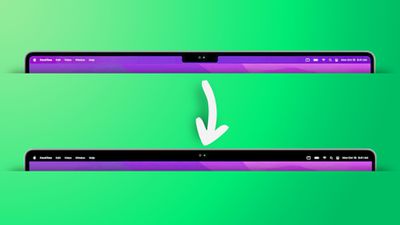
If you bought a new MacBook Pro and you're having a hard time acclimatizing to the notch at the top of the screen in the middle of the menu bar, there's an app for that.
remove notch app feature2
The inclusion of a display notch on the redesigned MacBook Pros was a surprise to most observers and was one of the few last-minute rumors that surfaced ahead of their unveiling.

Some have since criticized Apple's design choice of adding a notch, but Apple has pushed back against criticism by saying that it's a "smart way" of giving users more room for their content, because it allowed the bezels to be made thinner for added screen real estate.

If that logic doesn't pass your scrutiny, the following apps are available. While they don't outright cancel the notch, they at least make its existence less obvious by forcing a black menu bar, similar to how macOS Monterey adds a black bezel to the top of the display when apps are in fullscreen mode, only by adapting your chosen wallpaper instead, like so.

remove notch app
Forehead (free): Besides letting you switch between your default wallpaper and a black notchless one, Forehead includes options to round the corners of the screen, similar to the rounded top corners of the new MacBook Pros. The ability to simulate a notch on older Macs is coming in an update.

TopNotch (free): Offers the same features as Forehead, and also supports Dynamic Wallpapers, works with multiple displays and spaces, and remains in the background and detects for wallpaper changes.

De-Notch-ifier (€9.95): Offers the same features as TopNotch, just in the form of a dropdown menu in the menu bar. De-Notch-ifier isn't a completely new app, rather it's a pre-configured version of Boring Old Menu Bar that gives you a boring old non-transparent menu bar on macOS Big Sur and later. If you buy one app, you get the other for free.

Own a new MacBook Pro? What do you think of the notch now that you've spent some time with it? Let us know in the comments.


Related Roundup: MacBook Pro
Buyer's Guide: MacBook Pro (Buy Now)
Related Forum: MacBook Pro

Popular Stories

iOS 26

iOS 26.4 Adds Two New Features to CarPlay

Tuesday March 24, 2026 1:55 pm PDT by
iOS 26.4 was released today, and it includes a couple of new features for CarPlay: an Ambient Music widget and support for voice-based chatbot apps. To update your iPhone 11 or newer to iOS 26.4, open the Settings app and tap on General → Software Update. CarPlay will automatically offer the new features so long as the iPhone connected to your vehicle is running iOS 26.4 or later....
Apple Business hero

Apple Unveils 'Apple Business' All-in-One Platform

Tuesday March 24, 2026 8:53 am PDT by
Apple today announced Apple Business, a new all-in-one platform that unifies device management, productivity tools, and customer outreach features. The service is designed to be a consolidated replacement for several of Apple's existing business-focused offerings, including Apple Business Essentials, Apple Business Manager, and Apple Business Connect. It provides organizations with a single...
AirPods Pro Firmware Feature

Apple Releases New Firmware for AirPods Pro 3, AirPods Pro 2 and AirPods 4

Tuesday March 24, 2026 12:31 pm PDT by
Apple today released new firmware for the AirPods Pro 2, AirPods Pro 3, and the AirPods 4. The firmware has a version number of 8B39, up from 8B34 on the AirPods Pro 3, 8B28 on the AirPods Pro 2, and 8B21 on the AirPods 4. There is no word on what's included in the firmware, but Apple has a support document with limited notes. Most updates are limited to bug fixes and performance...

Top Rated Comments

sniffies Avatar
58 months ago
Honestly, much ado about notching
Score: 44 Votes (Like | Disagree)
Havalo Avatar
58 months ago
There's an easier solution, go with the previous gen and also save lots of bucks. Win-win... :)
Score: 25 Votes (Like | Disagree)
contacos Avatar
58 months ago
I tried one of them but I actually prefer the notch. Seeing the black bar at all time makes the screen appear smaller for some reason. Trick to the brain?maybe because this way you will have the actual bezel + the black „digital bezel“ from the menu bar so it ends up looking like one big bezel. I prefer seeing the wallpaper behind the menu bar

Attachment Image
Score: 24 Votes (Like | Disagree)
58 months ago
The notch is not a feature, it is a compromise. Very sad what Apple is becoming.
Score: 24 Votes (Like | Disagree)
ProfessionalFan Avatar
58 months ago
Just use the computer and you will quickly realize the notch is a complete non-issue.
Score: 22 Votes (Like | Disagree)
frifra Avatar
58 months ago
But are these apps top-notch?
Score: 19 Votes (Like | Disagree)














