Brydge's MAX+ Keyboard for 11-Inch iPad Pro Now Available - MacRumors
Skip to Content

Brydge's MAX+ Keyboard for 11-Inch iPad Pro Now Available

Earlier this year, we took a look at Brydge's top-of-the-line MAX+ keyboard and trackpad combo for the 12.9-inch iPad Pro, a fairly close competitor to Apple's pricier Magic Keyboard.
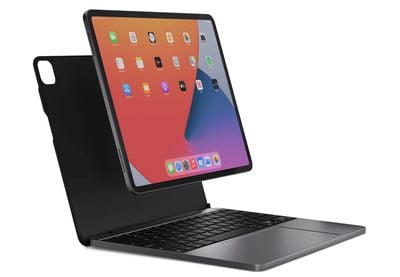
brydge max plus ipad pro 11
A version of the MAX+ for the 11-inch iPad Pro (all generations) and fourth-generation iPad Air is now available, offering the same experience as its larger sibling but for Apple's smaller tablets. The 11-inch version of the MAX+ is priced at $199.99, which is $100 less than Apple's Magic Keyboard, and it comes in Space Gray, Silver, and White options.

The MAX+ snaps onto the magnetic back of the iPad Air or ‌iPad Pro‌, but connects over Bluetooth rather than through the Smart Connector used by Apple's Magic Keyboard. This also means the MAX+ can't draw power from the iPad and must be charged separately about every three months, according to Brydge.

Otherwise, you'll get a similar experience to the Magic Keyboard, with backlit keys that feel good under the fingers and a solid amount of travel, as well as a large multi-touch trackpad. The keyboard also includes a row of shortcut keys to give you quick access media controls, brightness, and more.

The Brydge MAX+ for the 11-inch iPad Pro and 10.9-inch iPad Air is available now for $199.99, while the larger version for the 12.9-inch iPad Pro is priced at $249.99. Brydge is currently running a discount for past and present members of the military that offers 20% off with the promo code THANKYOU.

Note: MacRumors is an affiliate partner with Brydge. When you click a link and make a purchase, we may receive a small payment, which helps us keep the site running.


Tag: Brydge

Popular Stories

iOS 26

iOS 26.4 Adds Two New Features to CarPlay

Tuesday March 24, 2026 1:55 pm PDT by
iOS 26.4 was released today, and it includes a couple of new features for CarPlay: an Ambient Music widget and support for voice-based chatbot apps. To update your iPhone 11 or newer to iOS 26.4, open the Settings app and tap on General → Software Update. CarPlay will automatically offer the new features so long as the iPhone connected to your vehicle is running iOS 26.4 or later....
Apple Business hero

Apple Unveils 'Apple Business' All-in-One Platform

Tuesday March 24, 2026 8:53 am PDT by
Apple today announced Apple Business, a new all-in-one platform that unifies device management, productivity tools, and customer outreach features. The service is designed to be a consolidated replacement for several of Apple's existing business-focused offerings, including Apple Business Essentials, Apple Business Manager, and Apple Business Connect. It provides organizations with a single...
AirPods Pro Firmware Feature

Apple Releases New Firmware for AirPods Pro 3, AirPods Pro 2 and AirPods 4

Tuesday March 24, 2026 12:31 pm PDT by
Apple today released new firmware for the AirPods Pro 2, AirPods Pro 3, and the AirPods 4. The firmware has a version number of 8B39, up from 8B34 on the AirPods Pro 3, 8B28 on the AirPods Pro 2, and 8B21 on the AirPods 4. There is no word on what's included in the firmware, but Apple has a support document with limited notes. Most updates are limited to bug fixes and performance...

Top Rated Comments

57 months ago
No smart connector = deal breaker
Thicker & heavier than Magic Keyboard = double deal breaker
Score: 26 Votes (Like | Disagree)
57 months ago
If only Apple made a lightweight laptop..
Score: 14 Votes (Like | Disagree)
57 months ago
connects over Bluetooth 🤮
Score: 11 Votes (Like | Disagree)
unashamedgeek Avatar
57 months ago

Does any third party vendor use the smart connector? I don’t think I’ve seen one keyboard other than Apples that uses it
Logitech makes a keyboard that uses the smart connector.
Score: 8 Votes (Like | Disagree)
AppleInLVX Avatar
57 months ago

connects over Bluetooth 🤮
Yeah... half the reason the Magic Keyboard is so awesome is because you don't need to think about it at all... it just works, and while it's working, it also feels great to use. I totally balked at the price of it initially, but it's seriously one of the best peripherals I own.
Score: 6 Votes (Like | Disagree)
57 months ago

Same. I have used it since it first came out last year and it works perfect with my M1 12.9 as well. It has held up really nicely as well, and the extra USB-C port is a major bonus to the MK.
I want to love the Magic Keyboard with my 12.9, but I would give it maybe 5/10. My issues:

1) Top heaviness. When it's on my lap and the chair is not super low, the keyboard bounces as I type. I find it really unstable/uncomfortable for lap usage.
2) Weight/thickness. It's thicker and heavier than a MacBook Air, about the same as MacBook Pro. Suddenly my tablet is not so portable.
3) Battery. My 2018 iPad Pro really takes a battery hit with the keyboard. Only get 2-3 hours max when using the keyboard, again negating the battery advantage the iPad used to have over laptops.
4) Reliability. When using certain apps like MS Teams or even on some webpages, the Magic Keyboard flat out stops working. It's not a great experience to be presenting on a call and not be able to type or move the pointer. This has happened to me fairly often and usually at the worst times.
5) Material. This is the least of my issues, but it's just not very pretty or durable for such an expensive device. I have a few big scratches/gouges in the plastic covering even with light usage.

Hope a redesign addresses these.
Score: 5 Votes (Like | Disagree)