
macOS 12.1 Fixes Menu Bar Icons Obscured by Notch on 2021 MacBook Pros - MacRumors
Skip to Content

macOS 12.1 Fixes Menu Bar Icons Obscured by Notch on 2021 MacBook Pros

Apple on Tuesday seeded the macOS Monterey 12.1 Release Candidate to developers for testing, and according to the release notes, the update resolves an issue with the notch obscuring "menu bar extras" on the 14-inch and 16-inch MacBook Pro.
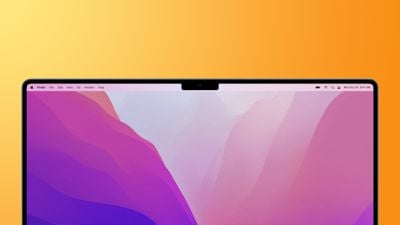
macbook pro 2021 notch feature
"Menu bar extras" are the tiny icons that appear on the right side of the menu bar, providing users with convenient access to app-specific controls. These icons could become overlapped by the notch on the new MacBook Pro models, causing the icons to be hidden or only partially visible, but Apple said this bug has been fixed in macOS 12.1.

As for top-level menus like File, Edit, and View on the left side of the menu bar, developers can update their Mac apps to play friendly with the notch. As a last resort for apps that have not yet been updated, users can enable a "scale to fit below built-in camera" setting for the app to adjust the active area of the MacBook Pro's display, ensuring that the app's menus appear below the notch and are always visible.

These changes come after several users complained about the notch interfering with menu bar items on the new MacBook Pro models.

macOS 12.1 also resolves several other bugs, including issues with Tap to Click, HDR video playback on YouTube, and MagSafe charging:

This release also includes bug fixes for your Mac:

- Desktop and Screen Saver may appear blank after selecting photos from the Photos library
- Trackpad could become unresponsive to taps or clicks
- External displays may not charge some MacBook Pro and MacBook Air computers when connected using Thunderbolt or USB-C
- HDR video playback on YouTube.com could cause 2021 MacBook Pro computers to panic
- Menu bar extras may be obscured by the camera housing on 2021 MacBook Pro computers
- MagSafe may stop charging on 2021 16-inch MacBook Pro computers when lid is closed and system is shut down

macOS 12.1 is expected to be released to all users as early as next week. When available, users can install the update by clicking on the Apple logo in the top-left corner of the screen, clicking on About This Mac, and clicking on the Software Update button.


Related Forum: macOS Monterey

Popular Stories

iOS 26

iOS 26.4 Adds Two New Features to CarPlay

Tuesday March 24, 2026 1:55 pm PDT by
iOS 26.4 was released today, and it includes a couple of new features for CarPlay: an Ambient Music widget and support for voice-based chatbot apps. To update your iPhone 11 or newer to iOS 26.4, open the Settings app and tap on General → Software Update. CarPlay will automatically offer the new features so long as the iPhone connected to your vehicle is running iOS 26.4 or later....
Apple Business hero

Apple Unveils 'Apple Business' All-in-One Platform

Tuesday March 24, 2026 8:53 am PDT by
Apple today announced Apple Business, a new all-in-one platform that unifies device management, productivity tools, and customer outreach features. The service is designed to be a consolidated replacement for several of Apple's existing business-focused offerings, including Apple Business Essentials, Apple Business Manager, and Apple Business Connect. It provides organizations with a single...
AirPods Pro Firmware Feature

Apple Releases New Firmware for AirPods Pro 3, AirPods Pro 2 and AirPods 4

Tuesday March 24, 2026 12:31 pm PDT by
Apple today released new firmware for the AirPods Pro 2, AirPods Pro 3, and the AirPods 4. The firmware has a version number of 8B39, up from 8B34 on the AirPods Pro 3, 8B28 on the AirPods Pro 2, and 8B21 on the AirPods 4. There is no word on what's included in the firmware, but Apple has a support document with limited notes. Most updates are limited to bug fixes and performance...

Top Rated Comments

rpmurray Avatar
56 months ago

So that ends the whining about the notch, right? Right?!
Notch so fast!
Score: 26 Votes (Like | Disagree)
anshuvorty Avatar
56 months ago
Can someone show us how this fix works in practice?
Score: 16 Votes (Like | Disagree)
Apple Knowledge Navigator Avatar
56 months ago

Jony Ive wouldn't allowed this.


You sure about that?
Score: 15 Votes (Like | Disagree)
56 months ago
That’s awesome but let’s get the memory leak fixed…

These new macs have the awesome ability to use their RAM as VRAM and system memory opening up a lot of doors but it doesn’t help if Control center is using up 15gb of RAM…
Score: 8 Votes (Like | Disagree)
56 months ago

There was no need for the ugly notch when the webcam is so bad if it was amazing then I would be happy with it, the webcam is terrible quality so it could of been in the small bezel like on dell
... What's wrong with the webcam? It's been reviewed as one of the highest quality on the market?
Score: 7 Votes (Like | Disagree)
Kylo83 Avatar
56 months ago
All I want is 120hz smooth scrolling in safari
Score: 6 Votes (Like | Disagree)















