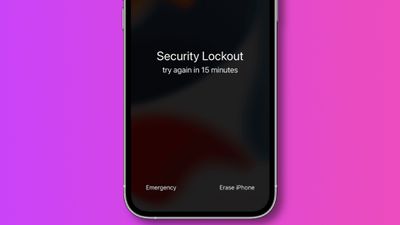
iOS 15.2, released this week, introduces the ability for customers to reset and erase their locked iPhone or iPad without needing to connect to a Mac or Windows PC.
As outlined in a support document (via 9to5Mac), iOS and iPadOS 15.2 add a new "Erase Device" option for when a device is locked out as a result of multiple failed attempts to enter the device's password. By pressing "Erase Device," users are prompted to confirm their identity with their Apple ID password, which results in the device being entirely erased and reset.
The new option is a welcome addition and a departure from the previous method, which required customers to put their iPhone or iPad into DFU mode and restore via Finder on the Mac or iTunes on Windows.
One caveat is that under the new method in iOS 15.2, the device must already have an active Wi-Fi or cellular connection before it is locked out. If not, users cannot connect to a network and will be forced to revert to the prior technique.
iOS 15.2 and iPadOS 15.2 include a host of new features, including a new App Privacy Report, the Apple Music Voice Plan, Legacy Contacts, and more. Catch up on all the latest features and additions with our round-up.
iOS 26.4 was released today, and it includes a couple of new features for CarPlay: an Ambient Music widget and support for voice-based chatbot apps.
To update your iPhone 11 or newer to iOS 26.4, open the Settings app and tap on General → Software Update. CarPlay will automatically offer the new features so long as the iPhone connected to your vehicle is running iOS 26.4 or later....
Apple today announced Apple Business, a new all-in-one platform that unifies device management, productivity tools, and customer outreach features.
The service is designed to be a consolidated replacement for several of Apple's existing business-focused offerings, including Apple Business Essentials, Apple Business Manager, and Apple Business Connect. It provides organizations with a single...
Tuesday March 24, 2026 12:31 pm PDT by Juli Clover
Apple today released new firmware for the AirPods Pro 2, AirPods Pro 3, and the AirPods 4. The firmware has a version number of 8B39, up from 8B34 on the AirPods Pro 3, 8B28 on the AirPods Pro 2, and 8B21 on the AirPods 4.
There is no word on what's included in the firmware, but Apple has a support document with limited notes. Most updates are limited to bug fixes and performance...
So, anyone can reset my iPhone without my consent?
That's been possible for years. Since I've been an iPhone user since 2017.
All one needs to do, put it in DFU mode and connect to a computer with iTunes.
Do a reset & restore iPhone.
It won't remove your activation lock or FindMy on your phone. but your data and Information will be completely erased from the phone (other than activation lock and FindMy)
Very welcome addition, working as tech support I know this new feature helps a lot normal users.
@HQuest Nope, after a force reset with recovery or DFU, iOS ask you your AppleID, but the APpleID is not completely visible. This is just another simple way to reset, but I'm quite sure the AppleID will not displayed entirely. Anyway your ID is protected by password and 2FA btw.
Nice! Now not only stolen devices can be taken for parts, thieves would know some of its previous owner information.
Hope I am not the only one to see a problem in this.
Incorrect.
Let’s just say I’m a technician who deals with customer’s forgotten passcodes on iPhones on a regular basis.
There is literally no difference between this new update and the procedure prior. This just takes out the middle man. (The computer)
Previously, if the iPhone was stolen, it could already be (DFU) resorted and taken apart.
Find My also stays on, so device activation is locked to owner’s Apple ID still.
Does this turn the "Find My iPhone" setting off or is this only to be used for a reset of the current owner (not getting rid of the phone).
Find My is still enabled after (if it was already on). Device will still be locked to Apple ID/owner.
So, anyone can reset my iPhone without my consent?
People already could by putting your iPhone into DFU mode with the computer and restoring it.
I thought iPhones required a password to be reset.
No password required.
This is an extreme big welcome addition to iOS. To be honest, should’ve been here years ago.
Being a tech who deals with this on a constant basis, this is an amazing time saver for people who tend to forget passwords and have to hunt down a computer for the passcode removal.
I’ve even met tons of people in different households who purposely don’t even own a computer.