
AV Artists Complain Monterey 'Orange Dot' Security Feature Makes Macs Unsuitable for Live Performances - MacRumors
Skip to Content

AV Artists Complain Monterey 'Orange Dot' Security Feature Makes Macs Unsuitable for Live Performances

Audiovisual artists who use Macs to output to large stage screens are calling on Apple to provide a way to disable a new security feature in macOS Monterey that is hindering their live performances.
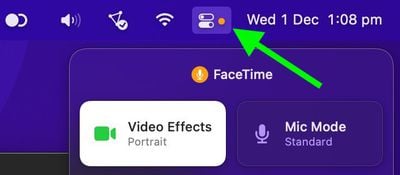
control center
For those unfamiliar with the feature, when an app is using the camera or the microphone in Monterey‌, a colored dot appears in the menu bar just next to the Control Center icon. Like in iOS, a green dot means an app is currently using the camera, while an orange dot means an app is using the microphone.

The idea behind the indicator dots is that it prevents apps and processes from sneakily recording conversations or videos, since the mic and the camera can't be accessed in the background without the user's knowledge.

The problem for AV artists is that the dot also appears on external displays, including external projectors and LED walls, which means live visual performances are negatively impacted. Disabling the menu bar via the "Displays Have Separate Spaces" system preference only makes the problem worse, because the orange dot still appears, only larger and more prominently.

monterey orange dot

Image credit: Mark Coniglio

Writing for music and motion website CDM, Peter Kirn notes that this issue is compounded by the fact that live visuals often use microphone or line input to produce audio-reactive graphics, so nothing untoward needs to be hijacking the camera or audio input for the indicator to appear.

Kirn also notes that the orange dot is visible when using Ableton Live 11.1 Beta. "I had missed it as I suspect many people had," he says, "as you wouldn't notice there was an issue until you tried to use fullscreen output on a display – which you will do when you have a show, but not necessarily when you're developing content."

Mark Coniglio, lead developer of audiovisual effects suite Isadora, alerted fellow AV artists to the issue in a forum post:

"In their infinite wisdom, Apple has added a security feature that negatively affects every audio/video app that uses one of the displays to output to a video projector, including our beloved Isadora... In our particular case, this means that this orange dot appears on the stage output, which is totally unacceptable for anyone using macOS as a professional video tool that sends video output to a video projector."

Urging fellow artists to provide feedback to Apple, Coniglio goes on to say that the company "must introduce an update that allows users to disable this feature immediately," since it currently makes Macs unsuitable for outputting live performances intended to be viewed by thousands of audience members.

Until then, artists have been provided with a short-term fix in the form of a command-line tool called "undot" that removes the indicator from the menu bar. However, the tool may not work in future updates to macOS, as it essentially blocks an intended security feature, which Apple is likely to frown upon.


Related Forum: macOS Monterey

Popular Stories

iOS 26

iOS 26.4 Adds Two New Features to CarPlay

Tuesday March 24, 2026 1:55 pm PDT by
iOS 26.4 was released today, and it includes a couple of new features for CarPlay: an Ambient Music widget and support for voice-based chatbot apps. To update your iPhone 11 or newer to iOS 26.4, open the Settings app and tap on General → Software Update. CarPlay will automatically offer the new features so long as the iPhone connected to your vehicle is running iOS 26.4 or later....
Apple Business hero

Apple Unveils 'Apple Business' All-in-One Platform

Tuesday March 24, 2026 8:53 am PDT by
Apple today announced Apple Business, a new all-in-one platform that unifies device management, productivity tools, and customer outreach features. The service is designed to be a consolidated replacement for several of Apple's existing business-focused offerings, including Apple Business Essentials, Apple Business Manager, and Apple Business Connect. It provides organizations with a single...
AirPods Pro Firmware Feature

Apple Releases New Firmware for AirPods Pro 3, AirPods Pro 2 and AirPods 4

Tuesday March 24, 2026 12:31 pm PDT by
Apple today released new firmware for the AirPods Pro 2, AirPods Pro 3, and the AirPods 4. The firmware has a version number of 8B39, up from 8B34 on the AirPods Pro 3, 8B28 on the AirPods Pro 2, and 8B21 on the AirPods 4. There is no word on what's included in the firmware, but Apple has a support document with limited notes. Most updates are limited to bug fixes and performance...

Top Rated Comments

mave1969 Avatar
56 months ago
Good lord. Inability to read, inability to comprehend, inability to see any needs other than their own. This item is a perfect example of why large sections of the general public should never be asked their opinion, or be allowed onto the internet in general.
Score: 79 Votes (Like | Disagree)
JosephAW Avatar
56 months ago
Maybe apple can move the dot under the notch. ;)
Score: 51 Votes (Like | Disagree)
ValerioParisMitritsakis Avatar
56 months ago
"In their infinite wisdom, Apple has..."

A great conversation starter, to insult the company whose help you need in order to get the matter resolved...
Score: 45 Votes (Like | Disagree)
FocusAndEarnIt Avatar
56 months ago
I actually saw this at a church service. Orange dot in the top right when displaying content. Definitely noticeable. This is an actual issue.
Score: 44 Votes (Like | Disagree)
56 months ago

I don't get it. All the other icons in the menu bar are not a problem, but a tiny orange dot is? 🤨
Apparently only the dot is forced on external monitors. I mean, it's illustrated right there in the article...
Score: 42 Votes (Like | Disagree)
error Avatar
56 months ago
The dot is fine in the menu bar… but in fullscreen mode on an external display it's terrible. Apple should make a way to hide the dot in fullscreen.
Score: 40 Votes (Like | Disagree)















