
Here's a First Look at the iPhone's Convenient Hotel Room Key Feature - MacRumors
Skip to Content

Here's a First Look at the iPhone's Convenient Hotel Room Key Feature

iOS 15 and watchOS 8 introduce the ability to add hotel room keys to the Wallet app on the iPhone and Apple Watch, allowing you to gain access to your room, elevators, and other locked areas by simply tapping your iPhone or Apple Watch against a card reader. The feature eliminates the need for a traditional plastic room card.
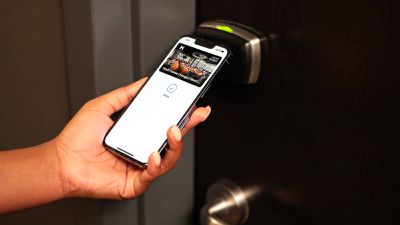
hyatt wallet app hotel room key
Last month, hotel chain Hyatt became the first to adopt the feature at six U.S. locations, including Andaz Maui at Wailea Resort, Hyatt Centric Key West Resort & Spa, Hyatt House Chicago/West Loop-Fulton Market, Hyatt House Dallas/Richardson, Hyatt Place Fremont/Silicon Valley, and Hyatt Regency Long Beach.

KTLA's Rich DeMuro recently visited the Long Beach location to test the feature, as seen in a video spotted by the blog Appleosophy.

Using the Hyatt app, hotel guests can add their room key to the Wallet app after completing a reservation, and they will be notified when check-in time arrives. Once a guest is checked in and the room is ready, the room key in the Wallet app will be activated for immediate use and display the guest's room number and reservation length.

DeMuro tested the feature with Express Mode enabled, meaning that the iPhone does not need to be unlocked in order to be used as a hotel room key. The process was quick and seamless, allowing him to gain access to his room and the elevator in a split second. Express Mode can be disabled for users who prefer an added layer of security.


Should the ‌iPhone‌ run out of battery, an automatic Power Reserve feature allows the device to be used as a hotel key for up to five hours.

Hotel room keys in the Wallet app are both convenient and can provide for a contactless experience. If a Hyatt guest needs to change rooms, extend a stay, or request a late check out, the hotel can update the guest's room key in the Wallet app remotely, eliminating the need for the guest to visit the front desk. When it's time to check out, guests can do so through the Hyatt app, and the room key will be remotely deactivated.

Hyatt plans to roll out hotel room keys in the Wallet app globally over time, and other hotel chains will likely follow suit, but the feature remains limited for now.


Popular Stories

iOS 26

iOS 26.4 Adds Two New Features to CarPlay

Tuesday March 24, 2026 1:55 pm PDT by
iOS 26.4 was released today, and it includes a couple of new features for CarPlay: an Ambient Music widget and support for voice-based chatbot apps. To update your iPhone 11 or newer to iOS 26.4, open the Settings app and tap on General → Software Update. CarPlay will automatically offer the new features so long as the iPhone connected to your vehicle is running iOS 26.4 or later....
Apple Business hero

Apple Unveils 'Apple Business' All-in-One Platform

Tuesday March 24, 2026 8:53 am PDT by
Apple today announced Apple Business, a new all-in-one platform that unifies device management, productivity tools, and customer outreach features. The service is designed to be a consolidated replacement for several of Apple's existing business-focused offerings, including Apple Business Essentials, Apple Business Manager, and Apple Business Connect. It provides organizations with a single...
AirPods Pro Firmware Feature

Apple Releases New Firmware for AirPods Pro 3, AirPods Pro 2 and AirPods 4

Tuesday March 24, 2026 12:31 pm PDT by
Apple today released new firmware for the AirPods Pro 2, AirPods Pro 3, and the AirPods 4. The firmware has a version number of 8B39, up from 8B34 on the AirPods Pro 3, 8B28 on the AirPods Pro 2, and 8B21 on the AirPods 4. There is no word on what's included in the firmware, but Apple has a support document with limited notes. Most updates are limited to bug fixes and performance...

Top Rated Comments

jz0309 Avatar
54 months ago

Until I'm sure door can't be hacked by Nicolas Cage I want proper metal keys.
not sure any hotel offers metal keys anymore ...
Score: 11 Votes (Like | Disagree)
Caliber26 Avatar
54 months ago

OK but using the watch? That’s convenient.
I hate, hate, HATE hotel key cards, especially at resorts with water parks and such. So easy to lose those things.
Meanwhile, my watch only comes off my wrist when I’m sleeping, so… no need to worry about losing anything
Not mention how easily those room keys get accidentally deactivated if they’re in contact with your credit cards or your phone. Nothing is more annoying than having to walk to the front desk to get your key reactivated. Especially at large resort hotels. This solves that issue for me.
Score: 7 Votes (Like | Disagree)
54 months ago
I've had a similar feature through Hilton for a few years now. Haven't needed a room key in some time, albeit through the Hilton app. I'm fairly sure after a couple updates it was also something that could be added to the Wallet. As I approached a room, the key would popup on my phone and I could choose to unlock the room. It was great.

Not sure there was a need for this - but it is nice to see tech moving forward even for the simple things.
Score: 7 Votes (Like | Disagree)
longofest Avatar
54 months ago

Does phone actually require physical contact with the reader? Weird.
No. It uses 13.56 Mhz wireless tech called "NFC" which typically communicates at a distance of about an inch. Because it is such a short range tech, many people end up just touching their device to the reader.
Score: 6 Votes (Like | Disagree)
TheYayAreaLiving 🎗️ Avatar
54 months ago

Until I'm sure door can't be hacked by Nicolas Cage I want proper metal keys.
I agree. I prefer the classic card hotel room key.
Score: 5 Votes (Like | Disagree)
techTAG Avatar
54 months ago

Does phone actually require physical contact with the reader? Weird.
Coming directly from Apple: https://support.apple.com/en-us/HT212847

[HEADING=2]How to open your hotel room with your iPhone or Apple Watch[/HEADING]
[LIST=1]
* Make sure that your device is turned on. It doesn't need to be connected to a cellular or Wi-Fi network.
* Hold the top of your iPhone or the display of your Apple Watch near the lock.
* When the door unlocks, a checkmark and Done show on your device.


So, no, no contact required according to their documentation, it may just be the way he uses NFC. I know people who even use Apple Pay by making contact between the watch or phone and the NFC reader, it is how some people do it.
Score: 5 Votes (Like | Disagree)















