iOS 15.4 Beta Adds Support for Setting Up Custom Email Domains With iCloud Mail - MacRumors
Skip to Content

iOS 15.4 Beta Adds Support for Setting Up Custom Email Domains With iCloud Mail

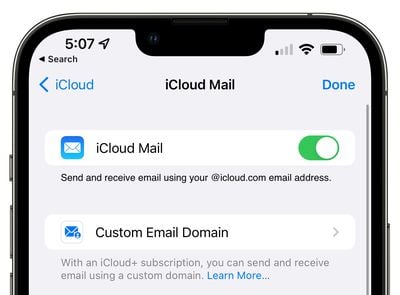
The iOS 15.4 beta that was introduced today expands support for the custom email domain feature available for iCloud+, adding an option to set up a custom domain with ‌iCloud‌ Mail directly on the iPhone.

custom email domain mail ios 15 4
If you go to Settings > Apple ID > ‌iCloud‌, "‌iCloud‌ Mail" is now a tappable option and it includes a section for setting up a Custom Email Domain.

Prior to now, custom domains were able to be set up with ‌iCloud‌ Mail, but Apple's iCloud.com website was required to get it working and there was no option to set it up right on the iPhone or iPad.
custom email domain ios 15 4
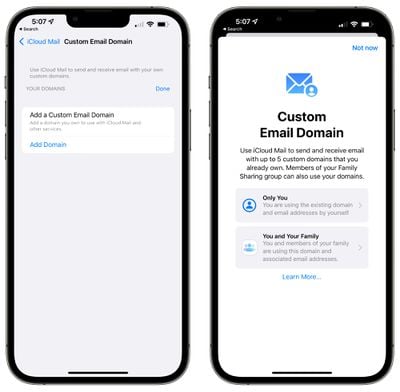
Setting up a custom email domain requires a paid ‌iCloud‌+ storage plan, which is priced starting at $0.99. The feature is designed to allow a custom email address like "johnny@appleseed.com" to be used for sending and receiving emails using ‌iCloud‌ Mail. Though the custom domain feature uses ‌iCloud‌ Mail, emails will be addressed to and sent from the custom domain.

Each ‌iCloud‌ user can add up to five custom domains to ‌iCloud‌ Mail, and members of a Family Sharing group can also use those domains. Email addresses that are currently used with the custom domain are supposed, and there's also an option to set up new email addresses with the domain.

Custom Email Domain settings on the iPhone and ‌iPad‌ will make it much easier to use custom email addresses. It's worth noting that this same feature is also available on the Mac under the System Preferences > ‌Apple ID‌ > ‌iCloud‌ Mail, but it does not yet appear to be functional.

Tags: iCloud, Mail

Popular Stories

iOS 26

iOS 26.4 Adds Two New Features to CarPlay

Tuesday March 24, 2026 1:55 pm PDT by
iOS 26.4 was released today, and it includes a couple of new features for CarPlay: an Ambient Music widget and support for voice-based chatbot apps. To update your iPhone 11 or newer to iOS 26.4, open the Settings app and tap on General → Software Update. CarPlay will automatically offer the new features so long as the iPhone connected to your vehicle is running iOS 26.4 or later....
Apple Business hero

Apple Unveils 'Apple Business' All-in-One Platform

Tuesday March 24, 2026 8:53 am PDT by
Apple today announced Apple Business, a new all-in-one platform that unifies device management, productivity tools, and customer outreach features. The service is designed to be a consolidated replacement for several of Apple's existing business-focused offerings, including Apple Business Essentials, Apple Business Manager, and Apple Business Connect. It provides organizations with a single...
AirPods Pro Firmware Feature

Apple Releases New Firmware for AirPods Pro 3, AirPods Pro 2 and AirPods 4

Tuesday March 24, 2026 12:31 pm PDT by
Apple today released new firmware for the AirPods Pro 2, AirPods Pro 3, and the AirPods 4. The firmware has a version number of 8B39, up from 8B34 on the AirPods Pro 3, 8B28 on the AirPods Pro 2, and 8B21 on the AirPods 4. There is no word on what's included in the firmware, but Apple has a support document with limited notes. Most updates are limited to bug fixes and performance...

Top Rated Comments

Seoras Avatar
54 months ago
With Google's recent announcement that it is moving everyone on free GSuite domain accounts to subscription Workplace accounts this will prove to be really popular.
I think Google's making a huge mistake timing it with Apple introducing custom email domains.
I accepted that my email was being snooped on by Google for data harvesting and selling.
With Apple's privacy focus it seems like the obvious move. Just how do I transfer over all my historical emails though?
Score: 15 Votes (Like | Disagree)
54 months ago

So, you still have to own the domain to set this up? I’m not sure how this works and what’s the benefit?
Most of time, when you registered a domain name, it doesn't come with mail service. Usually you have to pay extra to add mail service so you can send/receive emails via your new domain name.
Score: 8 Votes (Like | Disagree)
54 months ago

Hmmm and what’s the benefit? I mean compared to a normally setup email imap account. Trying hard but I see none so far…
If you own a business, you can now use John@yourcompany.com instead and it will look more professional than a gmail or icloud account
Score: 8 Votes (Like | Disagree)
54 months ago

Locks you into apples ecosystem.
How? You can just switch it off again and use a different provider at any time. Your username is not appropriate.
Score: 7 Votes (Like | Disagree)
Think|Different Avatar
54 months ago
Wow, the comments here asking “why?” — some things aren’t for everyone, ha.
Score: 7 Votes (Like | Disagree)
james2538 Avatar
54 months ago
I'll consider switching back once iCloud adds status syncing across devices. It's annoying to read email on my iPad/MacBook and still have my iPhone show that I have unread messages until I refresh it. Same for flags.

FastMail has had this for years and has always been rock solid. (Pretty sure Google/Microsoft paid plans offer it too)
Score: 7 Votes (Like | Disagree)