

Changes to the way OneDrive syncs files and folders on Mac has caused upset among users of the cloud storage service, following Microsoft's rollout last month of a new "Files On-Demand Experience" for Macs running macOS 12.1 and later.

In a change coming with macOS 12.3, currently still in beta, Apple is deprecating the kernel extensions originally used by OneDrive's syncing features, so the Mac client is now using Apple's File Provider extensions instead. Microsoft says this new technology stack should make the feature "much better integrated with the operating system compared to the first version." Judging by feedback though, that has not been the experience of many users, with slowdowns and bugs variously reported.
Worsening matters, in tandem with the new macOS extensions integration, Microsoft has also made Files On-Demand the default behavior of its OneDrive client. The Files On-Demand feature is designed to allow users to access files in the cloud without having to download them and use storage space on their Mac. Previously, it was an optional feature and users could disable it. However, the latest update has controversially removed the original user setting to disable it, further angering customers who now have no way of keeping local copies of their synced files.
What this has meant in practice for many users is that any local copies of files synced to OneDrive have been summarily wiped from their Mac since the update was rolled out. Responding to the change on Microsoft's community answers forum, one customer complained:
What is going on? Why would you enforce Files On-Demand on your customers, isn't it enough to enable it by default? My 70GB of cloud data is not local anymore, sometimes I have no internet, you are locking me away from my files. Also making it impossible for me to do full text searches. Files On-Demand is also too slow, waiting a second to display folder contents is too much when you organize things in deep folder structures.
How I can disable Files On-Demand? Will you please stop knowing the best for your customers? We aren't toddlers. Thanks!
If Files On-Demand is enforced by policy, I will leave your cloud service once and for all.
Responding to the question, another user wrote:
You could have asked instead of just deleting everything so I have to download all of my files again. So angry at Microsoft over this. Returning my files to local has been a gigantic pain in the rear end. I have far better things to do than to painstakingly select each folder and choose "always keep on this device".
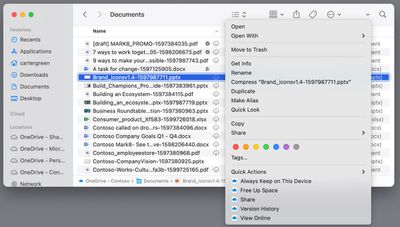
Microsoft includes an ability in OneDrive's Finder integration to mark synced files as "Always Keep on This Device" (internally referred to as "pinning"), and some users have resorted to exhaustively re-downloading all their files and folders using this option, but not without a high degree of syncing fails. Another user writes:
The proposed solution of doing this on the root doesn't work. If I select this option for more than a couple of folders, I am greeted with a Finder error citing "cannot communicate with the helper." I've been working on this for hours and it appears I have several hours to go. Already provided feedback via the option on OneDrive. Bad form, Microsoft.
On top of these errors, some users are also experiencing problems with files refusing to download or open correctly in their default application. One Redditor posts:
Prior to today, when I double clicked a Word document, PPT, etc. in the Finder that resided in my OneDrive folder, the Office app would open the OneDrive version and autosave my changes. Today, when I do that, it just treats it as a local file and won't sync it with OneDrive. I still have the setting "Use Office applications to sync Office files that I open" enabled, but the new version seems to have broken that.
Hundreds of similar complaints about the enforced changes and associated bugs can be found on Microsoft's OneDrive blog, the MacRumors Forums, and scattered over Reddit, with many users saying they will move to a rival cloud storage syncing solution unless the ability to store synced files locally is brought back and the syncing bugs are fixed. We've reached out to Microsoft to provide more clarity on the situation and will update this article if we hear back.






















