
Microsoft Responds to OneDrive Mac User Criticism Following Decision to Enforce Files On-Demand Feature [Updated]

Earlier this week, MacRumors reported on a OneDrive for Mac update that has caused upset among users of the cloud storage service, partly due to alleged bugs it has introduced but mainly because the new version no longer allows users to opt out of its cloud-based Files On-Demand feature, which was previously an optional setting.

OneDrive
In an update to its original blog post introducing this aspect of its new "Files On-Demand Experience," Microsoft has now responded to these concerns by explaining that the first version of Files On-Demand is built on several pieces of technology that are now deprecated by Apple in macOS 12.3, currently still in beta.

Apple is deprecating the kernel extensions originally used by OneDrive's syncing features, so the Mac client is now using Apple's File Provider extensions instead. On the question of whether this has introduced a technical reason for why Files On-Demand must always be enabled, Microsoft touts the benefits of OneDrive's new dependency on Apple's File Provider platform, including the resolution of compatibility issues, and how that has factored into its controversial decision to enforce its Files On-Demand feature:

Files On-Demand has been available on Windows since 2017, and on macOS since 2018. In that time, we've progressed from the feature being opt-in only to being on by default for all users and have closely monitored how many users turn off Files On-Demand. Only a very small number of users disable Files On-Demand on both platforms, and there are two main reasons for that.

When Files On-Demand first shipped on Windows, some applications didn't work well with the way we stored files, or with anti-virus or other security software that was installed. Over time, we've fixed most of these problems. On macOS, we took a similarly cautious approach, but the application compatibility landscape is quite different and, in some ways, less complex. Still, there were a few cases where, due to the technology stack we were using on macOS, it made sense for certain users to disable Files On-Demand to preserve compatibility. With the File Provider platform, these problems have gone away, so application compatibility issues on macOS should be much less likely to occur. If you find something different with your setup, please reach out to your support contact so we can diagnose the issue.

Despite its rationale for enforcing Files On-Demand, Microsoft acknowledges that keeping all content locally on devices is "an important scenario for a small set of users," and says the best way to do this is to select Always Keep on This Device to mark content as pinned. "If you want all files synced on your device, you should pin the OneDrive folder," says Microsoft.

Users can do this by browsing to their OneDrive in Finder, changing the view to Icons view, and then right-clicking the blank space between icons and selecting Always Keep on This Device. "We're actively looking at ways to make this easier to configure on both macOS and Windows," adds Microsoft.
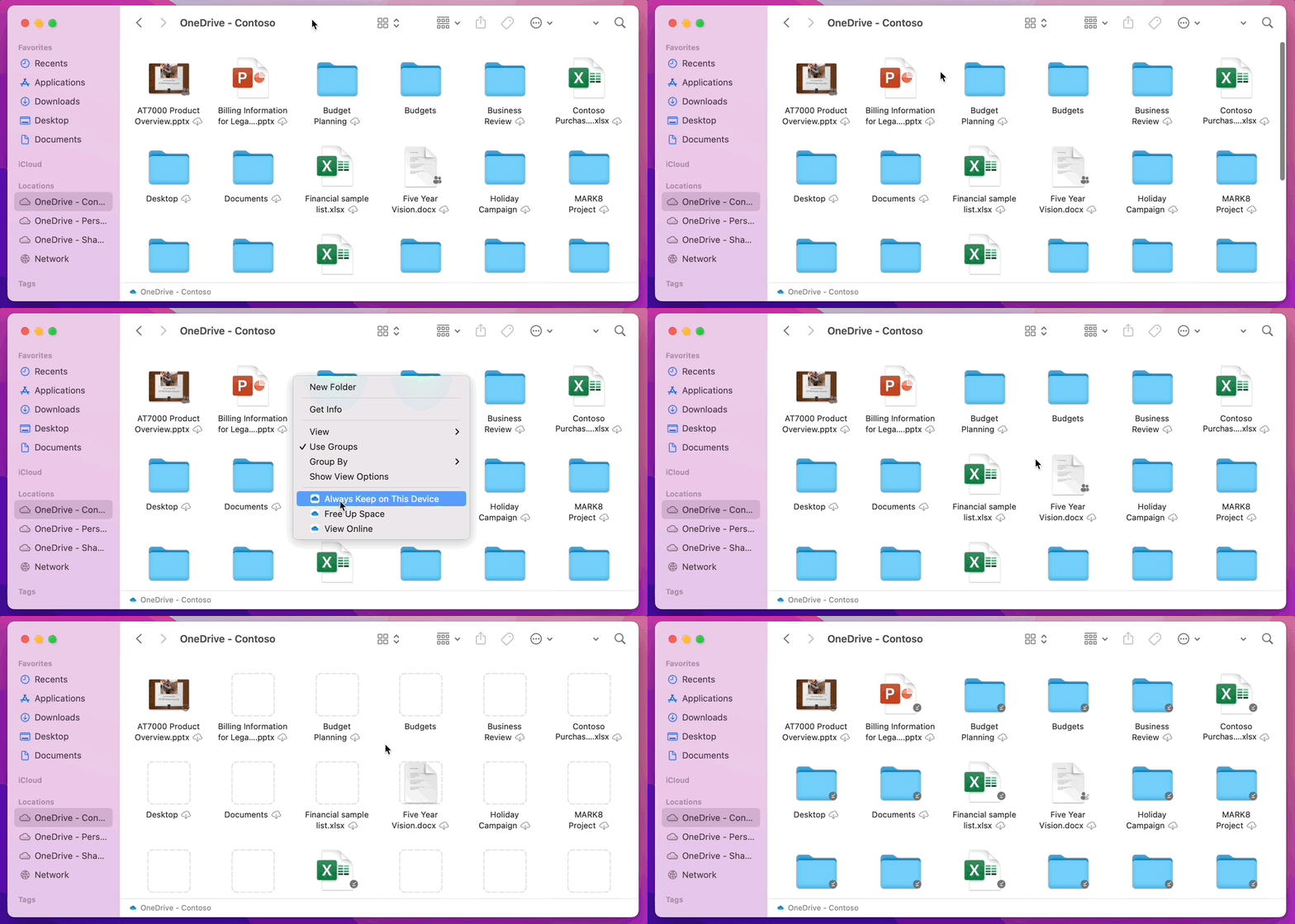
macOS Pin the Root 2
In addition, Microsoft offers an explanation for why some users have experienced slowdowns when browsing folders in OneDrive:

"To save space and system resources, the File Provider platform doesn't actually create the files OneDrive is managing until the first time you need them. The first time you open a OneDrive folder, macOS will create them on-demand. This can sometimes take a moment.

"To avoid this delay, you can force the system to pre-create all of these files and folders for you without downloading your content. To do this, open a Terminal window and type "ls -alR ~/OneDrive" (or the path to your OneDrive). This will ensure all of your files and folders are created, but not downloaded, before you browse.

"Finally, it is important to note that beginning in macOS 12.3, File Provider is the only Files On-Demand solution that is supported on macOS. Our prior solution is no longer supported."

Microsoft says it is aware of users experiencing issues with AutoSave when using the App Store version of the OneDrive app and it is actively working to resolve the issue in the next few days.

In the meantime, users who can't wait until then can move to the Standalone build of OneDrive by unlinking their account, uninstalling the ‌App Store‌ version, and reinstalling the Standalone version [Direct Link].

Are you happy with Microsoft's explanation for enforcing the Files On-Demand setting? Share your thoughts in the comments.

Update 2/4/22: Microsoft recently updated the blog to confirm the AutoSave issue has been fixed: "The fix for AutoSave for the ‌App Store‌ version was released in the Store today. It is fixed with 22.002.0201.0005."

Popular Stories

maxresdefault

Apple Shows Off a Key Reason to Upgrade to the iPhone 17

Saturday February 7, 2026 9:26 am PST by
Apple today shared an ad that shows how the upgraded Center Stage front camera on the latest iPhones improves the process of taking a group selfie. "Watch how the new front facing camera on iPhone 17 Pro takes group selfies that automatically expand and rotate as more people come into frame," says Apple. While the ad is focused on the iPhone 17 Pro and iPhone 17 Pro Max, the regular iPhone...
Finder Siri Feature

Why Apple's iOS 26.4 Siri Upgrade Will Be Bigger Than Originally Promised

Friday February 6, 2026 3:06 pm PST by
In the iOS 26.4 update that's coming this spring, Apple will introduce a new version of Siri that's going to overhaul how we interact with the personal assistant and what it's able to do. The iOS 26.4 version of Siri won't work like ChatGPT or Claude, but it will rely on large language models (LLMs) and has been updated from the ground up. Upgraded Architecture The next-generation...
wwdc sans text feature

Apple Rumored to Announce New Product on February 19

Thursday February 5, 2026 12:22 pm PST by
Apple plans to announce the iPhone 17e on Thursday, February 19, according to Macwelt, the German equivalent of Macworld. The report, citing industry sources, is available in English on Macworld. Apple announced the iPhone 16e on Wednesday, February 19 last year, so the iPhone 17e would be unveiled exactly one year later if this rumor is accurate. It is quite uncommon for Apple to unveil...
apple wallet drivers license feature iPhone 15 pro

Apple Says These 7 U.S. States Plan to Offer iPhone Driver's Licenses

Monday February 9, 2026 6:24 am PST by
In select U.S. states, residents can add their driver's license or state ID to the Apple Wallet app on the iPhone and Apple Watch, and then use it to display proof of identity or age at select airports and businesses, and in select apps. The feature is currently available in 13 U.S. states and Puerto Rico, and it is expected to launch in at least seven more in the future. To set up the...
14 inch MacBook Pro Keyboard

New MacBook Pros Could Now Arrive in March

Sunday February 8, 2026 6:02 am PST by
New MacBook Pro models with the M5 Pro and M5 Max chips could arrive as soon as Monday, March 2, according to Bloomberg's Mark Gurman. In today's "Power On" newsletter, Gurman said that the release of new MacBook Pro models is tied to the release of macOS Tahoe 26.3. The launch is said to be slated for as early as the week of March 2. He added that the M4 Pro and M4 Max models on sale today...

Top Rated Comments

ahostmadsen Avatar
53 months ago
Files on demand is probably the worst, most exploitive idea ever. NEVER use files on demand. Why?

1. You no longer own your own files. You lease it from your cloud provider.
2. You are totally dependent on your cloud provider. If they have a technical problem, go out of business etc. you loose everything.
3. You have no backup of your files.
4. If you buy a HD that cannot hold all your files, it's very hard to move from one cloud provider to another.
5. You cannot use your files without an internet connection.
6. etc.

So, of course cloud providers love files on demand. But for users it's a disaster. It's like peeing in your pants: at first it's nice warm (you save money on local HDD), but in the end it will become a disaster.
Score: 26 Votes (Like | Disagree)
contraband Avatar
53 months ago

Why doesn't apple make their own onedrive service... or rent out more icloud storage on googles servers. God forbid a computer company spin up some servers for their users.
The fact that you are asking for Apple to make a OneDrive-like service just shows how unsuccessful iCloud Drive is.
Score: 21 Votes (Like | Disagree)
Aaron Priven Avatar
53 months ago
The problem is not that Microsoft switched to Apple's new back-end system. The problem is that instead of saying "oh, you currently have files-on-demand turned off, we'll set all your root folders to have 'Always store on this device' turned on", they said "oh, you currently have files-on-demand turned off, we'll turn it on without asking you."
Score: 11 Votes (Like | Disagree)
tritian Avatar
53 months ago
Short version:

"We changed a default setting awhile ago. Most people either
A) Hated it but were too lazy to see if the behavior could be changed
B) Didn't know how to change it
C) Didn't notice

So we are keeping it because most of our users are too dumb to understand what we are doing to them. Smart vocal users are the minority so we can do whatever we want."
Score: 7 Votes (Like | Disagree)
Uln4321 Avatar
53 months ago

Files on demand is probably the worst, most exploitive idea ever. NEVER use files on demand. Why?

1. You no longer own your own files. You lease it from your cloud provider.
2. You are totally dependent on your cloud provider. If they have a technical problem, go out of business etc. you loose everything.
3. You have no backup of your files.
4. If you buy a HD that cannot hold all your files, it's very hard to move from one cloud provider to another.
5. You cannot use your files without an internet connection.
6. etc.

So, of course cloud providers love files on demand. But for users it's a disaster. It's like peeing in your pants: at first it's nice warm (you save money on local HDD), but in the end it will become a disaster.
This! ^ backing up files on external drives is nearly impossible with all these on demand options.

Edit: Looks like its a little easer than I thought. You can select all and download all at once. The only issue I have is new files added on other computers are going to have to be manually downloaded each time.
Score: 5 Votes (Like | Disagree)
TheMacDaddy1 Avatar
53 months ago
It is a great feature, especially when lots of Mac owners end up buying Mac's with 256gig Hard Drives because the cost of a HD upgarde is crazy from Apple.

Between Apples forced changes, crazy high HD up-charges and NO WAY to upgrade the HD....it's Microsoft's fault? All cloud vendors on Mac's have to deal with this, not just Microsoft. I mean iCloud Drive DOES THE SAME THING.
Score: 4 Votes (Like | Disagree)















